With an unprecedented number of businesses encouraging or mandating personnel to work from home, both business leaders and employees are suddenly faced with the challenge of operating effectively as a distributed workforce. Suddenly there are a lot of questions about what it takes to support remote employees.
Fortunately, a lot of companies have already blazed the remote workforce trail and we can learn from them. What’s more, learning how operate as a distributed team may be useful anyway as 65 percent of surveyed workers state they are more productive at home than in a traditional office. But what does it take to work successfully from home? To give your remote workers the opportunity to do their best, they’ll need the right set up.
Empower your employees with the right toolkit to work from home
Remote workers can benefit from having an ideal setting and robust technology at their disposal to be more efficient and effective. When working with your remote employees, you should empower them with the must-have ingredients to work successfully from home.
A Distraction Free Space
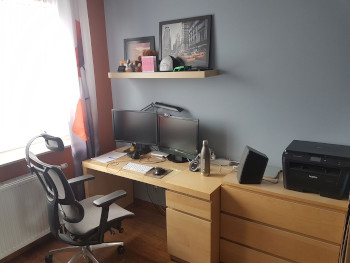
Ideally, it’s good to have a separate room that operates as a home office. Many times, spaces have to play double duty, but whenever possible, your remote staff should have a distraction-free space with available desk space and comfortable chair. A distraction-free space usually means the ability to shut the door, so interruptions from other family members don’t constantly bombard them.
Fast and Reliable Wi-Fi
Most of us assume that Wi-Fi reliability is a given, no matter if your team is in a metro or rural area. However, that’s not always the case. Talk to your employees about internet service providers in their location and the different speeds. The minimum speed that avoids lag is 20 Mbps. If you are unsure of your internet speed, test it with these instructions.
Beyond speed, you also need to consider reliability. Research any concerns about the provider’s ability to maintain near-perfect uptime and what challenges may impact reliability, such as frequent storms or areas prone to power outages.
Computer Hardware and Peripherals
The type of work your remote employee does will often prescribe the right computer. An easy way to make a home hardware checklist is simply to replicate what they have on their desk in the office. For extended remote working environments, a stand-alone laptop is usually not enough. Rather, a standard desktop set-up, supported by the right peripherals, is important for productivity.
Beyond the computer, they’ll need screens. Most employees benefit from operating at least one external monitor, increasing productivity and making it easier to run multiple applications. For those with computer-intensive roles, a reasonably-sized monitor can also help prevent eye strain. A high-quality headset is also important for easy interaction with colleagues and customers over the phone or during video conferencing. Additionally, for video conferencing, a webcam is necessary and should have the ability to stream HD. Finally, a keyboard and a mouse with ergonomic features completes the hardware requirements.
Cloud-Based Phone System
With a cloud-based phone system, your team will have access to telephony features no matter where they are. If you currently have a legacy phone system that sits on-site, it can be difficult to accommodate remote employees. With cloud-based phone systems, your team can have unobstructed mobility for those who work remotely all the time.
In seeking out a cloud-based phone system, also look for automation features that deliver real-time information, like sending email alerts when the user has a new voicemail. Remote employees can then respond quickly if necessary or forward to someone who can.
Video Conferencing
While your remote employees can handle most activities and tasks via team chat or email, there are times when it’s essential to meet virtually. With video conferencing, they can easily stream HD video with multiple participants. This feature allows them to easily connect and meet with clients or internal team members efficiently. When looking for a video conferencing app, consider these additional features:
- Browser-based app: Users don’t have to download any software. They can quickly click a link and be part of the meeting. No plugins or installations required.
- Screen sharing: This feature is essential for optimized collaboration. Your remote workers can screen share in real-time, which can expedite decision making, saving everyone time. Screen sharing is as simple as a click and offers users the option to share specific documents or tabs.
- Screen annotations: While using the screen share feature, screen annotations are another vital tool. With screen annotations functionality, participants can draw on the document shared, making notes on actions to take post-call.
- Meeting recording and automated note taking: Rather than scrambling to take notes during remote meetings, pick a video conferencing tool that allows your team to record their meetings or automatically types up their meeting notes with automated post-meeting distribution. Both features save time and tired fingers.
Team Chat
Instant communication is critical for remote worker productivity. Your employees need to interact every day to share knowledge and make decisions. Email threads can become long and complicated, and most employees don’t have time to be on long phone calls. Thus, using the right team chat application can eliminate these time wasters.
Here’s what to look for in a team chat platform that drives productivity:
- Accessible on desktop and via a mobile app with instant synchronization across channels
- Ability to add attachments
- Status settings: this lets team members know who is available, busy, or away
- Usable while employees are interacting with other communications tools (i.e., sending chats while on a call)
Team chat delivers the right tools for your employees to stay in touch and resolve issues fast, increasing what they can do every day.
File Collaboration
Almost every document your company creates needs the eyes of more than one person. Sharing files can become a nightmare if you’re not using a file collaboration tool. You could end up with multiple versions and a lot of confusion.
Instead, use a platform that makes file collaboration harmonious. The most up-to-date version will be available to those that have permissions, and all members can co-edit without the fear of overwriting. Employees can also access those files from any device so they can review on the go.
You’ll also want to make sure your platform has file backup in real-time to ensure that nothing is lost. File restoration is another feature to ask about, which can quickly reinstate your documents in the event of data loss.
Email and Calendaring
As email remains the most used channel for business communications, a good remote work environment dictates the need for a smoothly operating inbox for employees to tackle all those additional messages sent across the distributed team. In particular, with remote work environments, advanced security should be top of mind. Look for solutions that come with advanced security features such as: anti-phishing and anti-malware protection, real-time link scanning, encryption, data loss prevention and comprehensive IT administrator control. You’ll want to rely on your eMail provider to identify threats and resolve them in real-time so your remote workers can focus on deliverables rather than worrying about malicious intent.
Mobile Device
BYOD (Bring Your Own Device) is already a standard policy across most companies. In a remote work environment, keeping a smart phone or tablet charged during business hours is important because they are the ultimate utility tools. As the number of virtual meetings inevitably increases, it is not uncommon to be stuck on a less important conference call when another party urgently needs to reach a team member for a quick discussion. Ideally the conversation can take place concurrently via chat but sometimes that’s not enough. That’s when remote workers will be thankful that they have their cell phone charged up. Additionally, In the case where a home Wi-Fi drops service for any amount of time, a mobile device may become the back up for calls, texts, emails or even video conferencing through your cellular network. It’s an instant-on business world and extended disruptions of any kind are frustrating. As remote workers set up their home workspace, be sure they install the mobile version of email, calendaring, chat, video conferencing, and file sharing apps on their mobile phone so they’ll be ready to handle any scenario.
Webinar Platform
For the company all-hands meetings, customer presentations or any other virtual meeting beyond 10 participants, consider a webinar solution to support your team in delivering their presentations. Webinar solutions are specifically designed for broad communications across a distributed audience. Look for offerings that support HD video broadcasting with easy screen sharing, audience Q&A, real-time polling, and custom invitation functionality. the moment a company employee takes the virtual stage and an audience is paying attention, you won’t regret having selected the right toolset that is easy to use.
Working Successfully at Home Starts with the Proper Setup
For remote workers to be successful, they need the support of management to ensure they have the proper setup and environment. Businesses can provide this with the best technology and guidance. With these aspects, you’ll be better able to manage your remote teams as well.