Tag: business continuity

  • Why IT Support for Growing Businesses Matters More Than Ever

    Why IT Support for Growing Businesses Matters More Than Ever

    For many businesses across the Mother Lode and Central Valley, technology has grown one decision at a time.

    A new software subscription here. An employee account there. A workaround that solved a problem years ago and simply became “the way we do things.”

    Over time, those small decisions add up.

    You may still be paying for software no one uses anymore. Former employees may still have lingering account access. Your team may rely on multiple systems, sticky notes and spreadsheets just to keep daily operations moving.

    Nothing may appear broken on the surface, but the environment starts feeling heavier, more complicated and harder to manage than it should.

    And when even small changes feel risky, many businesses simply leave things alone.

    Why IT Cleanup Feels Overwhelming

    Cleaning out a storage room is easy because you can physically see what’s there.

    Technology environments are different.

    Most businesses today rely on a mix of cloud services, email platforms, remote access tools, business applications, mobile devices and third-party vendors. Some systems were set up years ago. Others may have been configured by former employees or outside consultants who are no longer involved.

    Documentation is often incomplete. Passwords may live in multiple places. Ownership becomes assumed instead of clearly defined.

    Eventually, your IT environment becomes less of a structured system and more of a collection of “things that work.”

    That creates real challenges:

    • No clear picture of everything connected to your business
    • Uncertainty about what is safe to remove or consolidate
    • Concerns about disrupting operations
    • Increased security risks from outdated systems and unused accounts
    • Rising costs from duplicate tools and unnecessary subscriptions

    For many business owners and managers, the issue is not a lack of awareness. It’s a lack of visibility and confidence.

    The Risk of Leaving Things Alone

    When technology clutter builds up, businesses often accept it as normal.

    But outdated systems and unmanaged access quietly create operational and security risks over time.

    Old software becomes harder to support and more vulnerable to cyber threats. Unused accounts can become entry points for attackers. Teams create their own processes because no one is certain which system should actually be used.

    The result is inefficiency, confusion and growing complexity.

    In industries common throughout our region — agriculture, manufacturing, hospitality, professional services and local government — even small disruptions can impact customer service, production schedules and day-to-day operations.

    The good news is that resolving these issues does not require a massive overhaul.

    It starts with clarity.

    What a Good IT Partner Actually Brings to the Table

    At NTELogic, we believe a good IT provider should act more like a guide than a salesperson.

    The goal is not to overwhelm businesses with technical jargon or unnecessary tools. The goal is to help business owners clearly understand their environment, reduce risk and make confident decisions.

    A trusted IT partner brings several important advantages:

    An Outside Perspective

    When businesses work in the same systems every day, inefficiencies become easy to overlook. An experienced outside partner can quickly identify duplication, unnecessary complexity and hidden risks.

    Experience Across Many Businesses

    Every growing business faces similar challenges at different stages. We’ve seen what happens when systems evolve without structure, when access is not properly managed and when older technology quietly creates operational drag.

    That experience helps avoid costly mistakes.

    A Structured Process

    Effective IT cleanup is methodical.

    First comes discovery and visibility. Then comes reviewing systems, accounts, licenses, workflows and security practices. From there, businesses can prioritize what should be retired, consolidated, documented or improved.

    Changes are made carefully and with purpose — not guesswork.

    Confidence and Stability

    The right IT partner helps ensure critical systems stay operational while improvements are made. That means less disruption, fewer surprises and a smoother path forward.

    Why This Matters for Growing Businesses

    Growth naturally increases complexity.

    More employees mean more accounts and devices to manage. More customers mean more sensitive information to protect. More services and locations mean more systems that need to work together reliably.

    What worked for a small team may no longer support a growing organization efficiently.

    An organized IT environment creates stability. Teams know which systems to use. Support becomes simpler. Security improves. Leadership gains confidence that the business can continue scaling without technology becoming an obstacle.

    Instead of working around your systems, your systems begin working for you.

    Start with Visibility

    You do not need to rebuild everything overnight.

    The first step is simply understanding what exists today:

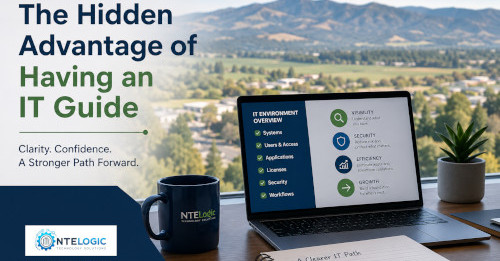
    • What systems are in place
    • Who has access
    • What tools overlap
    • What subscriptions are still active
    • Where risks and inefficiencies may exist

    Once that picture becomes clear, better decisions become easier.

    At NTELogic, we help businesses throughout the Mother Lode and Central Valley bring clarity and structure back to their technology environments — without unnecessary complexity or pressure.

    Ready to Simplify Your IT Environment?

    If your business has grown faster than your technology planning, now is a good time to take a closer look.

    NTELogic can help you identify hidden risks, reduce unnecessary complexity and create a more secure, manageable technology environment that supports your business as it continues to grow.

    Contact NTELogic Technology Solutions today to schedule a discovery conversation and take the first step toward a cleaner, more organized and more reliable IT environment.
  • Automation Shortcuts That Save Time and Money for Mother Lode & Central Valley Businesses

    Automation Shortcuts That Save Time and Money for Mother Lode & Central Valley Businesses

    For many businesses across the Mother Lode and Central Valley, the workday is filled with small manual tasks that quietly consume time, create frustration and slow down growth.

    A local office manager enters the same customer information into multiple systems. A dairy operation waits on approvals because requests are buried in email inboxes. A hospitality business struggles with onboarding seasonal employees because account setup depends on handwritten checklists.

    None of these issues seem dramatic on their own.

    But over weeks and months, they add up to hundreds of lost hours, unnecessary payroll costs and missed opportunities to better serve customers.

    At NTELogic Technology Solutions, we see this every day. The good news is that solving these problems doesn’t require a massive technology overhaul or an enterprise-sized budget. In many cases, the biggest wins come from practical automation shortcuts that remove everyday friction from your business operations.

    The Hidden Cost of Manual Work

    Most businesses already have technology in place. The challenge is that many daily processes still rely heavily on repetitive manual steps.

    By the middle of the day, employees may have already:

    • Entered the same information multiple times
    • Chased approvals through email
    • Reset passwords manually
    • Checked systems that could monitor themselves
    • Repeated routine tasks that should already be standardized

    Individually, these interruptions seem minor. Collectively, they drain productivity, create avoidable errors and pull employees away from the work that actually grows the business.

    For smaller and midsize organizations in rural communities like Sonora, Jamestown, Modesto and Turlock, these inefficiencies often go unnoticed because everyone is simply focused on getting through the day.

    That’s where automation can make a measurable difference.

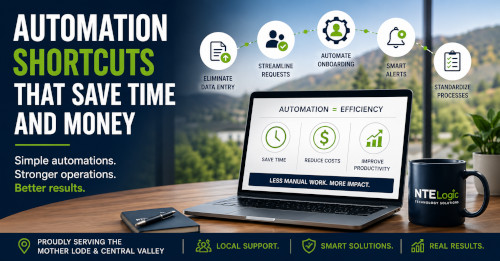
    5 Automation Shortcuts That Deliver Immediate Value

    The best automation strategies focus on removing repetitive work that shouldn’t require skilled attention in the first place.

    1. Eliminate Duplicate Data Entry

    If your staff is entering customer, vendor or inventory information into multiple systems, your business is paying for the same work more than once.

    Connecting systems so information flows automatically can:

    • Reduce human error
    • Improve reporting accuracy
    • Eliminate repetitive administrative work
    • Free up billable or revenue-generating time

    For agricultural operations, professional offices and hospitality businesses throughout the Central Valley, this can dramatically improve efficiency without adding complexity.

    2. Streamline Common Internal Requests

    Password resets, approval requests and access changes may only take a few minutes each, but the constant interruptions break focus and slow productivity.

    Automation can route and process these requests automatically so your team spends less time waiting and more time working.

    The result:

    • Faster response times
    • Less frustration for employees
    • Reduced IT overhead
    • Better operational consistency

    3. Automate Employee Onboarding & Offboarding

    Inconsistent onboarding creates confusion. Incomplete offboarding creates security risks.

    Automation ensures the right systems, permissions and processes are handled consistently every time.

    Benefits include:

    • Improved cybersecurity
    • Faster employee productivity
    • Reduced administrative workload
    • Better compliance and accountability

    This is especially important for organizations with seasonal staffing, multiple locations or remote workers.

    4. Replace Manual Monitoring with Smart Alerts

    Too many businesses still rely on someone manually checking backups, systems or reports to confirm everything is working properly.

    Modern monitoring tools can automatically alert your IT provider the moment something needs attention.

    That means:

    • Faster response to issues
    • Less downtime
    • Reduced monitoring labor
    • Improved business continuity

    For businesses operating 24/7 – including dairy, agriculture and hospitality operations – proactive monitoring is critical.

    5. Standardize Repetitive Processes

    When tasks are handled differently every time, mistakes become inevitable.

    Automation helps standardize repeatable processes so the same steps happen consistently across your organization.

    This leads to:

    How to Identify Automation Opportunities

    You don’t need to be an automation expert to recognize where your business is losing time.

    In most organizations, the best opportunities are hiding in plain sight.

    Ask yourself:

    • Where does work consistently slow down?
    • What tasks frustrate employees the most?
    • Which processes rely heavily on manual entry?
    • Where do small mistakes create larger cleanup work later?
    • What repetitive tasks consume time every single day?

    Those answers usually point directly to the areas where automation can create the fastest return on investment.

    Why Your IT Foundation Matters

    Automation works best when it’s built on a stable, secure and organized IT environment.

    If systems are disconnected, outdated or poorly managed, automation can actually increase confusion instead of reducing it.

    That’s why successful automation starts with understanding how your business operates – not simply buying new software.

    At NTELogic Technology Solutions, we help businesses throughout the Mother Lode and Central Valley identify practical ways to reduce friction, improve efficiency and strengthen security using the technology they already rely on every day.

    Our approach focuses on:

    • Simplifying operations
    • Improving cybersecurity
    • Reducing downtime
    • Strengthening business continuity
    • Helping your team work more efficiently without adding complexity

    Stop Losing Time to Repetitive Work

    The most valuable automation improvements are often the quietest ones.

    They eliminate duplicate steps. Reduce interruptions. Prevent small problems from becoming expensive ones.

    And they help your business operate more smoothly, securely and efficiently every day.

    If your business is spending too much time on repetitive manual work, it may be time to take a closer look at your IT environment.

    Ready to Find Hidden Efficiency Opportunities?

    Contact NTELogic Technology Solutions to schedule a discovery conversation with our team. We’ll help you identify practical automation opportunities that can save time, reduce frustration and support long-term growth for your business across the Mother Lode and Central Valley.

  • How Mother Lode & Central Valley Businesses Can Prevent Costly Downtime

    How Mother Lode & Central Valley Businesses Can Prevent Costly Downtime

    At NTELogic, we provide managed backup & disaster recovery services to help businesses across the Mother Lode and Central Valley recover quickly from technology failures.

    When business owners think about downtime, they often imagine major events like cyberattacks, natural disasters, or large-scale power outages.

    While those situations do happen, they are not the most common reason businesses lose productivity.

    Across the Mother Lode and Central Valley, most downtime is caused by everyday technology issues.

    A spilled drink on a laptop.
    A deleted file.
    A failed software update.
    A computer that finally stops working.

    These small problems can stop work instantly if there isn’t a fast way to recover systems and data.

    At NTELogic, we regularly help businesses throughout Sonora, Jamestown, Columbia, Angels Camp, Oakdale, Modesto, and surrounding Central Valley communities recover from these situations.

    In most cases, the issue isn’t the incident itself.

    The real cost comes from how long it takes to get back to work.

    The Most Common Causes of Business Downtime

    Many business interruptions don’t come from disasters or cyberattacks. They come from normal workplace events that happen every day.

    A Simple Accident with a Laptop

    A cup of coffee tips over onto a laptop.

    The screen flickers and the computer shuts off.

    Now the employee suddenly loses access to:

    • Email communication
    • Project documents
    • Customer records
    • Calendars and appointments

    Work stops immediately.

    If there is no quick way to restore the employee’s data and environment, the business could lose hours of productivity.

    Accidentally Deleted Files

    Human error is one of the most common technology issues businesses face.

    A file may be deleted accidentally, or someone may save over the only copy of an important document.

    Employees begin searching through:

    • Shared folders
    • Email attachments
    • Archived folders
    • Old storage drives

    What should be a quick fix turns into hours of lost time.

    With proper backup systems, restoring a file should take only a few minutes.

    Software Updates That Go Wrong

    Regular updates are essential for security and performance.

    However, sometimes an update can cause unexpected issues.

    • Applications stop working
    • Computers run extremely slow
    • Systems fail to boot

    Without backup and rollback capability, businesses may lose half a day or more troubleshooting the issue.

    Aging Technology That Finally Fails

    Eventually every computer or server reaches the end of its lifespan.

    When that system fails, businesses must determine:

    • How quickly a replacement system can be installed
    • How to restore critical data
    • How to reinstall business applications

    Without a recovery plan in place, even a single hardware failure can disrupt an entire team.

    Why Downtime Is a Business Continuity Issue

    No matter what causes downtime, the results are always the same.

    • Employees cannot work
    • Customers wait longer for service
    • Projects are delayed
    • Revenue opportunities are lost

    For small and midsize businesses across the Mother Lode and Central Valley, even a short interruption can have a measurable financial impact.

    Quick Downtime Cost Check

    Try this quick exercise.

    • How many employees rely on computers to do their jobs?
    • What is the average hourly cost of those employees (wages + overhead)?
    • Multiply that number by the number of employees.

    Example:

    10 employees × $35/hour = $350 per hour of downtime

    If systems stop working for 4 hours, that’s $1,400 in lost productivity – not including delayed projects or missed opportunities.

    Most technology problems aren’t dramatic events.

    They are everyday issues.

    The real question is:

    How quickly could your business recover?

    How Managed Backup Protects Your Business

    Modern businesses rely on managed backup and disaster recovery solutions to minimize downtime.

    A well-designed backup system typically includes:

    • Automated backups of critical data
    • Secure offsite or cloud backup storage
    • Image-based system backups
    • Rapid file restoration capability
    • Regular backup monitoring and testing

    These protections ensure businesses can recover quickly when technology problems occur.

    Protect Your Business with Managed Backup & Disaster Recovery

    At NTELogic, we help businesses across the Mother Lode and Central Valley implement backup and disaster recovery systems designed to keep operations running.

    Our Managed Backup service includes:

    • Automated monitored backups
    • Rapid file restoration
    • Full system recovery
    • Secure offsite backup storage
    • Backup verification and testing

    If you’re unsure how quickly your business could recover from a technology failure, we can help review your current backup strategy.

    📞 Mother Lode: (209) 694-4599
    📞 Central Valley: (209) 790-4560

    Backup & Disaster Recovery for Mother Lode and Central Valley Businesses

    NTELogic provides managed IT services, cybersecurity protection, and backup & disaster recovery solutions for businesses throughout the Mother Lode and Central Valley.

    We work with organizations in:

    • Sonora
    • Jamestown
    • Columbia
    • Angels Camp
    • Groveland
    • Oakdale
    • Modesto
    • and surrounding communities.

    Our goal is simple: help local businesses recover quickly from technology failures so operations continue without disruption.


    NTELogic provides managed IT services, cybersecurity protection, and backup & disaster recovery solutions for businesses throughout the Mother Lode and Central Valley.

    We work with organizations in Sonora, Jamestown, Columbia, Angels Camp, Groveland, Oakdale, Modesto, and surrounding communities to ensure their data is protected and their operations can quickly recover from unexpected technology issues.

    Whether it’s recovering from a failed computer, restoring a deleted file, or rebuilding systems after a larger outage, our goal is simple: keep local businesses running with minimal disruption.

  • Why Sonora, CA Businesses Need Managed IT vs Reactive Break-Fix

    Why Sonora, CA Businesses Need Managed IT vs Reactive Break-Fix

    Managed IT vs Break-Fix

    In Sonora, CA, businesses of all sizes depend on technology to stay productive, competitive, and connected. But when IT issues strike—even small ones—they can bring operations to a halt. For many years, local businesses relied on the traditional “break-fix” model: something breaks, you call a tech to fix it. Simple enough on paper… but costly, unpredictable, and risky in practice.

    Today’s business environment demands a smarter approach. That’s where Managed IT Services come in. Instead of waiting for technology to fail, Managed IT keeps your systems monitored, maintained, protected, and performing—every day.

    If you own or operate a business in Sonora, here’s why Managed IT is not just an advantage, but a necessity.

    Break-Fix Is Reactive—and Reactive Is Risky

    Under the break-fix model, you only get help after something goes wrong. That means:

    • Downtime is unavoidable
    • Problems often escalate because they weren’t caught early
    • Fixes are unpredictable and often expensive
    • There’s no ongoing security monitoring
    • You’re relying on luck that nothing serious breaks

    In Sonora’s rural environment-where connectivity, aging hardware, and power fluctuations already create challenges – waiting for something to “break” before acting is an expensive gamble.

    Why Managed IT Services Are a Better Choice

    Managed IT Services take the uncertainty out of your technology. Instead of reacting to problems, a Managed Service Provider (MSP) like NTELogic monitors your systems around the clock, identifies issues before they become outages, and keeps everything secure and up-to-date.

    With Managed IT, Sonora businesses get:

    Predictable, Budget-Friendly Costs

    • Monthly flat-rate pricing means no surprise bills or “emergency” charges. You budget once and get ongoing care.

    Always-Up-to-Date Systems

    • Regular patching, updates, and maintenance prevent vulnerabilities and improve performance.

    Stronger Cybersecurity

    • From advanced endpoint protection to staff security training, Managed IT adds layers of defense that break-fix simply doesn’t provide.

    Continuous Monitoring

    • Systems are monitored 24/7, catching issues instantly—often before you even know something was wrong.

    Reduced Downtime

    • Faster response times, proactive maintenance, and early detection all mean one thing: your business stays running.

    In Sonora, CA, businesses of all sizes depend on technology to stay productive, competitive, and connected. But when IT issues strike—even small ones—they can bring operations to a halt. For many years, local businesses relied on the traditional “break-fix” model: something breaks, you call a tech to fix it. Simple enough on paper… but costly, unpredictable, and risky in practice.

    Today’s business environment demands a smarter approach. That’s where Managed IT Services come in. Instead of waiting for technology to fail, Managed IT keeps your systems monitored, maintained, protected, and performing—every day.

    If you own or operate a business in Sonora, here’s why Managed IT is not just an advantage, but a necessity.

    Break-Fix Is Reactive—and Reactive Is Risky

    Under the break-fix model, you only get help after something goes wrong. That means:

    • Downtime is unavoidable
    • Problems often escalate because they weren’t caught early
    • Fixes are unpredictable and often expensive
    • There’s no ongoing security monitoring
    • You’re relying on luck that nothing serious breaks

    In Sonora’s rural environment-where connectivity, aging hardware, and power fluctuations already create challenges – waiting for something to “break” before acting is an expensive gamble.

    Why Managed IT Services Are a Better Choice

    Managed IT Services take the uncertainty out of your technology. Instead of reacting to problems, a Managed Service Provider (MSP) like NTELogic monitors your systems around the clock, identifies issues before they become outages, and keeps everything secure and up-to-date.

    With Managed IT, Sonora businesses get:

    Predictable, Budget-Friendly Costs

    • Monthly flat-rate pricing means no surprise bills or “emergency” charges. You budget once and get ongoing care.

    Always-Up-to-Date Systems

    • Regular patching, updates, and maintenance prevent vulnerabilities and improve performance.

    Stronger Cybersecurity

    • From advanced endpoint protection to staff security training, Managed IT adds layers of defense that break-fix simply doesn’t provide.

    Continuous Monitoring

    • Systems are monitored 24/7, catching issues instantly—often before you even know something was wrong.

    Reduced Downtime

    Faster response times, proactive maintenance, and early detection all mean one thing: your business stays running.

    Unique IT Challenges for Sonora, CA Businesses

    Operating in the Sierra foothills presents conditions that make Managed IT especially important:

    • Spotty or inconsistent broadband
    • Older infrastructure common in historic and rural buildings
    • Limited in-house IT staff
    • Greater exposure to wildfire-related power events
    • Local businesses often running 24/7 operations (hospitality, agriculture, retail, health services)

    Downtime in Sonora isn’t just inconvenient—it’s expensive. Whether you’re running a shop in downtown Sonora, managing a ranch, or coordinating a professional office, you need technology that’s dependable and supported.

    The Hidden Costs of Break-Fix

    Many Sonora businesses initially choose break-fix because it seems cheaper. But hidden costs add up fast:

    • Emergency repair fees
    • Lost productivity
    • Lost sales
    • Damaged customer trust
    • Data loss or breach risk
    • Repeated issues because root causes aren’t addressed

    Managed IT eliminates these unpredictable “surprise” costs and replaces them with stability and strategic care.

    How Managed IT Drives Growth

    Technology shouldn’t slow you down. With Managed IT, local businesses benefit from:

    • Strategic IT planning
    • Cloud solutions to improve mobility
    • Centralized communications
    • Secure remote access
    • Scalable support as your business grows

    Instead of calling for help when something is broken, you have a partner invested in keeping you operational and moving forward.

    Why Sonora Businesses Choose NTELogic

    NTELogic is proudly based in Sonora and serves the entire Mother Lode. We understand the unique needs of local businesses and provide services built specifically for rural and foothill operations.

    Our Managed IT program includes:

    • 24/7 monitoring
    • Advanced cybersecurity
    • Managed backups
    • Patch and update management
    • Help desk support
    • Business continuity planning
    • Proactive system maintenance
    • Network and endpoint protection

    With NTELogic, you’re not just getting an IT service, you’re getting peace of mind.

    Final Thoughts

    The days of “call when something breaks” are over. For Sonora businesses that want to stay secure, efficient, and competitive, Managed IT is the smart, predictable, and cost-effective solution.

    If you’re ready to stop fighting fires and start focusing on your business, NTELogic is here to help.

    Stay Secure. Stay Productive. Stay Ahead.

    Your business deserves technology that works – without surprises, downtime, or security gaps.

    NTELogic’s Managed IT Services protect your systems, your data, and your productivity with proactive monitoring, expert support, and next-generation security designed for Sonora and the Mother Lode.

    • 24/7 monitoring and support
    • Advanced cybersecurity protection
    • Reliable managed backups
    • Predictable, fixed monthly cost
     

    Ready to upgrade from break-fix to true peace of mind? Call us at (209) 694-4599

  • Top 4 Business Risks of Ignoring IT Strategy

    Top 4 Business Risks of Ignoring IT Strategy

    A weak technology strategy rarely announces itself. At first, it may look like a few scattered tech issues, such as lagging systems, integration failure and unexpected system outages. In reality, these aren’t random problems but signs of a deeper issue: an IT strategy that hasn’t kept up with the business.

    Most companies don’t intentionally overlook strategy; it just falls behind while day-to-day operations take over. But without a clear roadmap, the cracks start to show fast.

    In this blog, we’ll discuss the top four business risks of ignoring your IT strategy and why addressing it early matters.

    The fallout of a poor IT strategy

    A risky IT strategy impacts more than your tech stack. It affects how your business runs, grows and stays competitive.

    Operational disruptions
    Without a structured IT roadmap that prioritizes coordination, your tools and platforms start working in silos. Updates clash, integrations break and routine processes turn into time-consuming workarounds. What should be seamless becomes a source of friction. Your team ends up wasting time fixing problems that a proper strategy would have prevented.

    Reputational damage
    Customers and partners may not see the backend, but they definitely feel its failures. Whether it’s a delayed delivery, a dropped interaction or a visible security lapse, each one chips away at your credibility. Even a small issue can lead someone to question whether your business is equipped to support them reliably.

    Financial losses
    When your IT evolves without structure, spending becomes reactive and unpredictable. You pay more for emergency support, last-minute licenses and rushed fixes. Meanwhile, cost-saving opportunities, like consolidating vendors and automating manual tasks, go unexplored. Over time, unplanned spending adds up to real damage to your budget.

    Employee frustration
    Even the most skilled employees struggle with unreliable tools. Lagging systems and repeated outages create constant interruptions that drain focus and energy. Productivity suffers, morale drops and internal confidence in the company’s direction starts to erode. The wrong setup not only slows down the work but also slows down the people.

    It’s time to shift from reactive to resilient

    A smart IT strategy effectively connects your systems, aligns them with your goals and removes the guesswork from your technology decisions. It helps you reduce friction, limit surprises and prepare for growth with confidence.

    If your team spends more time troubleshooting than executing, it’s a sign that your tech is running ahead of your strategy, or worse, without one.

    You don’t need to overhaul everything. You just need a clearer plan. One that simplifies operations, improves performance and supports your team as your business moves forward.

    Need help? We’re by your side. Our expertise might be exactly what your business needs. Contact us today to schedule a no-obligation consultation.
  • How to Strengthen Your Business’s IT Infrastructure in an Unpredictable World

    How to Strengthen Your Business’s IT Infrastructure in an Unpredictable World

    The past few years have made one thing abundantly clear: businesses that treat IT as a set-it-and-forget-it function are gambling with their futures. Between ransomware attacks, hardware shortages, and the ripple effects of geopolitical instability, companies need to rethink infrastructure not as a support system, but as a survival layer. A resilient IT backbone isn’t just about uptime anymore — it’s about adaptability, continuity, and strategic foresight. In a landscape where risks hide behind every screen, the smartest move is to plan for chaos. And while the term “infrastructure” might sound cold and impersonal, what it protects is anything but: your people, your workflows, your hard-earned progress. Let’s break it down.

    Define What’s Truly Critical

    Start here: What systems could your business absolutely not afford to lose? This isn’t a philosophical exercise — it’s a diagnostic tool. Separate the merely inconvenient from the truly existential. A CRM outage might be annoying. Losing inventory data in the middle of Q4? Devastating. Mapping out your tech dependencies forces clarity on your weak points and gives you a concrete list of priorities. To approach this systematically, study how leading firms approach understanding process criticality — it’s the difference between reactive panic and proactive resilience.

    Consider Hardware Designed to Survive

    Some environments just eat equipment. Heat, dust, vibrations, and tight enclosures can all conspire to shorten your hardware’s life — unless it was built for that exact challenge. Industrial mini PCs are built like tanks but operate like modern workhorses. Silent, compact, and capable of wide temperature tolerance, they’re ideal for spaces like warehouses, shop floors, outdoor kiosks, and mobile rigs. If your team works in physical or variable environments, now’s the time to explore the applications of mini industrial computers that don’t crumble under real-world conditions.

    Build Toward the Edge

    The centralization of IT infrastructure was once the gold standard. Today, it’s a liability. With the rise of remote work, IoT deployments, and location-agnostic teams, businesses are moving compute power closer to where action happens — the edge. Think of edge devices like field agents: smart, agile, and tailored to specific missions. They reduce latency, lighten bandwidth loads, and allow for autonomous operation in case the central system goes dark. When planning your next deployment, consider the balance between cloud resources and edge privacy and bandwidth efficiency — especially if you’re in logistics, healthcare, or manufacturing.

    Security Isn’t a Department — It’s a Mindset

    Most small and mid-sized businesses still treat cybersecurity as something to outsource or handle “when we get bigger.” This thinking is a trap. Security isn’t about perimeter defenses anymore — it’s about trust. That means passwords, patches, policy training, and zero-trust frameworks have to become as normal as budgeting. And culture matters: the fastest way to get hacked is by having people who are afraid to admit they don’t understand the rules. That’s why it’s essential to establish a culture of security from day one — even if you’re a team of five.

    Redundancy Is Efficiency, Not Waste

    For every dollar you spend on backups and failovers, there’s a voice in your head asking, “Do we really need this?” That voice will vanish the first time a server fails or a data center floods. Redundancy doesn’t mean duplicating everything — it means identifying the highest-value nodes in your system and giving them lifelines. That could be mirrored drives, redundant ISPs, cloud backups, or battery-backed switches. Redundancy gives you time, and in a crisis, time is everything. If you’re not sure where to start, this guide to IT redundancy strategies is a solid launch point.

    Disaster Recovery Is Not a Later Thing

    Imagine this: an electrical surge wipes out a key server. You recover it — mostly. Then you realize: the data wasn’t backed up last week because “the job failed.” This is the silent death knell of many small businesses. Having a disaster recovery plan isn’t optional anymore — but many business owners don’t know what that looks like in practice. Managed IT service providers now bundle DR into monthly contracts, making it easier than ever to outsource preparedness. You can start exploring managed services for disaster recovery without building an in-house IT team.

    Maintain, Back Up, Repeat

    IT failures rarely come from big explosions — they’re more like leaks. A misconfigured update. A forgotten firmware patch. An ancient server that just… stops. Preventative maintenance isn’t glamorous, but it’s your cheapest insurance policy. The same goes for backups — and no, once a week isn’t enough. At a minimum, audit your infrastructure against this checklist of preventative maintenance and backup solutions and build from there.

    Every IT department looks good on paper until something breaks. Then it’s all caps emails, finger-pointing, and lost hours. You can’t control the chaos outside your business, but you can absolutely control how prepared you are. Resilience isn’t about perfection — it’s about intentional, thoughtful preparation. And whether you’re a one-person startup or a 100-person warehouse operation, now is always the right time to fortify what matters. Because when it hits the fan, the best tech decision is the one you already made.

    You can start discovering how NTELogic can transform your business with cutting-edge technology solutions. Please visit NTELogic today to learn more!

  • Protecting Your Business in the Cloud: What’s Your Role?

    Protecting Your Business in the Cloud: What’s Your Role?

    The cloud gives you the flexibility to run your business from anywhere, the efficiency to enhance your team’s performance and a strategic edge to stay ahead of competitors without a huge cost.

    But here’s the thing—it’s not all sunshine and rainbows. Business on the cloud carries risks that cannot be ignored.

    Business owners often have this misconception that once their data is in the cloud, it’s fully protected by the cloud service provider. But that’s not quite how it works. Instead, it’s more of a team effort, and you have a crucial role to play.

    The shared responsibility model

    When it comes to securing cloud data, both the cloud service provider and the customer have specific responsibilities they are obligated to fulfill. This cloud security practice is called the shared responsibility model.

    However, if you don’t know which security tasks are your responsibility, there may be gaps that leave you vulnerable without you realizing it.

    The trick to keeping your cloud secure is knowing where the cloud provider’s job ends and yours begins. This starts with analyzing your agreement to understand what specific security roles are with the provider and what remains within your purview.

    What’s your responsibility?

    While every cloud provider may be different, here’s a simple breakdown of what you’re likely to be responsible for:

    Your data: Just because your files are in the cloud doesn’t mean they’re automatically protected.

    What you must do:

    • Encrypt sensitive files to make it difficult for hackers to read them if they were stolen.
    • Set access controls to limit users from viewing privileged information.
    • Back up critical data to ensure business continuity.


    Your applications: If you use any cloud apps, you are responsible for securing them as well.

    What you must do:

    • Keep software updated, as older versions may have vulnerabilities that hackers can exploit.
    • Limit third-party app access to reduce the chances of unauthorized logins.
    • Monitor for unusual activity to prevent potential data breaches.


    Your credentials: You can’t secure your accounts using weak passwords.

    What you must do:

    • Enforce strong password protocols to prevent unauthorized access.
    • Use multi-factor authentication as an extra precautionary step.
    • Implement policies that limit access based on roles and responsibilities.

    Your configurations: You’re responsible for setting configurations up correctly and monitoring them regularly.

    What you must do:

    • Disable public access to storage to prevent outsiders from accessing your files.
    • Set up activity logs so you know who’s doing what in your cloud.
    • Regularly audit permissions to ensure only the right users have access.


    Take charge without worry!

    You don’t need to be an IT expert to secure your business in the cloud—you just need the right people. As an experienced IT service provider, we understand your challenges. Whether it’s protecting your customer data or setting up configurations properly, we know how to do it right. We help you turn your cloud into a safe haven so you can focus on growing your business instead of worrying about tech.

    Contact us for a free, no-obligation consultation.

  • 3 Reasons to Partner with an Excellent IT Service Provider

    3 Reasons to Partner with an Excellent IT Service Provider

    Running a business is a balancing act. You’re constantly managing growth, operations and security while trying to stay competitive. But as technology evolves, so do the challenges. Cyberthreats are more sophisticated, compliance requirements keep changing and downtime is more expensive than ever. Without the right IT expertise, these challenges can slow you down.

    That’s why you need to turn to IT service providers. They don’t just handle tech issues when something breaks. They help you prevent problems, streamline operations and ensure your IT investments work for your business. Let’s take a closer look at why partnering with an IT service provider must be a top priority.

    The three core benefits of IT service providers

    Choosing an IT partner is more than just outsourcing IT tasks. It’s about equipping your business with the right tools, expertise and strategies to grow without disruption. Here are the three ways in which the right IT service provider can make a difference:

    Bridging knowledge gaps
    Technology moves fast, and without expert guidance, you might fall behind or leave vulnerabilities unchecked. An IT service provider brings deep expertise across key areas:

    • Cybersecurity: Helps protect your business from cyberthreats by implementing strict security measures and conducting regular risk assessments.
    • Network infrastructure: Designs, implements and maintains a reliable network to keep your systems fast, secure and always connected.
    • Cloud management: Helps you leverage cloud technology for better flexibility, security and performance, ensuring seamless business operations.
    • Data management and analytics: Implements data-driven solutions to improve decision-making and streamline business processes.
    • Compliance and regulatory assistance: Ensures you meet industry regulations, avoiding legal risks, penalties and reputational damage.
    • IT support and maintenance: Provides proactive monitoring and regular updates to keep your IT infrastructure running efficiently.
    • Disaster recovery and business continuity: Implements backup strategies and redundancy measures to ensure you stay operational even when unexpected disruptions hit.

    Instead of hiring specialists for each IT function, an IT service provider covers all your bases.

    Optimizing resources
    IT costs can spiral out of control without proper planning. An IT service provider helps you make the most of your investments. Here’s how:

    • Cost efficiency: Reduces expenses related to hiring, training and maintaining an in-house IT team.
    • Predictable budgeting: Shifts IT costs from unpredictable emergency expenses to steady, planned investments.
    • Scalable solutions: Tweaks IT services to meet your business needs, ensuring you never overpay for unused resources or struggle with outdated systems.
    • Access to advanced technology: Keeps your business ahead of the curve with the latest tools, innovations and best practices without the hefty price tag of constant internal training.
    • Enhanced productivity: Frees up your team from IT distractions by handling routine tasks such as patch management, backups and system updates.
    • Proactive maintenance and support: Prevents IT issues before they escalate, keeping operations smooth and minimizing downtime.

    By optimizing IT resources, your business can operate more efficiently while keeping costs under control.

    Implementing strategic technology planning
    A strong strategy doesn’t just support your business; it drives growth. IT service providers help you develop and execute technology plans that align with your long-term goals.

    • Assess existing IT infrastructure: Identifies gaps, weaknesses and opportunities for improvement to build a stronger IT foundation.
    • Deep understanding of business goals: Ensures IT investments align with your company’s vision, objectives and operational needs.
    • Develop a technology roadmap: Creates a step-by-step plan with clear milestones and resource allocation for future IT projects.
    • Implement new technologies and systems: Ensures smooth integration of new tools and upgrades without disrupting daily operations.
    • Continuous IT system monitoring: Provides ongoing oversight to detect and resolve performance issues, security threats and inefficiencies before they impact business operations.
    • Regular technology reviews and adjustments: Keeps your IT strategy relevant and aligned with industry trends, business growth and evolving challenges.

    With a strategic IT plan in place, your business is better equipped to scale, innovate and stay competitive.

    Take the next step

    Technology shouldn’t be a burden to your business—it should be an asset that drives success. If you’re tired of dealing with IT roadblocks, unpredictable costs and outdated strategies, it’s time to make a change. Partnering with an IT service provider like us gives you the expertise, efficiency and strategy needed to scale and compete.

  • A Deep Dive Into the Six Elements of Cyber Resilience

    A Deep Dive Into the Six Elements of Cyber Resilience

    The reality of facing a cyberattack isn’t a matter of if but when. The threat landscape has grown increasingly complex, and while traditional cybersecurity focuses on prevention, it’s not enough to combat every potential breach. If a cybercriminal outsmarts your security strategy, you want your business to make it out on the other side.

    That’s where cyber resilience comes into play—a strategic approach that equips businesses to anticipate, withstand, recover from and adapt to cyber incidents. Think of it as your business’s ability to bounce back stronger, ensuring continuity no matter what comes its way.

    The question is: Are you ready to make your business resilient? If you are, it’s time to focus on the core elements of cyber resilience to safeguard your business and protect what matters most.

    The core elements of cyber resilience

    Cyber resilience is about more than just implementing the latest tools. It’s a comprehensive framework built on six key elements that strengthen your ability to navigate and mitigate risks effectively:

    Cybersecurity
    Effective cybersecurity policies are the cornerstone of resilience. This involves proactive defense measures such as regular security assessments, threat intelligence and real-time monitoring. These practices help identify vulnerabilities and close gaps before attackers can exploit them.

    A strong cybersecurity framework not only prevents breaches but also provides the groundwork for all other elements of resilience.

    Incident response
    No system is foolproof. That’s why having a well-defined incident response plan is critical. This plan outlines the steps your team should take during a breach—detecting the threat, containing the damage and initiating recovery protocols.

    A quick, coordinated response minimizes downtime and ensures a smooth return to normal operations.

    Business continuity
    Imagine losing access to customer data or critical systems for even a few hours. Business continuity planning ensures your operations remain functional during and after a cyberattack.

    By leveraging backup systems, disaster recovery plans and redundancies, you can keep serving customers while mitigating the long-term financial and reputational impact of a breach.

    Adaptability
    The cyber landscape evolves rapidly, with attackers constantly finding new vulnerabilities. Adaptability means keeping your defenses up to date by learning from past incidents, monitoring trends and implementing cutting-edge technologies.

    A flexible approach ensures your business can address emerging risks without falling behind.

    Employee awareness
    Employees are often the first point of contact for cyberthreats, making their awareness and training vital. Phishing emails, ransomware and social engineering tactics are just a few ways attackers target your workforce.

    Regular education sessions help employees recognize red flags, report incidents promptly and act as an active line of defense against breaches.

    Regular compliance
    Compliance with cybersecurity regulations isn’t just about avoiding penalties—it’s about protecting your customers and your reputation. Adhering to industry standards demonstrates a commitment to safeguarding sensitive data and instills confidence in your business. It also ensures you’re prepared for audits and other legal obligations.

    Each of the above elements reinforces the others, creating a holistic approach to resilience. Together, they ensure your business can maintain operations, protect customer trust and recover quickly from incidents.

    Let’s build a resilient future together

    No business can achieve true resilience overnight, but every small step brings you closer. Whether it’s implementing proactive measures, developing a robust incident response plan or training your employees, the journey to resilience starts with a commitment to act.

    We’re here to help. Let us guide you through the complexities of cyber resilience planning and show you how to protect your business from potential threats.

    Contact us today to start building a stronger, more secure future for your business. Because when it comes to resilience, every second counts.

  • Agility for Your People, Processes and Technology

    Nothing is more crucial to a business than stability. Yes, profit matters, but companies can achieve consistent profits easily when markets are stable.

    The world, of course, doesn’t always work this way. Markets are highly unpredictable and things change in the blink of an eye. If your business’s viability is dependent on the marketplace, which is almost always the case, you must be prepared to face the challenges of trying to maintain a smooth path through a changing landscape.

    Businesses that survive and thrive under any circumstances share one trait: they are agile. When faced with a challenge, an agile business, like a skilled soccer player, knows when to decelerate, accelerate and turn. Agility can help organizations adapt to changes in the market and changes within the company.

    Begin with people, processes and technology

    People
    Beyond systems, stable and flexible personality types must be prioritized in your hiring practices. This means hiring those who are comfortable with change and can leverage change to better themselves and eventually the company. People are just as critical as processes in your organization’s ability to be agile.

    For instance, dividing positions by novelty versus repetition is a good idea (i.e., tasks with little to no context and which require a lot of research vs. well-documented duties with a playbook).

    Companies that use both work styles and appropriately cross-train their employees to take on both are usually better equipped to deal with changing market situations.

    Processes
    It’s a good idea to plan ahead, but it’s also advisable to leave room for unexpected changes. Find the right combination for you. A process can be 70% planned and 30% improvised but knowing your typical mix ahead of time makes it easier to react quickly when the situation demands it.

    To take your processes through the path of agility, answer the following questions:

    • How does your company assess agility? Is this working well, or do you need to broaden the definition to include departments other than IT?
    • Categorize the work you’ve done in the last 12 months (what percentage of it was planned versus ad hoc?)
    • Are the right people in the appropriate positions?
    • What slowed previous attempts to pivot quickly?

    Technology
    When handled properly, technology can substantially support your people and processes. However, you must make sure that the technology you use helps your business adapt to changes quickly. Otherwise, it could be the biggest hindrance in your journey towards agility.

    Collaborate for success

    Implementing all of the above could be overwhelming since you probably already have your hands full running your business. However, collaborating with a specialist managed service provider (MSP) like us can take the burden off your shoulders and give you the peace of mind you deserve. Feel free to reach out to us for a no-obligation consultation.