Tag: cybersecurity

  • OneNote Being Used to Spread Malware


    With Microsoft disabling macros by default on Office documents, cybercriminals are left needing another means to launch malware that’s victim-supported by default.

    We should expect nothing less of threat actors; when pushed up against a wall with their most powerful asset – Office macros – taken away from them, the most cunning of them will find alternative methods. The challenge for the most sophisticated of cybercriminals is to ensure that the greatest number of potential victims have the application needed that acts as the launcher.

    According to a recent tweet from email security company Prevention Point, a new method involving weaponized OneNote attachments has been spotted in the wild. The initial phish looks relatively standard for a socially-engineered email.

    With the OneNote execution looking somewhere between unexpected (after all, who ever needs to double-click a button within an application to see a supported document?) and sort of brilliant (I would assume that most knowledge workers haven’t interacted frequently with OneNote, so, “maybe this is how it works?”).

    And to boot, the default installation of Office 365 (that is, the software installed on a Windows endpoint) includes OneNote.

    The takeaway here is this is downright dangerous – threat actors have found yet another new way to engage with users in a way that helps move their attack forward with a double-click. This example of the constant evolution of the phish perfectly justifies why organizations need to keep users continually enrolled in security awareness training so that Joe User is always kept up on their toes with security top of mind.

  • Cybersecurity for Employees: Awareness Can Save You from a Breach

    Your company might use iron-clad network protection and implement encryption across the board. However, your data and systems are still at risk of a cyberattack if you aren’t focusing on employee awareness. This risk exists because employees are behind a significant chunk of data breach incidents. These basic steps can help to raise employee awareness and ensure your company is protected.

    Human Error Is a Major Cybersecurity Weak Point for Businesses

    Employee negligence is a major cybersecurity issue for businesses of all sizes. Shred-It’s Ninth Annual Data Protection Report revealed that human error continues to be the driver of most data breaches. Fifty-three percent of C-suite executives cite external human error or accidental loss as primary problems. Twenty-eight percent of small business owners feel the same way. In the report, Ann Nickolas, Senior Vice President of Stericycle, says, “For the second consecutive year, employee negligence and collaboration with external vendors continues to threaten the information security of US businesses.”

    A data breach can have severe consequences when you add up reputational damage and lost revenue. Employee retention can be a problem as well – 33 percent of respondents in the Shred-It survey stated that they are likely to seek employment elsewhere after their employer experiences a data breach. That goes for both breaches of consumer and employee data.

    According to the 2020 Cost of a Data Breach report published by IBM and the Ponemon Institute, the average cost of each lost record is $146. As losing thousands of records during a breach is common, shoring up your employees’ cybersecurity habits is well worth the effort.

    Use this security checklist for in-office and remote employees to figure out what steps your company can take to reduce the risk of a breach.

    1. Train employees to recognize phishing emails

    Email phishing attacks are common. With this type of cyberattack, a hacker sends an email that appears legitimate and asks the recipient to share information or download a file.

    To protect against phishing emails, it’s important to use advanced email protection, which will help to weed out spoof emails and other external threats. Also, make sure all of your employees understand what a phishing email looks like, what the risks are if they fall for one, and what they should do if they spot what they think might be a phishing email message.

    2. Password Security

    A strong password policy is often the first line of defense against cyber attacks, yet many organizations continue to follow outdated guidelines that expose them to significant risk.

    According to Verizon’s 2020 Data Breach Investigations Report, lost or stolen credentials remain the number one hacking tactic used by malicious actors to perpetrate data breaches, with compromised or weak passwords responsible for 35% of all breaches.

    Password Sharing

    While sharing a password might seem convenient and harmless, it can have serious consequences. Passwords should never be shared with others. Period.

    Password Reuse

    Use different passwords for different accounts. That way, if one account is compromised, at least the others won’t be at risk.

    Password Length & Complexity

    Length trumps complexity. The longer a password is, the better. Use at least 16 characters whenever possible. Make passwords that are hard to guess but easy to remember.

    3. Require Multi Factor Authentication (MFA)

    With Multi Factor Authentication, even if a hacker steals an employee’s password, they still will be locked out of their device or system. This is how it works: an employee will use a password and another identifier such as biometric data or a code sent to their email or phone number. Since a hacker can’t steal biometric data and likely doesn’t have someone’s device, as well as their password, their chances of breaking in drop to nearly zero.

    4. Establish a data breach policy

    What an employee does after a suspected data breach will determine how quickly your business recovers. If they don’t act quickly by alerting your IT team, a hacker may have enough time to infiltrate your systems and do extensive damage. With a fast response, it’s possible to lock down your network and mitigate the risks.

    Tell your employees who they should contact if they notice a suspicious email, receive a security alert, if their device is stolen, or if they believe something is amiss with your company’s networks. Also, let them know they won’t be reprimanded if they fall victim to an attack. Employees should know they have their employer’s support. Otherwise, some people may not speak up when there’s a problem.

    5. Discuss mobile device usage

    If employees are using their smartphone or another personal device for work, teach them how to use their devices securely.

    • Always install the latest updates to ensure they’re using the newest operating system. These updates often include critical security updates.
    • If your company isn’t using a virtual private network (VPN), employees need to be very careful about what network they use when accessing business apps remotely. Only log on when using a secure network. They shouldn’t ever use public networks such as those found in coffee shops and airports.
    • Practice good flash drive hygiene – only use company-issued drives. Once one leaves the office, it should be wiped clean or discarded upon return.

    Make Cybersecurity a Part of Your Work Culture

    Following cybersecurity best practices such as using two-factor authentication, avoiding suspicious emails, and practicing good password security can go a long way in protecting against an attack. But, if cybersecurity isn’t a part of your work culture, it’s easy for these best practices to be forgotten.

    Cultivate a cybersecurity-aware culture by openly talking about risks, updating your employees about new best practices, providing training for new employees, and refreshing knowledge with regular internal messaging such as company-wide emails or training meetings.

  • Protect Your Employees Against Vishing

    Cybercriminals are always looking for new ways to scam users. Attacks continue to be more sophisticated and common. Organizations must remain vigilant and understand all the different avenues, including vishing (voice phishing), which uses the telephone as the channel for scamming.

    This post will define what vishing is and critical steps to take to protect your employees from falling prey to it.

    What is Vishing?

    Vishing is a cybercrime that uses voice communication, most often VoIP (voice over IP) phone systems. Cybercriminals use social engineering tactics to attempt to defraud the person on the other end.

    In many cases, these scammers impersonate the government, the IRS, a bank agent, the police, or another trustworthy organization. The content of the call is typically a threat of arrest, bank account closure, or other serious consequences.

    Unfortunately, many fall victim to it, giving in to the demands of the scammer. They may release private information, such as banking accounts, Social Security numbers, or other sensitive data.

    What’s the State of Vishing?

    Vishing grew tremendously in 2020, somewhat as a consequence of remote work. The FBI (Federal Bureau of Investigation) and CISA (Cybersecurity and Infrastructure Security Agency) released a joint advisory on the surge.

    They noted that in mid-July, a vishing campaign targeted various companies through VPN login pages. Actors created phishing pages for the internal VPN login page. They then created employee dossiers with social engineering tactics. The hackers often posed as another employee using spoofed numbers. They advised victims of a new VPN page, which they would send to the targeted employee. When the victim used the fake VPN page, the hacker could gain access to the company’s networks.

    The combination of VPNs and the elimination of in-person verification made these attacks fruitful for many.

    One example was the Twitter breach in July 2020. Hackers were able to hijack 130 accounts of prominent figures. The company admitted that social engineering and phone spear-phishing were the cause.

    Vishing Techniques

    There are several ways that cybercriminals can execute vishing.

    • VoIP: Creating fake numbers is easy for hackers. That can appear to be local or use the 1-800 prefix.
    • Wardialing: This approach uses software to call specific area codes and leave an urgent voicemail claiming that some security issue occurred. In the voicemail, they ask the victim to call back with account information.
    • Caller ID Spoofing: This is similar to VoIP vishing. Cybercriminals use a fake number or caller ID. It could appear as unknown or as a legitimate number, such as the phone number of a trusted government organization.

    These represent the more technologically forward tactics. However, there’s a low-tech way for hackers to get information—from your trash. They can collect vital information if documents aren’t shredded or properly destroyed.

    Now that we’ve covered the background of the topic, let’s discuss prevention

    Ways to Protect Against Vishing Attacks

    There are many ways to protect against cybercriminals that use these tactics. They fall into a few buckets of awareness, technology, and best practices.

    Ensure Every Employee Is Aware and Trained

    Employees are often the weak link in a cyber breach. Vishing is just one more way to isolate them. The best thing you can do is to create a continuous campaign of awareness around cyberattacks. It should be part of your wide-ranging cybersecurity education. Here are some ideas for implementing and maintaining such a campaign:

    • Every new employee should undergo training.
    • All employees should have at least yearly training if not more.
    • IT teams should work with marketing or HR to deliver bite-sized security content. You could distribute this via internal newsletters, intranet sites, or visually with signs and posters.
    • If employees receive a suspicious call, they should have a process to report it to security leaders.
    • Companies should issue advisories to employees about specific scams going on right now, so they’ll be more alert (i.e., scams related to COVID-19 or the IRS around tax time).
    Use Technology to Prevent Calls

    Most organizations employ cloud-based phone systems. Often these platforms have built-in spam caller protection. That’s a good first defense. The technology can detect calls from fraudsters. You then have the chance to either block them or send them to voicemail, so they never get answered.

    Further, phone systems today are often part of a unified communications (UC) platform. There are various security features you’ll want the system to have to protect it from hackers. Having these features in place will mitigate any attack if the hacker successfully gets information from the employee.

    • Advanced firewall systems that prevent intrusions and integrate with VPNs and traffic management
    • Intrusion protection systems (IPS) for detecting traffic that appears suspicious that made it through the firewall
    • DDoS (Distributed Denial of Service) protection
    • Commercial-grade edge routers, which are configured to resist IP-based network attacks
      Regular vulnerability scans
    Other Best Practices to Protect Against Vishing

    There are several other practices to put into place to keep vishing attacks at bay. The use of mobile apps via your UC platform will keep calls routing through your company’s VoIP. Calls won’t come directly to your smartphone number.

    You can also let employees know, especially those working in contact centers, that it’s okay to hang up the phone. If an employee can quickly define the call as vishing, the best thing to do is end the call.

    Finally, be sure you have strict security protocols about exchanging information, especially around accounts or wires. With this as part of your bedrock, employees won’t fall for scams.

  • Ransomware and Malware Threats: The State of Cybersecurity

    Cybersecurity is a growing concern for organizations all over the world. A single attack can lead to thousands or even millions in losses, and cybercriminals continue to come up with more sophisticated methods of attack. Ransomware and malware threats are some of the most common types of cyberattacks.

    Let’s take a look at how big of a risk these threats are right now and dive into what the average small to mid-sized business can do to protect itself from an attack.

    Ransomware and Malware – What’s the Difference?

    Ransomware and malware are sometimes used interchangeably, but they aren’t the same thing. It’s important to know the difference to ensure you have the right protocols and cyber protection in place to protect your business.

    Malware

    Malware is a blanket term that refers to all types of malicious code or files that are used to damage a user’s device or network.

    • Trojan horses, worms, spyware, and viruses are all types of malware.
    • Hackers send malware through emails, USB drives, and software installations. You can also open your computer or your network up to malware simply from browsing the internet.
    • Once malware is on your computer or network, it can cause a number of problems ranging from slowing down performance to a loss of control over your data.
    Ransomware

    Ransomware is one type of malware, and it’s generally the most difficult one to protect against. A cyber attacker will use ransomware specifically to stop you from accessing your system or your data until you pay them a fee. It’s essentially malware designed to hold your device or network for ransom.

    • Ransomware is primarily delivered via phishing emails. A tainted email will have a malicious attachment or a deceptive link that takes you to an infected website if you click on it. Cyber attackers can also send ransomware in an instant message.
    • With this type of threat, an attacker may lock you out of your system or encrypt your files so you can’t access them.

    How Big of a Threat Are They?

    Robust antivirus software and email encryption can help to protect against many malware threats. Ransomware, however, is a massive business threat. It doesn’t matter if you have a global enterprise or a small company – all organizations are vulnerable.

    To give you an idea of the size of the problem, look at these numbers:

    • In 2021, global ransomware damages are expected to cost organizations $20 billion – that’s 57 times more than the cost of damages in 2015.
    • By the end of 2021, a business will be attacked by ransomware every 11 seconds.
    • From 2019 to 2020, there was a 62 percent increase in the number of global ransomware attacks.
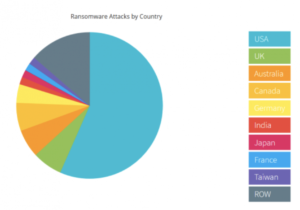
    • Last year, more than half of all successful ransomware attacks occurred in the US.

    NTELogic.com | The State of Cybersecurity

    Wondering what happens in a typical ransomware attack? Often, cyber attackers will lock your system and demand payment, usually in Bitcoin. Other times they will take down your IT system or wreak havoc in other ways. Because you can’t access your data when you’re under attack, you may also have to deal with days of downtime.

    No matter what the specifics are, ransomware attacks are always difficult and often very expensive. Your business may have to pay for:

    • A ransomware recovery IT team to get your company back online and to ensure the IT infrastructure is secure
    • A digital forensics team to identify exactly what happened
    • A public relations firm to help you with any reputational damage caused by the attack
    • The actual ransom – you can hire a ransomware negotiator to try and bring down the cost of the ransom and to manage the transaction on your behalf

    How to Protect Against Malware and Ransomware Threats

    While the threat of these cyberattacks is unnerving, there are many tools a business can use to mitigate risk and keep your systems protected.

    • Real-time backup. With real-time file backups, you can restore your files to any point you need to from the cloud. This enables fast recovery from ransomware attacks. It may save you from having to pay a ransom and reduce business downtime. Make sure your cloud backup solution includes advanced antimalware and antivirus software.
    • Employee training. Phishing emails are the main point of entry for ransomware attacks. All it takes is one individual unknowingly clicking on a malicious link or file attachment to put your business at risk. Make sure all of your employees are aware of the threat of ransomware attacks. They should know how to spot a phishing email and what to do if they think they may have clicked on a malicious link. Also, in general, all employees should be cautious of any email or instant message that they aren’t familiar with.
    • Advanced email protection. Because emails are ground zero for cyberattacks, it’s worth it to consider an advanced email protection solution. Ideally, your email protection comes with anti-phishing and anti-spoofing protection to help filter out external threats, malicious link protection, and outbound scanning. This helps to prevent malware from spreading if an employee clicks on a phishing link.

    NTELogic offers comprehensive, multi-layered email protection for SMBs, as well as secure backup and file management. Our expert team is also happy to talk to you about how Email Protection, ShareSync, and other Intermedia solutions can help protect your business from ransomware and malware threats. Contact us today to learn more.