Tag: email security

  • Cybersecurity in the Country – Why Businesses in Tuolumne County Can’t Afford to Ignore Cyber Crime

    Cybersecurity in the Country – Why Businesses in Tuolumne County Can’t Afford to Ignore Cyber Crime

    When most people picture cybercrime, they think of giant corporations, big-city hospitals, or government agencies getting hit by hackers.

    But in 2025, that picture is wrong.

    Across California and the nation, small and rural organizations are increasingly in the crosshairs—manufacturers, farms, clinics, local governments, food processors, retail shops, and professional offices. In many cases, these attacks are causing weeks of downtime, permanent data loss, and six-figure recovery bills.

    For businesses in places like Tuolumne County and the broader Mother Lode, cybersecurity is no longer a “big city problem.” It’s a business survival problem.

    This post looks at:

    • Why rural businesses are now prime targets
    • Common myths that keep small businesses exposed
    • Real examples of cyber incidents impacting smaller and rural California organizations
    • What “proactive cybersecurity hygiene” actually means in day-to-day operations
    • How NTELogic helps local businesses improve their security culture and resilience

    “We’re Too Small to Be a Target” – The Most Expensive Myth in Rural Business

    Attackers don’t care about your ZIP code or how many people are in your town. They care about three things:

    1. How easy you are to compromise
    2. How quickly you’ll pay to get back online
    3. How quietly they can move on to the next victim

    Recent research shows just how wrong the “only big companies get hit” myth really is:

    • Roughly 46% of all cyber breaches now impact organizations with fewer than 1,000 employees.
    • An estimated 43% of cyberattacks in 2023 targeted small businesses specifically.
    • The FBI’s 2024 Internet Crime Report logged more than 859,000 cybercrime complaints with reported losses over $16 billion, a 33% increase over the prior year.

    And small businesses are paying a heavy price. The U.S. Small Business Administration notes that cybercrimes against the small business community cost an estimated $2.9 billion in 2023 alone.

    For a local dental office, insurance agency, or construction firm, that kind of incident isn’t an inconvenience, it can threaten the business itself.

    Why Rural Businesses Are Especially Attractive Targets

    Rural communities like Tuolumne County, Calaveras County, and other parts of the Central Valley and Mother Lode share some common realities that cybercriminals quietly exploit:

    1. Limited in-house IT staff

    Most rural businesses don’t have a full-time cybersecurity team—or even a full-time IT person. Technology tends to be managed by:

    • An office manager “who’s good with computers”
    • A business owner juggling many roles
    • A remote IT provider who only gets called when something breaks

    That means critical tasks like patching, log review, MFA rollout, or staff training often get pushed aside.

    2. Older systems and specialized line-of-business apps

    Agriculture, healthcare, manufacturing, and local government often run older software and specialized systems—from feed and dairy management platforms to legacy accounting software and controllers for pumps, gates, and machinery.

    These systems are:

    • Harder to patch or update
    • Sometimes no longer supported by the vendor
    • Often exposed to the network in risky ways

    Attackers love that combination.

    3. Connectivity challenges and “workarounds”

    Rural internet constraints can lead to creative, but risky solutions:

    • Remote access tools left open to “make it easier to support sites”
    • VPNs or port forwarding set up once and never revisited
    • Shared admin passwords used on multiple systems

    These shortcuts are convenient for daily work but create a wide attack surface.

    4. Heavy dependence on uptime

    Many rural operations run 24/7 – dairies, farms, critical infrastructure, clinics, and hospitality. Shutting down even for a day can mean:

    • Spoiled product
    • Missed harvest windows
    • Lost bookings and revenue
    • Disrupted services to the community

    Attackers know that organizations under severe uptime pressure are more likely to pay ransom quickly.

    Real-World Cyber Incidents in Smaller & Rural California Communities

    You don’t have to look to Silicon Valley or Los Angeles to see the damage cybercrime can cause.

    Here are a few examples from smaller or rural California organizations:

    A California agriculture business crippled by ransomware

    A California-based agricultural business suffered a serious ransomware attack while working with a previous IT provider. The attack disrupted operations so badly that they had to rebuild their network and systems with help from a new IT security partner.

    This was not a global corporation, it was an agriculture company, the kind of business you might find in any Central Valley or foothills community.

    Grass Valley and Shafter: small cities, big cyber impacts

    The City of Grass Valley, a town of around 13,000 people, disclosed that its systems had been compromised by ransomware, with attackers threatening to publish stolen city data if ransom wasn’t paid.

    Similarly, the City of Shafter, a small agricultural city in Kern County, reported a ransomware incident that froze and locked its IT system, disrupting city services and forcing City Hall to close while the incident was investigated.

    While these are municipalities rather than private companies, the lesson is the same:

    If a small city government can be shut down by ransomware, so can a local business running similar technology and facing similar resource constraints.

    Healthcare facilities serving local communities

    Healthcare organizations that serve regional and rural populations have also been hit hard:

    • Granite Wellness Centers, which operates in Northern California communities, discovered a ransomware attack that exposed the information of approximately 15,600 patients, including health and insurance data.
    • Mission Community Hospital in Panorama City, California, has been the subject of multiple reports and legal filings following a 2023 ransomware attack in which attackers claimed to steal roughly 2.5 TB of data, including imaging records, employee information, and financial reports.

    Again, the pattern is clear: cybercriminals are not just going after national hospital chains, they’re targeting community-focused organizations that often lack enterprise-grade budgets or staffing.

    If attacks like these can hit rural or regional organizations in California, they can absolutely hit a professional office, retail shop, clinic, or ag operation in Tuolumne County.

    What Proactive Cybersecurity Hygiene Looks Like (In Plain English)

    “Cybersecurity hygiene” sounds abstract, but in practice it’s a collection of very concrete habits, tools, and decisions.

    Here’s what that looks like for a rural business that wants to stay ahead of threats.

    1. Know what you have (and where it is)
    You can’t protect what you don’t know about.

    • Maintain an inventory of devices (PCs, laptops, servers, tablets, phones, network gear).
    • Track software and line-of-business apps, including older systems that are still critical.
    • Document where your data lives (local servers, cloud apps, USB drives, backup systems, third-party services).

    2. Keep systems patched and protected
    Most attacks still succeed by exploiting known, unpatched vulnerabilities.

    • Enable automatic updates where possible.
    • Use managed endpoint protection (EDR/MDR) rather than basic consumer antivirus.
    • Regularly review and update firewall and remote access settings.

    3. Lock down identities and access
    Human logins are often the weakest link.

    • Turn on multi-factor authentication (MFA) for email, remote access, and cloud apps wherever possible.
    • Use unique, strong passwords stored in a password manager instead of reusing the same password everywhere.
    • Limit admin access, only give high-level privileges to people who truly need them.

    4. Make backup and recovery non-negotiable
    A backup you think is working is almost as dangerous as having no backup at all.

    • Use managed, monitored backups with both local and cloud copies where possible (especially important with unreliable rural internet).
    • Ensure backups are encrypted and protected from ransomware (offline or immutable copies).
    • Test restores regularly so you know how long it will take to get systems back up.

    5. Train your team – over and over
    Today’s phishing scams and phone-based social engineering (“vishing”) are sophisticated. Attackers use:

    • Look-alike domains
    • Fake Microsoft or bank logins
    • Phone calls pretending to be “IT support”

    Regular security awareness training and simulated phishing campaigns help staff recognize and report attacks instead of falling for them.

    6. Plan for the “when,” not just the “if”
    Every rural business should have a simple, clear incident response plan:

    • Who gets called first (internal and external)?
    • How do you isolate infected systems?
    • How do you communicate with customers or patients if systems are down?
    • Who handles law enforcement notifications, breach notifications, and cyber insurance claims?

    Even a 2–3 page playbook written in plain language is better than scrambling after the fact.

    Building a Security Culture in a Rural Business

    Technology is only half the story. In smaller communities, culture is often the deciding factor between resilience and disaster.

    A strong security culture in a rural business looks like:

    • Leaders talking about cybersecurity the way they talk about safety, quality, or customer service.
    • Employees feeling comfortable speaking up if something looks suspicious.
    • Regular, short “toolbox talks” or lunch-and-learns on topics like phishing, passwords, and safe remote work.
    • Clear, written policies for acceptable use, remote access, and handling sensitive data.
    • Security being considered during business decisions, not bolted on afterwards (for example, when adding a new cloud system or remote site).

    In places like Tuolumne County, where many people know each other personally, that culture can spread quickly, especially when it’s framed not as fear, but as taking care of employees, customers, and the community.

    How NTELogic Helps Rural Businesses Strengthen Cybersecurity

    NTELogic was built in and for communities like the Mother Lode and Central Valley. We understand:

    • Unreliable rural internet and the need for local + cloud strategies
    • The specialized software used by agriculture, dairy, and other rural operations
    • The realities of small IT budgets and lean staffing
    • The importance of keeping operations running 24/7

    Here’s how we support local businesses in improving their security posture and culture:

    1. Managed endpoint protection and monitoring
    We deploy and manage enterprise-grade endpoint detection and response (EDR) and remote monitoring to:

    • Detect ransomware and malware behavior early
    • Isolate compromised devices
    • Keep systems patched and up to date
    • Provide visibility across laptops, desktops, and servers

    2. Managed backup and disaster recovery
    Our NTELogic Managed Backup Service is designed with rural realities in mind:

    • Flexible selection of which data and applications to protect
    • Support for applications that store data in non-standard locations (including common ag and dairy software)
    • Encrypted backups with options for both local appliances and cloud storage
    • Regular monitoring, testing, and support when a restore is needed

    This combination helps minimize downtime and makes it much easier to say “no” to ransom demands.

    3. Secure email and identity protection
    Because so many attacks start in the inbox, we help local businesses:

    • Harden Microsoft 365 and hosted email with advanced email protection
    • Implement MFA and conditional access where supported
    • Set up and manage DKIM, SPF, and DMARC to reduce spoofing and improve email trust
    • Provide guidance on identity-based licensing and changes in Microsoft’s Office and M365 ecosystem

    4. Security awareness and culture programs
    Technology alone won’t fix human risk, so we offer:

    • Ongoing cybersecurity awareness training for employees
    • Phishing simulations tailored to common scams hitting local businesses
    • Simple, rural-friendly policies and quick-reference guides
    • Executive and owner briefings to align security with business priorities

    5. Business continuity and incident planning
    Drawing on decades of experience in business continuity, emergency management, and IT, we can help you:

    • Identify critical systems and data
    • Map out dependencies across sites and vendors
    • Build and document incident response and recovery plans
    • Run tabletop exercises so your team knows how to react under pressure

    Bringing Big-City Cybersecurity to Small-Town Businesses

    Cybercrime is no longer a distant, abstract risk reserved for Fortune 500 companies. It’s already affecting towns like Grass Valley and Shafter, regional healthcare providers, and agriculture businesses that look a lot like the operations up and down Highway 49 and 99.

    For rural businesses in Tuolumne County and the surrounding region, the choice isn’t whether to “do cybersecurity” or not. The choice is whether to approach it reactively after an incident, or proactively as part of how you run your business.

    If you’d like help:

    • Assessing where your biggest risks actually are
    • Building a realistic, affordable cybersecurity roadmap
    • Putting managed protection, backup, and training in place
    • Or simply translating all this jargon into a plan your team can follow

    NTELogic is here in your backyard, not a faceless call center three time zones away.

  • Cybersecurity Starts With Your Team: Uncovering Threats and the Benefits of Training

    Cybersecurity Starts With Your Team: Uncovering Threats and the Benefits of Training

    When you think about cybersecurity, your mind might jump to firewalls, antivirus software or the latest security tools. But let’s take a step back—what about your team? The reality is that even with the best technology, your business is only as secure as the people who use it every day.

    Here’s the thing: cybercriminals are intelligent. They know that targeting employees is often the easiest way into your business. And the consequences? They can range from data breaches to financial losses and a lot of sleepless nights.

    So, let’s break this down. What threats should you be worried about, and how can regular training protect your team and business?

    Common cyberthreats that specifically target employees

    These are some of the main ways attackers try to trick your team:

    • Social engineering
      This is a tactic in almost all cybercriminal playbooks. Attackers rely on manipulation, posing as trusted individuals or creating urgency to fool employees into sharing confidential data or granting access. It’s about exploiting trust and human behavior rather than technology.
    • Phishing
      A popular form of social engineering, phishing involves deceptive emails or messages that look official but aim to steal sensitive information or prompt clicks on harmful links.
    • Malware
      Malware refers to malicious software designed to infiltrate systems and steal data, corrupt files or disrupt operations. It often enters through unintentional downloads or unsafe websites, putting your data and functionality at risk.
    • Ransomware
      A specific kind of malware, ransomware, encrypts files and demands payment to unlock them. It’s one of the most financially damaging attacks, holding businesses hostage until a hefty ransom is paid.
    Employee cyber awareness training and its benefits

    You wouldn’t let someone drive your car without knowing the rules of the road, right? The same logic applies here. Cyber awareness training equips your team with the knowledge to spot and stop threats before they escalate. It’s about turning your employees from potential targets into your first line of defense.

    The benefits of regular employee cyber awareness training are:

    • Fewer data breaches
      Well-trained employees are less likely to fall for phishing or other scams, which lowers the chance of a data breach.
    • Stronger compliance
      Many industries require security training to meet legal standards. By staying compliant, you avoid potential fines and build trust with partners.
    • Better reputation
      Showing a commitment to security through regular training shows clients and customers that you take data protection seriously.
    • Faster responses
      When employees know how to spot and report issues quickly, the response to any threat is faster and more effective, minimizing potential damage.
    • Reduced insider threats
      Educated employees understand the risks, minimizing both accidental and intentional insider threats.
    • Cost savings
      Data breaches come with huge costs, from legal fees to loss of customer trust. Training can lessen the chances of cyber incidents and save your company money in the long run.
    So, where do you start?

    Start with a solid cybersecurity program. This isn’t a one-and-done deal. It’s ongoing. Your team needs to stay updated on new threats and best practices. And it’s not just about sitting through a boring presentation. Make it engaging, practical and relevant to their daily roles.

    By investing in your team, you’re not just boosting their confidence—you’re safeguarding your business. And in a world where cyberthreats evolve faster than ever, that’s a win you can count on.

    Not sure how to do it alone? Send us a message. Our years of experience and expertise in cyber awareness training are exactly what you need.
  • Strengthening Your Digital Identity: The Power of Email Authentication

    In an era dominated by digital communication, email remains a fundamental tool for personal and professional correspondence. However, the convenience of email comes hand in hand with the potential risks of cyber threats, making email security a paramount concern. To fortify your digital fortress, using email authentication is not only important, it is quickly becoming a requirement. Popular email service providers like Gmail and Microsoft 365 now require sender’s mail servers to have email authentication in place, or the message will be rejected.

    Email authentication emerges as a crucial line of defense in this landscape, ensuring that the messages we send and receive are from legitimate sources. Let’s delve into the types of email authentication and explore the myriad benefits they bring to the table.

    Sender Policy Framework (SPF) is a widely adopted email authentication method. It works by allowing domain owners to specify which mail servers are authorized to send emails on their behalf. This prevents cybercriminals from spoofing or forging the “From” address, a common tactic in phishing attacks. DomainKeys Identified Mail (DKIM) is another potent authentication technique that adds a digital signature to outgoing emails, verifying their authenticity. By validating the source, DKIM ensures that the content remains untampered during transit.

    Domain-based Message Authentication, Reporting, and Conformance (DMARC) is the third pillar of robust email authentication. DMARC builds upon SPF and DKIM, offering domain owners a policy framework to declare their authentication practices and instruct email receivers on how to handle messages that fail authentication checks. DMARC provides valuable insights through reporting, allowing organizations to monitor and fine-tune their email authentication strategies.

    The benefits of adopting these email authentication methods are abundant. Foremost, they shield against phishing attacks by confirming the legitimacy of the sender. This not only protects individuals from falling victim to scams but also safeguards businesses from reputational damage. Additionally, authenticated emails contribute to enhanced deliverability, as reputable mail servers are less likely to mark them as spam. As we navigate an increasingly digital landscape, email authentication stands as a cornerstone in fortifying our online communication, fostering trust, and ensuring the integrity of our digital identities.

    Contact us to learn how implementing email authentication can improve your email deliverability while leveling-up your cyber security posture.

  • How Does Email Archiving Work?

    Email is likely a critical communication channel for your business, both internally and externally. However, you may have concerns about security, accessibility, and storage. The best solution to address all of these is email archiving. In this post, we’ll explain what it is, how it works, and why it should be part of your email system.

    What Is Email Archiving?

    Email archiving is the practice of preserving these communications through cloud-based storage. It enables users to index, search, and retrieve old emails.

    Why Would an Organization Archive Emails?

    There are several business reasons to deploy an archiving solution, including:

    • Business continuity and disaster recovery
    • Internal audits, investigations, and eDiscovery for litigation (especially true for highly regulated industries)
    • Regulatory compliance mandates
    • Following security best practices
    • Record management
    • Protection of intellectual property (IP)
    • Minimizing the need to increase bandwidth while retaining the data

    Your need to archive may fall into multiple categories. It delivers benefits that can help you in various ways, from compliance requirements to cost savings.

    How Does the Archiving Process Work?

    The email archiving process captures 100% of inbound and outbound emails. The system then places these in a secured, cloud environment that’s accessible.

    It’s not the same as email backup. The difference is that a backup only backs up data for a limited time period to restore if necessary. Simply backing up your email doesn’t consider compliance requirements, nor does it help prevent data loss.

    If you’re currently only using a backup approach, you should be aware of its limitations. It’s also important to understand if it can or cannot deliver on all the business reasons you have for preserving email.

    What Are the Benefits of Email Archiving?

    The benefits of email archiving translate into business value. They include:

    Meeting Regulatory Compliance

    Certain industries have mandates regarding email communication if it contains confidential information. One of the most common is HIPAA, which regulates healthcare information. Those in this sector can achieve compliance by archiving.

    The archive keeps the data secure and provides a virtual paper trail should an audit occur. Compliance isn’t an option; it’s mandatory. By leveraging an archiving solution, you can also meet the regulations for FRCP, SOX, FINRA, GLB, NYSE, NASD, SEC, and others.

    Retaining Data

    Even the smallest companies generate thousands of emails. They often contain vital information, so retaining them is appropriate and may even be required. However, keeping them on your email server isn’t sustainable. You’ll quickly see your bandwidth diminish, which could include more costs.

    An archive moves those emails to the cloud and provides you with the ability to search them. The data is secure due to encryption, and you can find what you need in minutes, not hours.

    Achieving a True Backup for Business Continuity

    As noted, an email backup falls short of restoration. In this model, the Office 365 cloud houses the email files; however, this storage alone doesn’t preserve data for the long term. The archiving integration builds on top of what you have to create a permanent place for the emails to reside. You don’t have to do anything extra; it’s automatic.

    Protecting IP

    Emails can often contain IP. In fact, Microsoft reported that as much as 75 percent of company emails include IP. While you may not notice this because the IP is inherent to you, it could become an area of risk. Even the most minor trade secrets need protection. You’ll have more control over the content of these emails with archiving. It provides a repository where data loss isn’t a threat.

    Managing Legal Discovery

    If your company is in the middle of litigation, there will likely be eDiscovery requests regarding email. Without an archive, this will be an arduous task. An archive enables you to search, filter, and find what you need, so you don’t waste time and resources.

    Recovering Deleted Emails

    Deleting emails is a normal function. Most of the time, there’s no cause for concern. However, sometimes a user can inadvertently or purposely delete something that’s important or includes confidential information. Unfortunately, some of your employees may be engaging in risky behavior. A backup is a smart move to mitigate any fallout from such actions.

    What Archiving Features Do You Need?

    Before you choose an archiving solution, here are the features you should prioritize:

    • Security: This is at the top of the list. Find out how the system safeguards data with encryption (both while in transit and at rest) and how it meets compliance requirements regarding data security.
    • Scalability: You don’t want to have limits on storage capacity. Be sure it can meet your needs today and tomorrow.
    • Indexing of all file types: Not all archiving products include all file types or attachments. Ask about what it can index to ensure you’re covered.
    • Constant email capture: Be sure the solution captures and stores all sent and received emails.
    • Search functionality: In most cases, if you need to access your email archive, it’s because you’re looking for specific information tied to litigation, a breach, or an audit. Select a product that makes searching easy with tagging, filtering, advanced search, and categorization.
    • Exporting: Once you find the emails you need, you’ll want to be able to export them for the archive. Make sure this is possible, and that you have multiple format choices.
    • Integration: The standard Office 365 archiving doesn’t offer you complete protection. You’ll need a specific tool that meets all your needs. This will typically require an integration, so be sure that there are no compatibility issues while comparing options.
    • Easy set-up: You shouldn’t have to jump through hoops to add this to your email. It should be simple to implement and not require additional licenses.

    Learn More About Email Archiving

    Email archiving is a smart decision for any business. It elevates your security, helps you meet compliance, protects your IP, and ensures access when you need it. Learn more about why you should add it to your email today by taking a tour of the NTELogic Email Archiving solution.

  • Cybersecurity for Employees: Awareness Can Save You from a Breach

    Your company might use iron-clad network protection and implement encryption across the board. However, your data and systems are still at risk of a cyberattack if you aren’t focusing on employee awareness. This risk exists because employees are behind a significant chunk of data breach incidents. These basic steps can help to raise employee awareness and ensure your company is protected.

    Human Error Is a Major Cybersecurity Weak Point for Businesses

    Employee negligence is a major cybersecurity issue for businesses of all sizes. Shred-It’s Ninth Annual Data Protection Report revealed that human error continues to be the driver of most data breaches. Fifty-three percent of C-suite executives cite external human error or accidental loss as primary problems. Twenty-eight percent of small business owners feel the same way. In the report, Ann Nickolas, Senior Vice President of Stericycle, says, “For the second consecutive year, employee negligence and collaboration with external vendors continues to threaten the information security of US businesses.”

    A data breach can have severe consequences when you add up reputational damage and lost revenue. Employee retention can be a problem as well – 33 percent of respondents in the Shred-It survey stated that they are likely to seek employment elsewhere after their employer experiences a data breach. That goes for both breaches of consumer and employee data.

    According to the 2020 Cost of a Data Breach report published by IBM and the Ponemon Institute, the average cost of each lost record is $146. As losing thousands of records during a breach is common, shoring up your employees’ cybersecurity habits is well worth the effort.

    Use this security checklist for in-office and remote employees to figure out what steps your company can take to reduce the risk of a breach.

    1. Train employees to recognize phishing emails

    Email phishing attacks are common. With this type of cyberattack, a hacker sends an email that appears legitimate and asks the recipient to share information or download a file.

    To protect against phishing emails, it’s important to use advanced email protection, which will help to weed out spoof emails and other external threats. Also, make sure all of your employees understand what a phishing email looks like, what the risks are if they fall for one, and what they should do if they spot what they think might be a phishing email message.

    2. Password Security

    A strong password policy is often the first line of defense against cyber attacks, yet many organizations continue to follow outdated guidelines that expose them to significant risk.

    According to Verizon’s 2020 Data Breach Investigations Report, lost or stolen credentials remain the number one hacking tactic used by malicious actors to perpetrate data breaches, with compromised or weak passwords responsible for 35% of all breaches.

    Password Sharing

    While sharing a password might seem convenient and harmless, it can have serious consequences. Passwords should never be shared with others. Period.

    Password Reuse

    Use different passwords for different accounts. That way, if one account is compromised, at least the others won’t be at risk.

    Password Length & Complexity

    Length trumps complexity. The longer a password is, the better. Use at least 16 characters whenever possible. Make passwords that are hard to guess but easy to remember.

    3. Require Multi Factor Authentication (MFA)

    With Multi Factor Authentication, even if a hacker steals an employee’s password, they still will be locked out of their device or system. This is how it works: an employee will use a password and another identifier such as biometric data or a code sent to their email or phone number. Since a hacker can’t steal biometric data and likely doesn’t have someone’s device, as well as their password, their chances of breaking in drop to nearly zero.

    4. Establish a data breach policy

    What an employee does after a suspected data breach will determine how quickly your business recovers. If they don’t act quickly by alerting your IT team, a hacker may have enough time to infiltrate your systems and do extensive damage. With a fast response, it’s possible to lock down your network and mitigate the risks.

    Tell your employees who they should contact if they notice a suspicious email, receive a security alert, if their device is stolen, or if they believe something is amiss with your company’s networks. Also, let them know they won’t be reprimanded if they fall victim to an attack. Employees should know they have their employer’s support. Otherwise, some people may not speak up when there’s a problem.

    5. Discuss mobile device usage

    If employees are using their smartphone or another personal device for work, teach them how to use their devices securely.

    • Always install the latest updates to ensure they’re using the newest operating system. These updates often include critical security updates.
    • If your company isn’t using a virtual private network (VPN), employees need to be very careful about what network they use when accessing business apps remotely. Only log on when using a secure network. They shouldn’t ever use public networks such as those found in coffee shops and airports.
    • Practice good flash drive hygiene – only use company-issued drives. Once one leaves the office, it should be wiped clean or discarded upon return.

    Make Cybersecurity a Part of Your Work Culture

    Following cybersecurity best practices such as using two-factor authentication, avoiding suspicious emails, and practicing good password security can go a long way in protecting against an attack. But, if cybersecurity isn’t a part of your work culture, it’s easy for these best practices to be forgotten.

    Cultivate a cybersecurity-aware culture by openly talking about risks, updating your employees about new best practices, providing training for new employees, and refreshing knowledge with regular internal messaging such as company-wide emails or training meetings.

  • Ransomware and Malware Threats: The State of Cybersecurity

    Cybersecurity is a growing concern for organizations all over the world. A single attack can lead to thousands or even millions in losses, and cybercriminals continue to come up with more sophisticated methods of attack. Ransomware and malware threats are some of the most common types of cyberattacks.

    Let’s take a look at how big of a risk these threats are right now and dive into what the average small to mid-sized business can do to protect itself from an attack.

    Ransomware and Malware – What’s the Difference?

    Ransomware and malware are sometimes used interchangeably, but they aren’t the same thing. It’s important to know the difference to ensure you have the right protocols and cyber protection in place to protect your business.

    Malware

    Malware is a blanket term that refers to all types of malicious code or files that are used to damage a user’s device or network.

    • Trojan horses, worms, spyware, and viruses are all types of malware.
    • Hackers send malware through emails, USB drives, and software installations. You can also open your computer or your network up to malware simply from browsing the internet.
    • Once malware is on your computer or network, it can cause a number of problems ranging from slowing down performance to a loss of control over your data.
    Ransomware

    Ransomware is one type of malware, and it’s generally the most difficult one to protect against. A cyber attacker will use ransomware specifically to stop you from accessing your system or your data until you pay them a fee. It’s essentially malware designed to hold your device or network for ransom.

    • Ransomware is primarily delivered via phishing emails. A tainted email will have a malicious attachment or a deceptive link that takes you to an infected website if you click on it. Cyber attackers can also send ransomware in an instant message.
    • With this type of threat, an attacker may lock you out of your system or encrypt your files so you can’t access them.

    How Big of a Threat Are They?

    Robust antivirus software and email encryption can help to protect against many malware threats. Ransomware, however, is a massive business threat. It doesn’t matter if you have a global enterprise or a small company – all organizations are vulnerable.

    To give you an idea of the size of the problem, look at these numbers:

    • In 2021, global ransomware damages are expected to cost organizations $20 billion – that’s 57 times more than the cost of damages in 2015.
    • By the end of 2021, a business will be attacked by ransomware every 11 seconds.
    • From 2019 to 2020, there was a 62 percent increase in the number of global ransomware attacks.
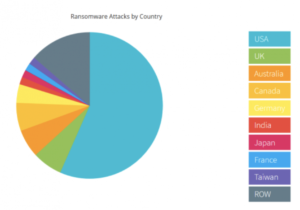
    • Last year, more than half of all successful ransomware attacks occurred in the US.

    NTELogic.com | The State of Cybersecurity

    Wondering what happens in a typical ransomware attack? Often, cyber attackers will lock your system and demand payment, usually in Bitcoin. Other times they will take down your IT system or wreak havoc in other ways. Because you can’t access your data when you’re under attack, you may also have to deal with days of downtime.

    No matter what the specifics are, ransomware attacks are always difficult and often very expensive. Your business may have to pay for:

    • A ransomware recovery IT team to get your company back online and to ensure the IT infrastructure is secure
    • A digital forensics team to identify exactly what happened
    • A public relations firm to help you with any reputational damage caused by the attack
    • The actual ransom – you can hire a ransomware negotiator to try and bring down the cost of the ransom and to manage the transaction on your behalf

    How to Protect Against Malware and Ransomware Threats

    While the threat of these cyberattacks is unnerving, there are many tools a business can use to mitigate risk and keep your systems protected.

    • Real-time backup. With real-time file backups, you can restore your files to any point you need to from the cloud. This enables fast recovery from ransomware attacks. It may save you from having to pay a ransom and reduce business downtime. Make sure your cloud backup solution includes advanced antimalware and antivirus software.
    • Employee training. Phishing emails are the main point of entry for ransomware attacks. All it takes is one individual unknowingly clicking on a malicious link or file attachment to put your business at risk. Make sure all of your employees are aware of the threat of ransomware attacks. They should know how to spot a phishing email and what to do if they think they may have clicked on a malicious link. Also, in general, all employees should be cautious of any email or instant message that they aren’t familiar with.
    • Advanced email protection. Because emails are ground zero for cyberattacks, it’s worth it to consider an advanced email protection solution. Ideally, your email protection comes with anti-phishing and anti-spoofing protection to help filter out external threats, malicious link protection, and outbound scanning. This helps to prevent malware from spreading if an employee clicks on a phishing link.

    NTELogic offers comprehensive, multi-layered email protection for SMBs, as well as secure backup and file management. Our expert team is also happy to talk to you about how Email Protection, ShareSync, and other Intermedia solutions can help protect your business from ransomware and malware threats. Contact us today to learn more.

     
  • Exchange Email Environment Top Tips for Security

    Exchange email is an essential tool for any business. By leveraging the cloud, organizations no longer have to house email servers on-premises, lowering costs and improving accessibility. While many Exchange environments offer the same features and functionality, they don’t all have the same security.

    If you’re considering a switch to Exchange or updating your current environment, consider these top tips for the most secure solution.

    The State of Email Security

    Email is essential to business communications. It’s also a vehicle for infiltrating networks via phishing techniques. According to the 2020 Verizon Data Breach Investigations Report, 25 percent of data breaches involved phishing.

    The pandemic has also been a flame to the fire for phishing. From February to May of this year, phishing attacks have risen over 600 percent in some areas.

    Phishing isn’t the only cause for concern. Many workers send sensitive data via email without encryption or security protocols, making it easy for hackers to intercept.

    You know these risks are real and have the potential to devastate your business. There are legal and brand reputation consequences for failing to protect against them. While there are threats internally and externally to your email security, there are also best practices to take to minimize risk.

    Tips for Secure Email Exchange

    Protect your email communication by implementing and maintaining these best practices.

    Choose an Exchange Partner with Credentials

    Any cybersecurity expert will vouch for the fact that cloud Exchange email is much safer than on-premises solutions. You likely don’t have the resources to build a robust security infrastructure, but the right Exchange partner can.

    To gauge the safety of a provider, look for one that meets established auditing standards, such as PCI (payment card industry) and SOC 2 Type II. Achieving these standards is a clear message that the provider has security and data breach protocols in place.

    Ensure Physical Security of Your Email Servers

    Exchange email lives in the cloud, but there are still physical servers at data centers. That means there is still a level of physical security. When comparing providers, ask about the facility’s security.

    Do they have camera surveillance? Secure access policies? Security guards?

    Use Email Encryption

    You can significantly reduce the risk of email data leaks with encryption. Email encryption delivers specific defenses, with outbound email content filtering and scanning of the content and attachments. The technology uses Public Key Infrastructure (PKI), S/MIME, and X.509 certificates to verify confidentiality, user authentication, and message integrity.

    This functionality is a requirement for certain compliance mandates, like HIPAA. However, it can be a useful tool for any industry, regulated or not. With Exchange, you can configure your policies around encryption to cover your specific needs.

    Protect Mobile Devices

    One of the most important benefits of Exchange email is its mobility. Your team can check email from any device, and many are probably using smartphones. When comparing different providers, be sure to ask if security features extend to mobile. Don’t assume that they do.

    With smartphone protection, you’ll also have peace of mind about lost or stolen devices. You can remote wipe them if necessary to protect confidential or private data.

    Arm Your Email System with the Right Defenses

    In the world of rising cybersecurity risk, your email system needs proactive defenses. You’ll find them with a multi-layered approach. Those defenses may include:

    • Anti-spam filtering: Removing spam can mitigate risks and improve bandwidth. You can control these settings and create white and black lists.
    • Continuous updates: Exchange should be auto-updating to fix any weaknesses from previous versions.
    • Malware protection: Stop malware from ever hitting the inbox.
    • Safe link features: This functionality prevents users from accessing known phishing sites.
    • Tier-1 antivirus: This security principle is universal, but not all protections are the same. Seek out solutions with proactive scanning and frequent virus definition updates.

    Document Email Practices and Educate Users

    Having a robust environment and proactive protections is essential to Exchange security, but so are your users. Your organization should document the policies around sending emails, especially if the information is confidential or protected.

    Employees can often be the “weak” link in security. They can also be the last line of defense. To empower them, you’ll need to educate them. Practice this as part of your culture, so they know what to look for and how to handle certain scenarios.

    NTELogic Exchange Email Goes Beyond Secure

    Our Exchange email platform delivers an abundance of security features. The platform encompasses all the best practices and more. Additionally, it offers flexibility and can boost productivity.