Tag: Security

  • Protecting Your Digital Identity: The Significance of Strong Passwords on World Password Day

    In today’s interconnected world, where our lives are increasingly intertwined with digital platforms, the importance of safeguarding our online accounts cannot be overstated. As we celebrate World Password Day on Thursday May 2nd, it serves as a poignant reminder of the crucial role that strong passwords play in protecting our digital identities. A strong password acts as the first line of defense against cyber threats, ensuring that our sensitive information remains secure from malicious actors.

    One of the primary reasons why strong passwords are essential is the prevalence of cyber attacks aimed at stealing personal data. Hackers employ sophisticated techniques to crack weak passwords and gain unauthorized access to accounts, posing a significant risk to individuals and organizations alike. By creating complex passwords that combine letters, numbers, and special characters, users can significantly enhance the security of their accounts and thwart potential attacks.

    Moreover, the importance of strong passwords extends beyond individual accounts to encompass broader cybersecurity initiatives. Weak passwords not only compromise personal data but also pose a threat to entire networks and systems. A single compromised account can serve as a gateway for cybercriminals to infiltrate an organization’s infrastructure, leading to devastating consequences such as data breaches, financial losses, and reputational damage.

    As we observe World Password Day, let us reaffirm our commitment to practicing good password hygiene. By adopting strong, unique passwords for each of our accounts and regularly updating them, we can fortify our defenses against cyber threats and preserve the integrity of our digital identities. Let this day serve as a reminder that proactive measures taken today can safeguard our online security tomorrow and beyond.

    Do you need help improving your digital hygiene? Download our 5 Ways to Make Your Passwords Stronger checklist.
  • Be Aware of These Top AI Cyber-Risks

    Our third installment for Cyber Security Awareness Month focuses on the benefits and risks of AI.

    The rise of AI has sparked a revolution. Everyone, from industry giants to smaller enterprises, is captivated and eager to leverage AI’s endless possibilities.

    However, amid the celebrations of AI’s merits, let’s not ignore its potential risks. A new array of cyberthreats emerges when intricate AI algorithms cross paths with malicious cyber elements. From AI-powered phishing schemes to ultra-realistic deepfakes, these dangers serve as a reminder to stay vigilant and prepared.

    In this blog, we embark on a journey to explore AI benefits and risks. Our aim is to guide you in harnessing AI’s strengths while safeguarding against its potential pitfalls.

    AI’s positive impact on business

    The top benefits of AI include:

    Smart data analysis
    AI’s expertise lies in swiftly deciphering massive data sets to uncover patterns. This ability proves invaluable in traversing through modern markets. The insights derived empower you to make well-founded decisions, steering clear of guesswork.

    Boosted productivity
    AI’s automation prowess liberates your employees from mundane tasks, helping them focus on more critical tasks. Tedious and manual work can now be done seamlessly without human intervention, boosting productivity.

    Faster business maneuvering
    In an ever-evolving technological landscape, keeping up to date is paramount. AI empowers you to process and respond to real-time information promptly. This agility enables swift reactions to evolving scenarios, customer demands and opportunities.

    AI’s cyber challenges

    As we delve into the world of AI, we must also acknowledge the potential risks:

    AI-powered phishing scams
    Sneaky cybercriminals employ AI-driven chatbots to create impeccable phishing emails without the usual red flags, such as grammar errors. These attacks exploit human vulnerabilities, luring even the most vigilant to share sensitive information.

    To bolster your defense, exercise caution with emails from unfamiliar sources. Scrutinize sender details, avoid suspicious links and employ anti-phishing tools for added protection.

    Malicious AI-generated code
    Cybercriminals harness AI tools for swift code generation, surpassing manual capabilities. These generated code snippets find their way into malware and other malicious software.

    Defend against these intricate schemes by educating your team about them. Strengthen your defenses through layered security measures, such as firewalls, antivirus software and automated patch management.

    Deepfakes and impersonations
    AI-generated deepfakes can propagate misinformation, deceiving unsuspecting individuals and leading to fraud or character defamation. For example, in the current era, where many banks rely on online KYC (KYC or Know Your Customer is commonly implemented in banks to comply with regulatory requirements and mitigate the risk of financial crimes), malicious actors can create ultra-realistic videos using another person’s voice and image samples to open accounts for illegal transactions.

    Identifying deepfakes necessitates a discerning eye. Among other factors, anomalies in skin texture, blinking patterns and facial shadows help distinguish genuine content from manipulated content.

    Collaborative path to success

    At the crossroads of innovation and challenges, knowledge takes center stage.

    Our comprehensive eBook, “Protecting Your Business – Navigating AI Safety,” stands as your compass in the AI landscape. Delve into AI’s intricacies, uncover potential pitfalls and acquire strategies for responsible and secure utilization in your business.

    If navigating AI on your own seems daunting, don’t worry. Connect with us for a no-obligation consultation. Together, we’ll navigate AI’s realm, harness its power and ensure your organization’s safety.

  • Busting 3 Ransomware Myths

    It’s Time to Bust These 3 Ransomware Myths

     In today’s digital age, ransomware attacks are becoming increasingly frequent, sophisticated and costly. With cybercriminals constantly evolving their tactics and targeting businesses of all sizes, organizations like yours must proactively safeguard your data and systems. Unfortunately, many companies fall prey to common ransomware myths, which can leave them vulnerable to attacks and unprepared to respond effectively in the event of an incident.

    In this blog, we’ll debunk three of the most prevalent ransomware myths and provide the accurate information you need to protect your business. Understanding the realities of ransomware and taking proactive steps against it can mitigate the risk and ensure you’re prepared to fight against cybercriminals.

    Top Myths to Bust

    Without further ado, let’s debunk the ransomware myths you should avoid at any cost:

    Myth #1: If my business gets hit with ransomware, I’ll pay the ransom and return to business.
    Many businesses believe that paying a ransom is the quickest and easiest way to recover encrypted data. However, that’s just a dangerous assumption.

    Paying a ransom does not guarantee that the attackers will keep their word and provide the decryption key. Also, paying a ransom only encourages cybercriminals to carry out more attacks in the future.

    The best way to protect your business is to have a solid backup strategy and a comprehensive security plan in place.

    Myth #2: My backups will get me back up and running if I get hit with ransomware. 

    While backups are essential to ransomware prevention, it’s a myth that backups will always save the day. Cybercriminals have upgraded their tactics to compromise backup files as part of their attack strategy.

    With the rise of double extortion attacks, cybercriminals not only encrypt data but also steal it. This means that even if you have a backup strategy in place, your data may still be at risk if attackers threaten to leak sensitive data unless a ransom is paid.

    Myth #3: My antivirus software (or any other security solution) provides complete protection from ransomware attacks. 

    Antivirus software is essential to a comprehensive defense against ransomware, but it’s not enough. Relying on a single security product to defend against ransomware is a mistake. There’s no silver bullet solution to ransomware. However, implementing a defense-in-depth strategy can help your business build the most.

    Partner to succeed

    While it’s true that no security measure is foolproof, taking proactive steps to secure your data and systems can significantly reduce the risk of falling victim to a ransomware attack. We can help ensure your organization is well-prepared to fight against ransomware and other cyberthreats. Feel free to reach out to us for a no-obligation consultation.

    To learn more about ransomware criminals and how to defend your business, download our infographic “The Anatomy of a Ransomware Attack.” It’s a valuable resource that can help you increase your basic understanding of ransomware, identify the signs if you’ve fallen victim and prepare you to defend against these attacks.

  • OneNote Being Used to Spread Malware


    With Microsoft disabling macros by default on Office documents, cybercriminals are left needing another means to launch malware that’s victim-supported by default.

    We should expect nothing less of threat actors; when pushed up against a wall with their most powerful asset – Office macros – taken away from them, the most cunning of them will find alternative methods. The challenge for the most sophisticated of cybercriminals is to ensure that the greatest number of potential victims have the application needed that acts as the launcher.

    According to a recent tweet from email security company Prevention Point, a new method involving weaponized OneNote attachments has been spotted in the wild. The initial phish looks relatively standard for a socially-engineered email.

    With the OneNote execution looking somewhere between unexpected (after all, who ever needs to double-click a button within an application to see a supported document?) and sort of brilliant (I would assume that most knowledge workers haven’t interacted frequently with OneNote, so, “maybe this is how it works?”).

    And to boot, the default installation of Office 365 (that is, the software installed on a Windows endpoint) includes OneNote.

    The takeaway here is this is downright dangerous – threat actors have found yet another new way to engage with users in a way that helps move their attack forward with a double-click. This example of the constant evolution of the phish perfectly justifies why organizations need to keep users continually enrolled in security awareness training so that Joe User is always kept up on their toes with security top of mind.

  • Ransomware and Malware Threats: The State of Cybersecurity

    Cybersecurity is a growing concern for organizations all over the world. A single attack can lead to thousands or even millions in losses, and cybercriminals continue to come up with more sophisticated methods of attack. Ransomware and malware threats are some of the most common types of cyberattacks.

    Let’s take a look at how big of a risk these threats are right now and dive into what the average small to mid-sized business can do to protect itself from an attack.

    Ransomware and Malware – What’s the Difference?

    Ransomware and malware are sometimes used interchangeably, but they aren’t the same thing. It’s important to know the difference to ensure you have the right protocols and cyber protection in place to protect your business.

    Malware

    Malware is a blanket term that refers to all types of malicious code or files that are used to damage a user’s device or network.

    • Trojan horses, worms, spyware, and viruses are all types of malware.
    • Hackers send malware through emails, USB drives, and software installations. You can also open your computer or your network up to malware simply from browsing the internet.
    • Once malware is on your computer or network, it can cause a number of problems ranging from slowing down performance to a loss of control over your data.
    Ransomware

    Ransomware is one type of malware, and it’s generally the most difficult one to protect against. A cyber attacker will use ransomware specifically to stop you from accessing your system or your data until you pay them a fee. It’s essentially malware designed to hold your device or network for ransom.

    • Ransomware is primarily delivered via phishing emails. A tainted email will have a malicious attachment or a deceptive link that takes you to an infected website if you click on it. Cyber attackers can also send ransomware in an instant message.
    • With this type of threat, an attacker may lock you out of your system or encrypt your files so you can’t access them.

    How Big of a Threat Are They?

    Robust antivirus software and email encryption can help to protect against many malware threats. Ransomware, however, is a massive business threat. It doesn’t matter if you have a global enterprise or a small company – all organizations are vulnerable.

    To give you an idea of the size of the problem, look at these numbers:

    • In 2021, global ransomware damages are expected to cost organizations $20 billion – that’s 57 times more than the cost of damages in 2015.
    • By the end of 2021, a business will be attacked by ransomware every 11 seconds.
    • From 2019 to 2020, there was a 62 percent increase in the number of global ransomware attacks.
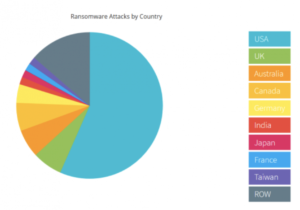
    • Last year, more than half of all successful ransomware attacks occurred in the US.

    NTELogic.com | The State of Cybersecurity

    Wondering what happens in a typical ransomware attack? Often, cyber attackers will lock your system and demand payment, usually in Bitcoin. Other times they will take down your IT system or wreak havoc in other ways. Because you can’t access your data when you’re under attack, you may also have to deal with days of downtime.

    No matter what the specifics are, ransomware attacks are always difficult and often very expensive. Your business may have to pay for:

    • A ransomware recovery IT team to get your company back online and to ensure the IT infrastructure is secure
    • A digital forensics team to identify exactly what happened
    • A public relations firm to help you with any reputational damage caused by the attack
    • The actual ransom – you can hire a ransomware negotiator to try and bring down the cost of the ransom and to manage the transaction on your behalf

    How to Protect Against Malware and Ransomware Threats

    While the threat of these cyberattacks is unnerving, there are many tools a business can use to mitigate risk and keep your systems protected.

    • Real-time backup. With real-time file backups, you can restore your files to any point you need to from the cloud. This enables fast recovery from ransomware attacks. It may save you from having to pay a ransom and reduce business downtime. Make sure your cloud backup solution includes advanced antimalware and antivirus software.
    • Employee training. Phishing emails are the main point of entry for ransomware attacks. All it takes is one individual unknowingly clicking on a malicious link or file attachment to put your business at risk. Make sure all of your employees are aware of the threat of ransomware attacks. They should know how to spot a phishing email and what to do if they think they may have clicked on a malicious link. Also, in general, all employees should be cautious of any email or instant message that they aren’t familiar with.
    • Advanced email protection. Because emails are ground zero for cyberattacks, it’s worth it to consider an advanced email protection solution. Ideally, your email protection comes with anti-phishing and anti-spoofing protection to help filter out external threats, malicious link protection, and outbound scanning. This helps to prevent malware from spreading if an employee clicks on a phishing link.

    NTELogic offers comprehensive, multi-layered email protection for SMBs, as well as secure backup and file management. Our expert team is also happy to talk to you about how Email Protection, ShareSync, and other Intermedia solutions can help protect your business from ransomware and malware threats. Contact us today to learn more.

     
  • COVID-19 and Cybercrime

    FBI Warns of Email Phishing Attacks in COVID-19 Pandemic

    Several of our clients have reported an increasing amount of phishing email messages showing up in their Inboxes and those of others in their organizations. The global efforts to combat the COVID-19 pandemic have understandably diverted much of our attention. Businesses large and small are reeling from the economic impacts. More than ever, we must keep our cyber guards up.
    Cybercriminals are always looking for new ways to steal your money, identity and data. Protect yourself and do your research before clicking on links purporting to provide information on the virus, donating to a charity online or through social media, contributing to a crowdfunding campaign, purchasing products online, or giving up your personal information in order to receive money or other benefits. These are just a few of the ways cybercriminals are using to infect computers with malware, steal usernames and passwords, gain access to business information and more. On Friday March 20, 2020, the FBI issued an alert addressing these emerging threats.
    According to the FBI alert, phishing emails are being sent daily in record numbers. Be on the look out for phishing emails that ask you to verify your personal information in order to receive an economic stimulus check from the government. While talk of economic stimulus checks has been in the news cycle, government agencies are not sending unsolicited emails seeking your private information in order to send you money. Phishing emails may also claim to be related to:

    • Charitable contributions
    • General financial relief
    • Airline carrier refunds
    • Fake cures and vaccines
    • Fake testing kits

    Also watch out for emails claiming to be from the Centers for Disease Control and Prevention (CDC) or other organizations claiming to offer information on the virus. Do not click links or open attachments you do not recognize. Fraudsters can use links in emails to deliver malware to your computer to steal personal information or to lock your computer and demand payment. Be wary of websites and apps claiming to track COVID-19 cases worldwide. Criminals are using malicious websites to infect and lock devices until payment is received.
    Remember, you are the first line of defense against phishing attacks and malware infections. Following these simple steps will limit your chances of biting on a phishing scam or malware infection:

    • Don’t open messages from unknown senders
    • Do not click on any links. By hovering your mouse pointer over the link, you can see the actual link displayed in a pop-up info balloon. If the link address looks unusual or does not match the site it states it’s from, it’s a phishing attempt.
    • Call the sender and ask them if they sent you the message. Only follow the link or open the attachment if you can verify its legitimacy with the sender.
    • Do not provide personal information to any unsolicited requests for information
    • Type in a trusted URL for a company’s site into the address bar of your browser to bypass the link in a suspected phishing message
    • If you want to donate, visit the fundraising organization’s web site directly, don’t use any links from any other source.
    • Only provide personal information on sites that have “https” in the web address or have a lock icon at bottom of the browser
    • Immediately delete messages you suspect to be spam

    Email phishing messages can be safely deleted. If a message appears suspicious and you would like help determining whether it’s a phishing attack or not, please call our office at (209) 790-4560 option 2, or send us an email at support@ntelogic.com.
    If you believe you have already responded to an email phishing message, clicked on a suspicious link or opened a suspicious attachment, notify your supervisor and manager, and then call our office at (209) 790-4560 option 2.

    Remember to always stay safe online and think before you click!

  • Five Simple Ways to Spot Phishing Emails

    Five Simple Ways to Spot Phishing Emails

    Five Ways to Spot Phishing Emails

    Did you know that 9 out of 10 data breaches today involve a phishing attack? These attacks typically consist of fake emails designed to look like they’re coming from a brand or institution that you trust or do business with.

    Their goal is to compel you to click a link or download an attachment, which then, puts malicious files on your computer. This can enable hackers to steal your identity, breach your employer’s systems, and more.

    The best way to defend yourself against phishing attacks is to identify phony emails before you click on them.

    Here are the five simple ways to spot a phishing email:

    1. Who’s the real sender?
      Make sure the organization name in the From line matches the email address between the brackets: Sam Sender <sam.sender@hisdomain.com>. Watch out for typos or foreign domains – think amaz0n.com or microsoft.com.ch
    2. Check the salutation
      If you have a relationship with the sender’s organization, the email should always greet you by name, not the generic :Dear valued customer”.
    3. Hover your mouse
      Use the mouse hover trick to see the full URL (web address) of any link you’re asked to open. DO NOT click the link, just hover your mouse pointer over the link and the full web address will be displayed. If you don’t recognize the web address, don’t click it.
    4. What’s in the message footer?
      The footer of any legitimate email should include at a minimum:
      – A physical address for the business
      – An unsubscribe button
      If either are missing, the message is likely fake
    5. When in doubt, hit DEL
      If you don’t know the sender or something just doesn’t seem right with the message, simply delete it. If it’s a legitimate message, the sender will resend the message or contact you some other way.
  • Do You VPN?

    NTELogic.com | VPN ServicesDo You VPN?

    If you travel for business, it is highly likely you’ve connected to the free Wi-Fi in the airport terminal, local coffee shop or even on public transit. Have you ever connected to that free Wi-Fi in your hotel room and gotten a creeping sense of dread, wondering if anyone might be able to see what you’re doing online? That’s not just a feeling, it’s a reality. Public and free Wi-Fi networks are the playground of cyber thieves. With a VPN – Virtual Private Network – you can protect your online transactions from snooping eyes.

    What Is a VPN, and How Does It Work?

    A VPN creates an encrypted tunnel between you and a remote server operated by a VPN service. All your internet traffic is routed through this tunnel, so your data is secure from prying eyes along the way. Because your traffic is exiting the VPN server, your computer appears to have the IP address of VPN service server, masking your identity and location.

    Do I Need a VPN On All My Devices?

    Short answer is yes. You need a VPN on all your devices that connect to Wi-Fi outside your trusted office or home network. For the most part, VPN clients are the same for both Windows and macOS.

    What a VPN Won’t Do

    Even with a VPN, things like cookies allow companies to track your internet usage even after you’ve left their sites.

    Protect Yourself With a VPN

    Today, many of us have multiple devices that connect to the web. Modern devices are more powerful than the top computers of just 10 years ago. The internet however, hasn’t really changed. It was designed to be distributed and insecure. Cyber criminals take advantage of the insecure nature of the Internet. This means, unfortunately, it is up to individuals to protect themselves. Antivirus apps and password managers go a long way toward keeping you safer, but a VPN is a uniquely powerful tool that you should definitely have in your personal security toolkit, especially in today’s connected world.

    Ready to Give It a Try?

    Many of the VPN service providers offer a free trial. Others offer a basic VPN service for free, and additional features with a paid version. We are proud to have partnered with Hide Me. Register here (link) for a free account and start your VPN service today. Each free account includes 2GB of data transfer, 1 simultaneous connection (1 device) and your choice of 5 worldwide proxy servers.
    Once you see how powerful and easy to use the Hide.Me VPN service is, we’re confident you’ll want to upgrade to the paid subscription. By upgrading your service, you’ll enjoy unlimited data transfer, 10 simultaneous connections (10 devices) and 60 worldwide proxy server locations. NTELogic takes care of upgrading your service so you never have to worry about a lapse in protection. Give it a try today – it’s free!

  • Barracuda Email Spoof

    What the Barracuda Email Spoof Means for Your Business

    Elaborate Scheme to Steal O365 User Credentials

    The email spoof remains one of the favorite tools used by cyber-criminals to phish information. A recently uncovered scheme moved the bar up in terms of sophistication. As if using known brands wasn’t enough, this latest phishing attempt spoofed one of the leading email security firms. As a result, the implications are scary.
    Internet security training firm KnowBe4 reported how the attackers took great effort to cover their tracks. A typical email spoof involves forging the sender address. Known and trusted brands are used to trick recipients into opening the message. This attack however,  went beyond using a known brand and forged the email message header information. In an attempt to give increased credibility, the attackers spoofed the message header information as if the message had been safely validated by Barracuda Networks, an email security company known for tracking and reporting email shenanigans like email spoofing.
    Once a recipient opened the message, they were asked to login to their Office 365 account. The illegitimate landing page was a complete duplicate of the real Office 365 portal. Even a savvy user who took the time to review the message header information could have easily surrendered their O365 account credentials. This is the scary part – this tactic will likely be used over and over again, using other, well known security brands.

    What’s a Small Business to Do?

    If you’ve not discussed how to spot an email spoof with your teams, now is the time. Email phishing attacks are at an all time high. Remind staff to be vigilant and question any email that doesn’t seem quite right. The best rule-of-thumb is to think before you click.
    A plethora of email security solutions are also available. From simple to sophisticated, there is an email security solution for every budget. Talk to your IT department or give us a call about email security in your office.

  • Latest Facebook Data Breach

    Facebook Data Breach Exposes User Data

    540 Million Facebook Users Impacted

    User ID’s, Friends Lists and Photos Among the Data Exposed

    Two separate databases that stored Facebook user profile details on unsecured Amazon AWS cloud servers were discovered this week by cybersecurity research firm Upguard. It was just last April that Facebook admitted malicious actors had likely accessed user data for all of Facebook’s 2.2 billion users. This time, the world’s biggest social network is not to blame.
    The massive data breach was tracked back to Mexico-based media company Cultura Colectiva. Another 3rd-party app, At the Pool, also improperly stored user profile data in a different AWS database, contributing to the breach.
    Upguard notified Cultura Colectiva and Amazon of the exposed data in January. Apparently, no action was taken until April 3rd.

    What This Means for You

    The databases have been secured and taken offline. While it’s unknown whether affected Facebook users will be notified that their data has been compromised, this latest breach is a good reminder to change your passwords, especially passwords used with Facebook.
    IT security best practices call for changing your passwords every 90 days. This may not be achievable for many users. A reasonable goal would be to change your passwords twice a year. Picking notable dates, such as Mother’s Day or the first day of school makes it easier to remember. Just like we’re supposed to change the batteries in our smoke alarms when the time changes. Pick your dates and put a note on the calendar.

    How Do I Create a Secure Password?

    Rather than trying to create and remember a password, try using a phrase or expression. After you’ve picked one, use the first letter of each word in the phrase. Substitute numbers and special charachters for two or more of the letters. Viola! You’ve created an easy to remember, secure password.
    Our Support Center has a How-To article on creating secure passwords that illustrates how easy it can be.