Author: NTELogic

  • Don’t Get Hooked: Understanding and Preventing Phishing Scams

    Imagine starting your day with a cup of coffee, ready to tackle your to-do list, when an email that appears to be from a trusted partner lands in your inbox. It looks legitimate, but hidden within is a phishing trap set by cybercriminals.

    This scenario is becoming all too common for businesses, both big and small.

    Phishing scams are evolving and becoming more sophisticated with every passing day. As a decision-maker, it’s crucial to understand these threats and debunk common myths to protect your business effectively.

    The most popular phishing myth

    Many people believe phishing scams are easy to identify, thinking they can spot them due to poor grammar, suspicious links or blatant requests for personal information.

    However, this is far from the truth. Modern phishing attacks have become highly complicated, making them difficult to detect. Cybercriminals now use advanced techniques like AI to create emails, websites and messages that closely mimic legitimate communications from trusted sources.

    Most phishing attempts today look authentic, using logos, branding and language that resemble those of reputable companies or persons. This level of deception means that even well-trained individuals can fall victim to cleverly disguised phishing attempts.

    Different types of phishing scams

    Phishing scams come in various forms, each exploiting different vulnerabilities. Understanding the most common types can help you better protect your business:

    1. Email phishing: The most common type, in which cybercriminals send emails that appear to be from legitimate sources, such as banks or well-known companies. These emails often contain links to fake websites, which they use to steal sensitive information.
    2. Spear phishing: Targets specific individuals or organizations. Attackers gather information about their targets to create personalized and convincing messages, making it particularly dangerous since it can bypass traditional security measures.
    3. Whaling: A type of spear phishing that targets high-profile individuals like CEOs and executives. The goal is to trick these individuals into revealing sensitive information or authorizing financial transactions.
    4. Smishing: A social engineering attack that involves sending phishing messages via SMS or text. These messages often contain links to malicious websites or ask recipients to call a phone number, prompting them to provide personal information.
    5. Vishing: Involves phone calls from attackers posing as legitimate entities, such as banks or tech support, asking for sensitive information over the phone.
    6. Clone phishing: Attackers duplicate a legitimate email you’ve previously received, replacing links or attachments with malicious ones. This tactic exploits trust, making it hard to differentiate fake email from genuine communication.
    7. QR code phishing: Cybercriminals use QR codes to direct victims to malicious websites. These codes often appear on flyers, posters or email attachments. When scanned, the QR codes take you to a phishing site.
     
    Protecting your business from phishing scams

    To safeguard your business from phishing scams, follow these practical steps:

    • Train employees regularly to recognize the latest phishing attempts and conduct simulated exercises.
    • Implement advanced email filtering solutions to detect and block phishing emails.
    • Use multi-factor authentication (MFA) on all accounts to add an extra layer of security.
    • Keep software and systems up to date with the latest security patches.
    • Utilize firewalls, antivirus software and intrusion detection systems to protect against unauthorized access.
     
    Collaborate for success

    By now, it’s clear that phishing scams are constantly evolving, and staying ahead of these threats requires continuous effort and vigilance. If you want to learn more about protecting your business from phishing and other cyberthreats, get in touch with us.

    Our team is here to help you strategically ramp up your cybersecurity measures. Together, we can create a safer digital environment for your business. Don’t hesitate. Send us a message now!
  • Protect Your Business from Within: Defending Against Insider Threats

    You might be thinking that you’ve done everything to protect your business from cyberthreats. You have the most advanced security solutions to defend against external threats, but are you equally protected against internal threats?

    Knowingly or unknowingly, your employees, your vendors, your partners and even you could pose a threat to your business. That’s why it’s crucial to know how to protect your business from within. In this blog, we’ll discuss various internal threats, how to identify red flags, and most importantly, how to avoid them.

    Common insider threats

    There are various types of insider threats, each with its own set of risks.

    Here are some common threats:

    1. Data theft: An employee or someone who is part of the organization downloads or leaks sensitive data for personal gain or malicious purposes. Physically stealing company devices containing privileged information or digitally copying them are both considered data theft.
      Example: An employee of a leading healthcare service provider downloads and sells protected patient information on the dark web.
    2. Sabotage: A disgruntled employee, an activist or somebody working for your competitor deliberately damages, disrupts or destroys your organization by deleting important files, infecting an organization’s devices or locking a business out of crucial systems by changing passwords.
      Example: A disgruntled employee of a coffee shop deliberately tampers with the machine, causing malfunction and loss of business.
    3. Unauthorized access: This is essentially a breach of security when malicious actors such as hackers or disgruntled employees gain access to business-critical information. However, individuals can mistakenly access sensitive data unknowingly, too.
      Example: A malicious employee uses their login credentials to access privileged information and then leaks it to competitors.
    4. Negligence & error: Both negligence and error lead to insider threats that can pose a security risk. While errors can be reduced through training, dealing with negligence would require a stricter level of enforcement.
      Example: An employee might click on a malicious link and download malware, or they might misplace a laptop containing sensitive data. In both cases, the company data is compromised.
    5. Credential sharing: Think of credential sharing as handing over the keys to your house to a friend. You can’t predict what they will do with it. They might just take some sugar or they might use your home for hosting a party. Similarly, sharing your confidential password with colleagues or friends throws up a lot of possibilities, including an increased risk of exposing your business to a cyberattack.
      Example: An employee uses a friend’s laptop to access their work email. They then forget to sign off and that personal laptop gets hacked. The hacker now has access to the company’s confidential information.
     
    Spot the red flags

    It’s crucial to identify insider threats early on. Keep an eye out for these tell-tale signs:

    • Unusual access patterns: An employee suddenly begins accessing confidential company information that is not relevant to their job.
    • Excessive data transfers: An employee suddenly starts downloading a large volume of customer data and transfers it onto a memory stick.
    • Authorization requests: Someone repeatedly requests access to business-critical information even though their job role doesn’t require it.
    • Use of unapproved devices: Accessing confidential data using personal laptops or devices.
    • Disabling security tools: Someone from your organization disables their antivirus or firewall.
    • Behavioral changes: An employee exhibits abnormal behaviors, such as suddenly missing deadlines or exhibiting signs of extreme stress.
     
    Enhance your defenses

    Here are our five steps to building a comprehensive cybersecurity framework that will ensure your business stays protected:

    1. Implement a strong password policy and encourage the use of multi-factor authentication wherever possible.
    2. Ensure employees can only access data and systems needed for their roles. Also, regularly review and update access privileges.
    3. Educate and train your employees on insider threats and security best practices.
    4. Back up your important data regularly to ensure you can recover from a data loss incident.
    5. Develop a comprehensive incident response plan that lays out the plan of action on how to respond to insider threat incidents.
     
    Don’t fight internal threats alone

    Protecting your business from insider threats can feel overwhelming, especially if you have to do it alone. That’s why you need an experienced partner. An IT service provider like us can help you implement comprehensive security measures.

    Let us help you safeguard your business from the inside out. Reach out and we’ll show you how to monitor for potential threats and respond effectively if an incident occurs.

  • Managed Service Provider vs. Technology Solutions Provider: Key Differences and Value

    In today’s rapidly evolving business environment, organizations often rely on external partners to handle their IT infrastructure and operations. Two common types of partnerships in this space are with Managed Service Providers (MSPs) and Technology Solutions Providers (TSPs). While both can deliver crucial support, their roles, approaches, and value propositions differ significantly. Understanding these differences is essential for making the right decision for your business needs.

    A Managed Service Provider (MSP) typically focuses on the day-to-day management of a company’s IT environment. MSPs offer services such as network monitoring, data backup, security management, and technical support on a subscription basis. Their primary goal is to ensure that a company’s IT systems remain operational and secure, often serving as a remote IT department. The MSP model revolves around reactive and proactive maintenance—fixing issues when they arise and preventing them through routine monitoring and updates.

    On the other hand, a Technology Solutions Provider (TSP) takes a more holistic and strategic approach to IT. While a TSP may offer some of the same services as an MSP, such as system monitoring and support, their primary focus is on leveraging technology to drive business transformation. A TSP works closely with organizations to identify pain points, design custom solutions, and implement new technologies that improve operations and facilitate growth. Their role extends beyond just managing IT infrastructure to becoming a strategic partner in optimizing business processes through the right technology.
    The key distinction between MSPs and TSPs lies in the scope of services and the level of strategic involvement. MSPs are largely operational, providing services to maintain IT systems. TSPs, however, are solution-oriented, focusing on innovation and business improvement. A TSP’s value comes from its ability to deliver tailor-made solutions that address specific challenges, integrate emerging technologies like artificial intelligence or cloud computing, and align technology initiatives with overall business goals.

    For businesses looking for increased value, partnering with a Technology Solutions Provider can offer significant advantages. A TSP not only ensures that your IT systems are functioning properly but also brings expertise in the latest technology trends, helping businesses stay competitive. By fostering innovation, improving workflows, and automating processes, a TSP can directly contribute to a company’s growth. This partnership is more collaborative, forward-looking, and aligned with long-term business success.

    In conclusion, while both MSPs and TSPs are critical players in the IT ecosystem, the strategic, transformative role of a TSP provides greater value to businesses looking to scale and innovate. Choosing a TSP as a partner means not just maintaining technology but harnessing it as a competitive advantage. This results in enhanced operational efficiency, better decision-making, and stronger market positioning.

  • Agility for Your People, Processes and Technology

    Nothing is more crucial to a business than stability. Yes, profit matters, but companies can achieve consistent profits easily when markets are stable.

    The world, of course, doesn’t always work this way. Markets are highly unpredictable and things change in the blink of an eye. If your business’s viability is dependent on the marketplace, which is almost always the case, you must be prepared to face the challenges of trying to maintain a smooth path through a changing landscape.

    Businesses that survive and thrive under any circumstances share one trait: they are agile. When faced with a challenge, an agile business, like a skilled soccer player, knows when to decelerate, accelerate and turn. Agility can help organizations adapt to changes in the market and changes within the company.

    Begin with people, processes and technology

    People
    Beyond systems, stable and flexible personality types must be prioritized in your hiring practices. This means hiring those who are comfortable with change and can leverage change to better themselves and eventually the company. People are just as critical as processes in your organization’s ability to be agile.

    For instance, dividing positions by novelty versus repetition is a good idea (i.e., tasks with little to no context and which require a lot of research vs. well-documented duties with a playbook).

    Companies that use both work styles and appropriately cross-train their employees to take on both are usually better equipped to deal with changing market situations.

    Processes
    It’s a good idea to plan ahead, but it’s also advisable to leave room for unexpected changes. Find the right combination for you. A process can be 70% planned and 30% improvised but knowing your typical mix ahead of time makes it easier to react quickly when the situation demands it.

    To take your processes through the path of agility, answer the following questions:

    • How does your company assess agility? Is this working well, or do you need to broaden the definition to include departments other than IT?
    • Categorize the work you’ve done in the last 12 months (what percentage of it was planned versus ad hoc?)
    • Are the right people in the appropriate positions?
    • What slowed previous attempts to pivot quickly?

    Technology
    When handled properly, technology can substantially support your people and processes. However, you must make sure that the technology you use helps your business adapt to changes quickly. Otherwise, it could be the biggest hindrance in your journey towards agility.

    Collaborate for success

    Implementing all of the above could be overwhelming since you probably already have your hands full running your business. However, collaborating with a specialist managed service provider (MSP) like us can take the burden off your shoulders and give you the peace of mind you deserve. Feel free to reach out to us for a no-obligation consultation.

  • Key Steps for Successful Business Continuity Planning

    Imagine being the owner of the most popular coffee joint on the corner. Your loyal customers line up outside each morning, eager to grab their caffeine fix. But, one day, as your staff hustles to keep up with the orders, a sudden storm knocks out the power, leaving the cafe in the dark. Or worse, a cyberattack targets your billing system, leaving a long line of frustrated customers.

    Unexpected chaos can strike any business at any time. One moment, you’re basking in the glory of running a successful establishment; the next, you’re thrown against a wall, staring at a crisis that could disrupt your entire business. Don’t let this be your story.

    In this blog, we’ll show you the key steps to create a Business Continuity Plan (BCP) that works for you and ensures your business stays up and running, even in the face of disaster.

    Key steps to successful business continuity planning

    Here is how you can stay resilient in the face of any challenge:

    Find what’s important for your business and prioritize it.
    Identify what’s necessary for your business. It’s crucial how you prioritize your business-critical resources. Once you’ve figured that out, try to understand how sudden disruptions can affect these functions.

    For example, if you run a coffee shop, brewing coffee and serving customers would be some of the essential functions of your business. You’d need to understand how disruptions can impact your business. Similarly, you must also ensure your kitchen runs efficiently while your coffee supply remains steady.

    Develop a comprehensive plan.
    Provide your team with clear, step-by-step instructions on the actions to take during a disruption. One goal is to minimize downtime, so assigning team members tasks to help manage disruptions efficiently is critical.

    For example, say you own a bakery, and your oven fails. You should have a plan that helps your team manage orders and communicate the delay to your customers. You should allocate specific roles to members to handle the repair work or the communication.

    Leverage the latest tools to protect business data.
    Some tools and solutions can take data backups automatically. The data is then saved in the cloud and can be retrieved when you need it. Similarly, you can utilize failover systems to switch to backup systems in a disaster.

    For example, if you run a gym, you can regularly back up and save your membership records on the cloud. The copies of all critical information can be accessed anytime and retrieved in case of a disruption. Additionally, you could keep an extra Point of Sale (POS) device in case your other payment options fail.

    Train your staff and test for preparedness.
    Regularly train your staff to improve team preparedness by simulating mock scenarios. This will help you test both your business continuity plan and your team’s efficiency. You can update and enhance your BCP per your business needs based on the training and testing.

    For example, restaurant staff should have ample instruction on how to handle kitchen fires. Similarly, the waitstaff must be prepared to handle backup billing machines and manage customer orders.

    Involve key stakeholders.
    Consider the opinions and feedback from your managers and key staff members. For the success of your BCP, it’s crucial to keep everyone in the loop as you update and make changes.

    For example, your cafe staff can share valuable information that could be important while building your BCP. It’s vital to keep them updated on changes to ensure everyone is on the same page.

    Continuous monitoring and improvement.
    Technical problems can come up at any time. Make it a standard practice to regularly look for potential system issues early. After a disruption, consider gathering information from your staff and customers to improve your continuity plan.

    For example, coffee and customer billing machines are the business-critical systems for a cafe. It’s crucial for you to check these types of equipment regularly for any issues. Use any disruption as an opportunity to improve. Take feedback from customers and your employees.

    Simplify continuity planning

    It can be overwhelming to implement business continuity planning, especially while managing your business independently. That’s where an experienced IT service provider can step in. From helping you identify critical business functions to implementing failover systems and conducting regular tests, we can guide you through every step of the way.

    Our experts will ensure that your BCP is effective and tailored to your unique business needs. Contact us today and let’s make continuity planning stress-free for you.

  • Navigating the Risks of Rapid Tech Acceleration

    We live in a world where possibilities are endless. From automated cars ferrying passengers to AI systems carrying out surgeries, tech innovations are quickly taking over our lives. The world of business is no different. Machine learning, AI, robotics and automation tools promise an unparalleled level of business efficiency.

    Many businesses are rushing to embrace these innovations because they fear being left behind. However, the critical question is: Do you fully understand the technology, including its potential negative consequences?

    All evolving technologies come with underlying risks. In this blog, we’ll discuss the dangers of rapid tech acceleration. We’ll also show you how to develop a strategic approach to ensure your technology investments push your business forward while minimizing the associated risks.

    Potential risks of tech acceleration

    Here are some of the potential risks associated with rapid tech acceleration:

    Security vulnerabilities: Advanced technologies are still nascent and often come with several undetected security flaws. Hackers can exploit these weaknesses to steal your data or launch a cyberattack.

    Pro tip: Make security assessments a standard practice before implementing a new IT solution.

    Operational disruptions: Hastily implementing new technology can affect your day-to-day operations. Issues like system malfunction, data loss and employees struggling to adapt to new solutions can adversely impact your productivity and efficiency.

    Pro tip: It would be prudent to implement tech upgrades in phases. Testing it first within a small team will help you identify and fix issues without disrupting daily operations.

    Skill gaps: Using a new IT tool requires new skills. But if your team isn’t well trained, they won’t be able to leverage the latest technology effectively. Untrained teams are bound to make more mistakes, which could reduce overall productivity.

    Pro tip: Investing in employee training modules will ensure they have the knowledge and skills to leverage the new IT tool effectively.

    Vendor lock-in: The tech industry is constantly innovating. Committing to a vendor who doesn’t keep up with the changing times could prevent your business from achieving growth and success.

    Pro tip: An experienced IT partner can help you choose scalable solutions that seamlessly integrate with your current infrastructure.

    Ethical dilemmas: Evolving technologies such as AI or robotics can give your business a competitive edge, but do you understand the ethical risks surrounding these innovations? Ignoring the ethical use of AI can have a far-reaching impact on data privacy and business transparency.

    Pro tip: Develop guidelines for the ethical use of technologies. An internal ethical committee can help promote a culture of responsible technology use.

    Regulatory challenges: It’s critical to ensure your business isn’t breaking any laws while implementing a new IT solution. With new technologies, it can get tricky as there might not be a proper regulation in place, but you still could unknowingly end up attracting fines or penalties.

    Pro tip: Legal experts can help you better understand your responsibilities surrounding the new technology. Additionally, you can seek the help of a trusted IT service provider, who will always work harder to keep you out of legal trouble.

    Strategic misalignment: It’s easy to fall for the latest tech that’s creating buzz. But if your new IT solution doesn’t align with your goals, you would be wasting your time and money on something that holds your business back instead of propelling it forward.

    Pro tip: Choose a solution that empowers your team and creates efficiency. Have a well-defined goal and clear success metrics. Also, regularly monitor and evaluate to see if the new IT solution delivers the desired results. Make further adjustments as necessary.

    Unleash your growth potential

    Technology can help you take your business to new heights. However, not all IT solutions are created equal and can expose your business to security or financial risks. On the other hand, a trusted IT service provider can help you navigate the complexities effortlessly.

    Talk to us today and learn how we can guide you through the new tech implementation while minimizing disruptions and maximizing results.

  • Why Smart Tech Acceleration Is Essential to Your Long-Term Success

    Are you feeling like you’re falling behind in today’s digital race? You’re not alone.

    The cutthroat business world no longer tolerates “good enough” or subpar technology.

    Therefore, it’s high time to turn technology into your growth engine, but hasty tech adoption won’t cut it. This is where smart tech acceleration comes in.

    What is smart tech acceleration?

    Smart tech acceleration isn’t just updating your tech at a breakneck pace but transforming it into a powerful ally for your business ambitions. This approach isn’t about quick fixes. It’s about adopting a visionary stance to ensure your tech journey aligns perfectly with your goals.

    Say goodbye to outdated tech. With smart tech acceleration, guide your business towards a dynamic and resilient future.

    Top business benefits of smart tech acceleration

    Smart tech acceleration offers numerous benefits that drive business growth. Here’s a closer look:

    Adaptability and resilience:
    Stay ahead of the game by utilizing technology that adjusts to your evolving business needs. This empowers you to swiftly respond to market changes and stay one step ahead of the competition.

    Think of it this way: when the business landscape shifts due to economic changes, consumer trends or unforeseen challenges, your operation will not only survive but thrive.

    Efficient operations:
    Streamlined technology helps you optimize your business processes, slash costs and supercharge productivity. Automation and workflows will free up valuable resources for strategic ventures, essentially allowing you to do more with less.

    Imagine having the ability to allocate your efforts and finances to innovation and growth rather than being bogged down by repetitive tasks. That’s the power of smart tech acceleration at your fingertips.

    Competitive advantage:
    Integrating cutting-edge solutions will set your business apart, attracting customers seeking innovative offerings. It’s not just about being different; it’s about being better and faster.

    By staying ahead of technology trends, you essentially future-proof your business, ensuring that new and existing customers see you as a trailblazer in your industry.

    Enhanced customer experience:
    Delight your customers with personalized services that boost satisfaction and loyalty. Smart tech acceleration allows you to leverage data and analytics for targeted marketing and improved customer interactions.

    Imagine creating a customer journey so seamless and tailored that each client feels like your services were crafted just for them. That’s the ultimate goal and a surefire way to build lasting relationships.

    Innovation:
    Drive new revenue streams with state-of-the-art technology. Embracing innovation opens the door to developing fresh products and services, expanding your business and boosting profits.

    Remember, innovation isn’t just about having the latest tech; it’s about creatively integrating it into your offerings to excite and serve your market better. It’s about leading the charge in solving problems and fulfilling needs in ways no one else has thought of.

    Partner for success

    Are you ready to supercharge your business with smart tech acceleration? Our team of experts is standing by to help you unleash the full potential of tech acceleration.

    We’ll assess your current technology setup, pinpoint areas for improvement and carve out a tailored roadmap for integrating innovative solutions that fuel your business growth.

    Don’t hesitate — kickstart your business transformation with smart tech acceleration. Reach out to us today for a personalized consultation.
  • Bay Area FasTrak Scam

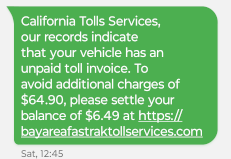
    Did you get a text saying “California Tolls Services, our records indicate that your vehicle has an unpaid toll invoice. To avoid additional charges of $64.90, please settle your balance of $6.49 at https://bayareafastraktollservices.com”?   Be careful – it is a scam!

    Cash-free, electronic toll collection is commonplace on bridges and toll roads across California and the nation. This shift has created a new type of fraud. Cybersecurity experts call it “smishing,” phishing perpetrated through SMS text messages. The template is simple: Scammers posing as toll road operators Like Bay Area FasTrak claim the recipient owes money, and provide a link to a fake website.FasTrk scam smishing

    From the beginning of March to April 12, the FBI’s internet crime complaint center received more than 2,000 reports of texts from impostor road toll collection services nationwide. Written in “almost identical language,” these texts requested payment for outstanding toll debts in similar amounts, spokespeople for the bureau said in a statement.

    If (and when) you receive one of these smishing messages, simply delete it. If you have unfortunately fallen into the scam, contact your bank or credit card company right away and report the charges.

    FasTrak — the Bay Area’s road and bridge toll collector — does not keep people’s mobile numbers or communicate by text. Drivers with FasTrak accounts pay tolls electronically via transponders mounted on their windshields, or photographs snapped of their license plates as they pass through a toll lane. People without accounts receive invoices in the mail after cameras capture their license plates.

    You can read more about smishing and the steps you can take to avoid getting scammed at the FCC’s web page on how to Avoid the Temptation of Smishing Scams.

    Interested in learning how you improve your cyber-hygiene?? We can help! Our blog post Cybersecurity for Employees: Awareness Can Save You from a Breach is full of tips, and our Zero Trust Security Checklist will get you started.

  • Debunking Myths About AI in Cybersecurity

    AI has become a buzzword that often evokes a mix of awe, doubt and even fear, especially when it comes to cybersecurity. However, the fact is that if used effectively AI can revolutionize the way businesses like yours operate.

    That’s why you must cut through the noise and separate fact from fiction if you want to leverage AI effectively. In this blog, we’ll debunk some common misconceptions about AI in cybersecurity.

    Let’s dive in.

    AI in cybersecurity: Fact from fiction

    There’s a lot of misinformation surrounding AI in cybersecurity. Let’s dispel some of these common AI myths:

    Myth: AI is the cybersecurity silver bullet
    Fact: AI isn’t a one-size-fits-all solution for cybersecurity. While it can efficiently analyze data and detect threats, it’s not an easy fix for everything. You can use AI security solutions as part of a multi-pronged cybersecurity strategy to automate tasks, pinpoint complex threats and assist your IT security professionals.

    Myth: AI makes your business invincible
    Fact: Cybercriminals are always finding new ways to exploit your IT systems, and it’s only a matter of time before they discover ways to breach AI solutions as well. AI alone can’t protect your business. Think of AI as a top-notch security system that is made better through regular vulnerability updates and staff education.

    Myth: AI is a perfect tool and always knows what it’s doing
    Fact: Don’t trust all the marketing gimmicks around AI. Yes, AI security is indeed a “super cool” tool. But keep in mind that AI is still an evolving technology, and there’s much to be perfected. Some companies make loud claims about their AI security tools. An honest vendor, however, will tell you that AI is not magic. If you give it time, AI can learn and adapt on its own.

    Myth: AI does everything on its own
    Fact: AI doesn’t fly solo! While AI is great at sniffing out suspicious activities, it still requires human intervention. You can set the goals for AI, analyze what it finds and make the final call on security decisions. There are also times when AI can sound the alarm for no reason; that’s when you need the expertise of your security team to say, “False alarm!”

    Myth: AI is for big companies with deep pockets
    Fact: AI security solutions are now within reach for businesses of all sizes as they are becoming more affordable and easier to use. Moreover, the availability of cloud-based AI solutions means that businesses, regardless of their size, can leverage AI without breaking the bank.

    Empower your cybersecurity

    Fortify your business with the help of AI-powered cybersecurity solutions. Don’t do it alone. Get some expert help. Partner with an experienced IT service provider like us. Our IT experts can assist you in understanding your security needs, finding the perfect AI solutions for your business and ensuring they’re implemented effectively.

    Contact us today for a free consultation and learn how we can keep your business safe in the digital age.
  • The Upcoming End of Life for Windows 10: What You Need to Know

    As technology continues to advance, so does the need to keep your systems updated and secure. Microsoft has announced that Windows 10 will reach its end of life (EOL) on October 14, 2025. This means that after this date, Microsoft will no longer provide security updates or technical support for Windows 10. It’s a significant shift that affects millions of users and organizations worldwide, highlighting the importance of preparing for the transition to the latest operating system.

    Versions Impacted by the End of Life

    All versions of Windows 10 are set to be impacted by this upcoming change. Whether you are using Windows 10 Home for personal use, Windows 10 Pro for small businesses, or the Enterprise and Education versions for larger organizations and institutions, the end of updates and support will apply universally. This broad impact underscores the necessity for users in all organizations to begin planning their migration strategies now to ensure they remain protected and supported.

    System Requirements for Windows 11

    With the end of life for Windows 10 looming, transitioning to Windows 11 becomes essential. However, it’s crucial to be aware of the system requirements to upgrade. Older computers may not meet the minimum system requirements for Windows 11. In general, systems manufactured prior to 2017 will not be able to run Windows 11.

    The minimum system requirements to run Windows 11 are:

    It is important to understand the minimum system requirements are what is required just to run Windows 11. If your computing needs are light internet browsing, email and social media, the minimum system requirements will provide an adequate user experience.

    For most users, especially those in businesses, more system resources are needed to handle the demands of common applications like Microsoft Word, Microsoft Excel, Adobe Creative Cloud and QuickBooks. The recommended system requirements for a more capable and smoother Windows 11 experience are:

    • A 2 GHz or faster compatible 64-bit processor with at least 6 cores
    • 16 GB of RAM
    • 512 GB SSD (Solid State Drive)
    • A DirectX 12 compatible graphics card
    • UEFI firmware with Secure Boot capability
    • TPM (Trusted Platform Manager) version 2.0

    The Importance of Having a Migration Plan

    The end of life for Windows 10 isn’t just a deadline; it’s a call to action. Having a well-thought-out migration plan to Windows 11 is essential to ensure a smooth transition. This plan should include steps for assessing current hardware capabilities, identifying computers that do not meet the system requirements for Windows 11, backing up data, checking software compatibility, training staff, and scheduling upgrades to minimize disruptions.
    Organizations should also consider the implications for legacy software and applications, and systems that may require updates or replacements. By planning ahead, users can avoid the risks associated with unsupported software, such as incompatibility, security vulnerabilities and compliance issues.

    Get Started Now

    As Windows 10 approaches end of life in October 2025, businesses need to get stared now to ensure minimal disruption to their business. Being proactive now will pay off significantly in the long run, ensuring a seamless and secure computing experience.

    Rather than going it alone, partnering with a technology solutions provider (TSP), like NTELogic, allows you to make the transition to Windows 11 as smooth as possible. A TSP can assess your current IT infrastructure, identify potential compatibility issues, and develop a customized upgrade project plan. They can provide hands-on support in deploying new devices, transferring data, installing software, and training employees.

    Contact us today at (209) 694-4599 if we can answer questions or to set up a consultation.