
Category: All

  • Bay Area FasTrak Scam

    Did you get a text saying “California Tolls Services, our records indicate that your vehicle has an unpaid toll invoice. To avoid additional charges of $64.90, please settle your balance of $6.49 at https://bayareafastraktollservices.com”?   Be careful – it is a scam!

    Cash-free, electronic toll collection is commonplace on bridges and toll roads across California and the nation. This shift has created a new type of fraud. Cybersecurity experts call it “smishing,” phishing perpetrated through SMS text messages. The template is simple: Scammers posing as toll road operators Like Bay Area FasTrak claim the recipient owes money, and provide a link to a fake website.FasTrk scam smishing
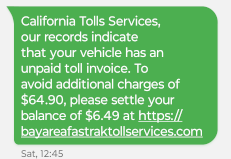
    From the beginning of March to April 12, the FBI’s internet crime complaint center received more than 2,000 reports of texts from impostor road toll collection services nationwide. Written in “almost identical language,” these texts requested payment for outstanding toll debts in similar amounts, spokespeople for the bureau said in a statement.

    If (and when) you receive one of these smishing messages, simply delete it. If you have unfortunately fallen into the scam, contact your bank or credit card company right away and report the charges.

    FasTrak — the Bay Area’s road and bridge toll collector — does not keep people’s mobile numbers or communicate by text. Drivers with FasTrak accounts pay tolls electronically via transponders mounted on their windshields, or photographs snapped of their license plates as they pass through a toll lane. People without accounts receive invoices in the mail after cameras capture their license plates.

    You can read more about smishing and the steps you can take to avoid getting scammed at the FCC’s web page on how to Avoid the Temptation of Smishing Scams.

    Interested in learning how you improve your cyber-hygiene?? We can help! Our blog post Cybersecurity for Employees: Awareness Can Save You from a Breach is full of tips, and our Zero Trust Security Checklist will get you started.

  • Debunking Myths About AI in Cybersecurity

    AI has become a buzzword that often evokes a mix of awe, doubt and even fear, especially when it comes to cybersecurity. However, the fact is that if used effectively AI can revolutionize the way businesses like yours operate.

    That’s why you must cut through the noise and separate fact from fiction if you want to leverage AI effectively. In this blog, we’ll debunk some common misconceptions about AI in cybersecurity.

    Let’s dive in.

    AI in cybersecurity: Fact from fiction

    There’s a lot of misinformation surrounding AI in cybersecurity. Let’s dispel some of these common AI myths:

    Myth: AI is the cybersecurity silver bullet
    Fact: AI isn’t a one-size-fits-all solution for cybersecurity. While it can efficiently analyze data and detect threats, it’s not an easy fix for everything. You can use AI security solutions as part of a multi-pronged cybersecurity strategy to automate tasks, pinpoint complex threats and assist your IT security professionals.

    Myth: AI makes your business invincible
    Fact: Cybercriminals are always finding new ways to exploit your IT systems, and it’s only a matter of time before they discover ways to breach AI solutions as well. AI alone can’t protect your business. Think of AI as a top-notch security system that is made better through regular vulnerability updates and staff education.

    Myth: AI is a perfect tool and always knows what it’s doing
    Fact: Don’t trust all the marketing gimmicks around AI. Yes, AI security is indeed a “super cool” tool. But keep in mind that AI is still an evolving technology, and there’s much to be perfected. Some companies make loud claims about their AI security tools. An honest vendor, however, will tell you that AI is not magic. If you give it time, AI can learn and adapt on its own.

    Myth: AI does everything on its own
    Fact: AI doesn’t fly solo! While AI is great at sniffing out suspicious activities, it still requires human intervention. You can set the goals for AI, analyze what it finds and make the final call on security decisions. There are also times when AI can sound the alarm for no reason; that’s when you need the expertise of your security team to say, “False alarm!”

    Myth: AI is for big companies with deep pockets
    Fact: AI security solutions are now within reach for businesses of all sizes as they are becoming more affordable and easier to use. Moreover, the availability of cloud-based AI solutions means that businesses, regardless of their size, can leverage AI without breaking the bank.

    Empower your cybersecurity

    Fortify your business with the help of AI-powered cybersecurity solutions. Don’t do it alone. Get some expert help. Partner with an experienced IT service provider like us. Our IT experts can assist you in understanding your security needs, finding the perfect AI solutions for your business and ensuring they’re implemented effectively.

    Contact us today for a free consultation and learn how we can keep your business safe in the digital age.
  • The Upcoming End of Life for Windows 10: What You Need to Know

    As technology continues to advance, so does the need to keep your systems updated and secure. Microsoft has announced that Windows 10 will reach its end of life (EOL) on October 14, 2025. This means that after this date, Microsoft will no longer provide security updates or technical support for Windows 10. It’s a significant shift that affects millions of users and organizations worldwide, highlighting the importance of preparing for the transition to the latest operating system.

    Versions Impacted by the End of Life

    All versions of Windows 10 are set to be impacted by this upcoming change. Whether you are using Windows 10 Home for personal use, Windows 10 Pro for small businesses, or the Enterprise and Education versions for larger organizations and institutions, the end of updates and support will apply universally. This broad impact underscores the necessity for users in all organizations to begin planning their migration strategies now to ensure they remain protected and supported.

    System Requirements for Windows 11

    With the end of life for Windows 10 looming, transitioning to Windows 11 becomes essential. However, it’s crucial to be aware of the system requirements to upgrade. Older computers may not meet the minimum system requirements for Windows 11. In general, systems manufactured prior to 2017 will not be able to run Windows 11.

    The minimum system requirements to run Windows 11 are:

    It is important to understand the minimum system requirements are what is required just to run Windows 11. If your computing needs are light internet browsing, email and social media, the minimum system requirements will provide an adequate user experience.

    For most users, especially those in businesses, more system resources are needed to handle the demands of common applications like Microsoft Word, Microsoft Excel, Adobe Creative Cloud and QuickBooks. The recommended system requirements for a more capable and smoother Windows 11 experience are:

    • A 2 GHz or faster compatible 64-bit processor with at least 6 cores
    • 16 GB of RAM
    • 512 GB SSD (Solid State Drive)
    • A DirectX 12 compatible graphics card
    • UEFI firmware with Secure Boot capability
    • TPM (Trusted Platform Manager) version 2.0

    The Importance of Having a Migration Plan

    The end of life for Windows 10 isn’t just a deadline; it’s a call to action. Having a well-thought-out migration plan to Windows 11 is essential to ensure a smooth transition. This plan should include steps for assessing current hardware capabilities, identifying computers that do not meet the system requirements for Windows 11, backing up data, checking software compatibility, training staff, and scheduling upgrades to minimize disruptions.
    Organizations should also consider the implications for legacy software and applications, and systems that may require updates or replacements. By planning ahead, users can avoid the risks associated with unsupported software, such as incompatibility, security vulnerabilities and compliance issues.

    Get Started Now

    As Windows 10 approaches end of life in October 2025, businesses need to get stared now to ensure minimal disruption to their business. Being proactive now will pay off significantly in the long run, ensuring a seamless and secure computing experience.

    Rather than going it alone, partnering with a technology solutions provider (TSP), like NTELogic, allows you to make the transition to Windows 11 as smooth as possible. A TSP can assess your current IT infrastructure, identify potential compatibility issues, and develop a customized upgrade project plan. They can provide hands-on support in deploying new devices, transferring data, installing software, and training employees.

    Contact us today at (209) 694-4599 if we can answer questions or to set up a consultation.
  • How Cybercriminals Use AI to Power Their Attacks

    Managing a business on your own is challenging enough without worrying about cyberattacks. However, there is cause for alarm as hackers are using artificial intelligence (AI) to launch sophisticated cyberattacks to steal your data and disrupt business operations.

    The good news is there are steps you can take to protect your business. This blog will explain how AI is being used in cybercrime and how you can safeguard your business.

    How hackers use AI

    Here are some of the ways cybercriminals are exploiting AI:

    Deepfakes: Hackers use AI to create highly realistic fake videos or audio recordings to impersonate someone you know, like your boss or a trusted friend. These deepfakes can be used to trick you into sending money or sharing sensitive information.

    How to spot it: Closely look for details like unnatural facial movements or sloppy voice synchronization.

    AI-powered password cracking: With the help of AI, cybercriminals can effortlessly crack common and easy passwords. Hackers with access to advanced computation offered by AI can automate the breaching process, so they can try millions of combinations to guess your password.

    How to fight back: Always use unique passwords. Consider using a password manager.

    AI-assisted hacking: Hackers no longer have to spend hours looking for vulnerabilities. Instead, with the help of AI, they can create automated programs that not only identify weaknesses in your system but also create new types of malware.

    How to stay ahead: Keep your security systems and software updated. Also, a mandate should be set up to scan for vulnerabilities routinely.

    Supply chain attacks: Threat actors use AI to insert malicious code into legitimate vendor products, which eventually will compromise your system as well.

    How to protect yourself: Only download software from trusted sources. Always be vigilant with updates and patches.

    Boost your defenses

    AI-powered cybercrime is a growing threat. That’s why having a strong IT partner by your side can be the ultimate weapon in your arsenal. Partner with us to leverage advanced technology to fortify your defenses.

    Reach out to us today for a free consultation and learn how our team can secure your business against evolving cyber risks.

    AI is still a new technology, and to many businesses, it may feel like uncharted territory. That’s why we’ve created this free infographic that will shed light on how AI can be used both ethically and unethically.


      NTELogic has permission to contact me at the email address provided: YesNo

    • Did you know hardware and software expire too?

      We are all aware of the term “use by date.” It is regularly used when talking about food and medications and refers to the date after which the product is no longer safe to consume. However, did you know that your software and hardware can expire too?

      This is because technology is constantly evolving and advancing. What was once cutting-edge can become obsolete in the blink of an eye.

      While many people may not think twice about using outdated technology, it has security and privacy implications for your business. Obsolete technology is often less secure than newer versions because it doesn’t receive modern security features or patches from the manufacturer’s support team. This can leave your device and your data less impervious to attacks. Plus, outdated technology may not be compliant with current privacy regulations, meaning your data could be at risk.

      So, what does this mean for you and your organization? Staying up to date with the latest software programs and hardware is crucial. To protect your business from the downfall of outdated technology, you need a plan for when your systems reach their expiration date.

      End-of-support for Office 2013

      In April 2023, Microsoft ended all support for Office 2013. This lack of support means you will not receive any technical assistance, bug fixes or security updates from Microsoft to cover any potential vulnerabilities.

      Even if all your Office 2013 apps continue to function after the specified time, you run the risk of being exposed to security vulnerabilities such as malware, phishing, ransomware and data theft.

      To keep your business safe, the best option is to migrate to Microsoft 365. As a cloud-based service, it can increase employee productivity and collaboration without the risk of using unsupported software. In its subscription-based model, Microsoft automatically patches vulnerabilities that hackers might exploit. More significantly, your workflow is unaffected by these updates because they take place in the background and your systems remain protected from sophisticated threats.

      A stitch in time saves nine

      If you follow the news, you’re probably aware of the upsurge in data breaches and cyberattacks. These attacks have targeted businesses of all sizes and industries. As a result, there is a greater acknowledgment of the importance of cybersecurity globally.

      However, many organizations are still not taking adequate precautions to defend themselves. One of the biggest mistakes a business can make is presuming that its cybersecurity measures are sufficient. Nothing could be further from the truth than this misconception.

      Investing in supported technologies is one of the most advantageous ways to protect your business. Supported technologies have routine internal security measures in place, and their support teams create and release updates and patches to make the product more secure and helpful.

      In the event of a data breach or cyberattack, supported technologies will also have a team of experts who can assist you in recovering from the incident.

      Always remember that prevention is better than cure.

      Need help?

      If you’ve read this far, then you must be determined to protect your organization by ensuring that no outdated software or hardware is being used by your team. However, this can be a heavy lift without expert assistance. Fortunately, we’re here to help.

      We can use our experience and skills to show you the right way to secure your business and provide you with the necessary tools so you won’t be caught off guard by outdated software or hardware. If you’re interested, please reach out to us for a no-obligation consultation.

      In addition, to help you learn more, download our checklist “How Technology Reaching End of Service Can Impact Your Business” by clicking here.

    • Protecting Your Digital Identity: The Significance of Strong Passwords on World Password Day

      In today’s interconnected world, where our lives are increasingly intertwined with digital platforms, the importance of safeguarding our online accounts cannot be overstated. As we celebrate World Password Day on Thursday May 2nd, it serves as a poignant reminder of the crucial role that strong passwords play in protecting our digital identities. A strong password acts as the first line of defense against cyber threats, ensuring that our sensitive information remains secure from malicious actors.

      One of the primary reasons why strong passwords are essential is the prevalence of cyber attacks aimed at stealing personal data. Hackers employ sophisticated techniques to crack weak passwords and gain unauthorized access to accounts, posing a significant risk to individuals and organizations alike. By creating complex passwords that combine letters, numbers, and special characters, users can significantly enhance the security of their accounts and thwart potential attacks.

      Moreover, the importance of strong passwords extends beyond individual accounts to encompass broader cybersecurity initiatives. Weak passwords not only compromise personal data but also pose a threat to entire networks and systems. A single compromised account can serve as a gateway for cybercriminals to infiltrate an organization’s infrastructure, leading to devastating consequences such as data breaches, financial losses, and reputational damage.

      As we observe World Password Day, let us reaffirm our commitment to practicing good password hygiene. By adopting strong, unique passwords for each of our accounts and regularly updating them, we can fortify our defenses against cyber threats and preserve the integrity of our digital identities. Let this day serve as a reminder that proactive measures taken today can safeguard our online security tomorrow and beyond.

      Do you need help improving your digital hygiene? Download our 5 Ways to Make Your Passwords Stronger checklist.
    • Don’t Make These Incident Response Planning Mistakes

      Worried about cyberattacks hitting your business? You’re not alone.

      Cyberattacks pose a real danger to businesses like yours and without a solid incident response plan, your business won’t be able to recover quickly, resulting in extensive losses. The good news, however, is that an incident response plan can help.

      Through this blog, we’ll show you the common mistakes, myths and misconceptions that can stop you from building a strong response plan. We’ll also share simple solutions that will help you safely navigate cyber challenges.

      Avoid these mistakes to build a strong response plan

      Here are a few common mistakes that all businesses should avoid:

      Mistake 1: Thinking cyber incidents only come from external attacks

      • By ignoring internal threats, you’re creating opportunities for cyberattacks.
      • Internal mistakes, like ineffective processes or human errors due to inadequate training, can also lead to data breaches.


      Solution:
      Invest in your employees and set up a process

      • Train your employees on cybersecurity best practices and establish protocols for handling
        sensitive information.
      • Periodically review your internal processes. This will help you find and resolve issues in your procedures that could lead to data leakage.


      Mistake 2: Focusing only on technology

      • You can’t build an effective incident response plan by solely focusing on technology. While tech solutions are valuable, they’re only effective when they are efficiently leveraged by a team of trained personnel.
      • A solid response plan goes beyond technology and includes communication plans, legal considerations and damage control strategies.


      Solution:
      Build a complete response plan

      • Train your response team on both tools and processes. Don’t focus solely on the technology.
      • Develop clear communication protocols.
      • Define clear roles and responsibilities.
      • Ensure your team understands your legal obligation to report and comply with data breach regulations.

      Mistake 3: Not updating your response plan

      • It’s a common misconception that an incident response plan, once created, need not be updated. However, the truth is, without regular review, updates and practice, a response plan will become ineffective.
      • Also, without simulations and post-incident analysis, you won’t be able to find the root cause of a problem and avoid future reoccurrence.


      Solution:
      Consistently review your response plan

      • Establish a process to hold regular reviews.
      • Adapt your response plan to keep up with the evolving threat landscape.
      • Conduct periodic simulations to refine your response strategy and ensure team readiness.
      The above-mentioned solutions will help you build a proactive incident response plan. However, it’s also a good strategy to take the help of experts if you don’t have the resources and tools. Consider partnering with an experienced IT service provider.

      Building resilience: Partner for a robust incident response plan

      Ready to fortify your business against cyberthreats?

      All businesses today must have a solid incident response plan against ever-evolving cybersecurity threats. However, to build an effective response plan, you need expertise, resources and advanced tools. That’s where we can be your strategic partner — your first line of defense against cyberstorms.

      Choose a partner who can give you complete peace of mind. Talk to us today!

    • Bridge IT Expertise to Non-Technical Minds

      Image via Pexels

      In the dynamic world of Information Technology (IT), the capability to communicate technical knowledge to non-technical audiences is more than just a skill — it’s an essential bridge connecting the complex world of IT with the practical realities of business and everyday life.

      This article — kindly provided by NTELogic — unfolds the practical strategies IT professionals can employ to translate their technical expertise into understandable, engaging narratives for everyone. By adhering to these strategies, IT experts can ensure their insights resonate across the board, fostering a deeper understanding and appreciation of their work.

      Tailor Your Message

      When you address non-technical stakeholders, it’s crucial to align your communication with their background, knowledge, and interests. This alignment ensures your message is not only heard but understood and valued. By considering what your audience knows and cares about, you can tailor your explanations to highlight the relevance of your work to their objectives or challenges. This approach not only enhances engagement but also builds a foundation for meaningful dialogue.

      Advance Your IT Proficiency

      Seeking out a Bachelor of Computer Science degree markedly elevates your capability to articulate intricate ideas with clarity. These programs meticulously cover the breadth of IT, programming, and foundational computer science theory, arming you with the adeptness to distill complex concepts into their essence without diminishing their significance. This educational pathway affords remarkable flexibility, enabling you to harmonize career obligations with the expansion of your comprehension and proficiency in conveying technical insights. Additionally, this approach fosters an environment where critical thinking and problem-solving skills are honed, further enhancing your communicative effectiveness. Check this out for more info.

      Simplify Language

      Employing technical jargon and acronyms may inadvertently distance or perplex those without a technical background. Aim to limit the use of this specialized vernacular, choosing instead to provide explanations that are both clear and direct. On occasions where technical terminology is indispensable, dedicate effort to elucidate these terms in a manner that resonates with everyday experiences. This method guarantees that your audience stays connected and comprehends the discussion, thereby preventing any sense of exclusion due to the esoteric language. Incorporating this thoughtful approach not only enhances understanding but also fosters a more inclusive dialogue where every listener feels valued and informed.

      Connect with Everyday Experiences

      Drawing parallels between complex technical concepts and familiar experiences or objects can dramatically improve understanding. This method makes the abstract tangible, allowing non-technical stakeholders to grasp sophisticated ideas through the lens of their everyday experiences. Such analogies serve as powerful tools in demystifying IT subjects, making them more accessible and relatable.

      Leverage Visual Aids

      Charts, graphs, diagrams, and visual representations play a pivotal role in clarifying complex data or processes. These visual aids can distill intricate information into digestible, engaging formats, aiding comprehension. By incorporating visual elements into your explanations, you can bridge the gap between complex technical details and straightforward, understandable insights.

      Craft a Narrative

      Presenting technical achievements as stories with a clear beginning, middle, and end transforms dry facts into compelling narratives. This narrative framing engages audiences by placing technical endeavors in a context that highlights challenges, solutions, and successes in a relatable, memorable manner. Stories not only make your message more engaging but also facilitate a deeper emotional connection with your work.

      Highlight Success with Metrics

      Utilizing key performance indicators (KPIs) and relevant metrics effectively communicates project success in terms that resonate with non-technical stakeholders. These quantifiable measures provide a clear, objective assessment of achievements, aligning technical outcomes with broader business objectives or user benefits. By focusing on metrics that matter to your audience, you can underscore the value and impact of technical projects in a universally understandable way.

      The art of conveying technical expertise to non-technical audiences lies in the thoughtful application of these strategies. By following the above advice, you can transform complex IT concepts into engaging, understandable insights. Embracing these approaches enables IT professionals to not only share their knowledge but also to foster an environment where technical and non-technical minds converge, leading to greater innovation, collaboration, and appreciation for the transformative power of IT.

    • Top 5 Threats IoT Devices Pose to Data Protection & Privacy

      How secure is your IoT (Internet of Things) data? If you don’t know the answer, you could be in trouble.

      Yes, IoT devices, or “smart” gadgets, have indeed made life easier for people and businesses like yours — but they can also expose your data and privacy to hackers. As a responsible business, you need to protect your IoT data from cyberthreats.

      In this blog, you’ll learn about the common IoT vulnerabilities and the top five threats you need to keep an eye out for. So, buckle up and let’s explore the world of IoT and data security.

      Understanding IoT vulnerabilities

      Common IoT vulnerabilities that you should be vigilant about are:

      Device flaws
      Some IoT devices have vulnerabilities in memory, firmware, physical interface, web interface and network services. Hackers can exploit these vulnerabilities by leveraging default passwords, outdated software and improper updates.

      Communication channels
      Cybercriminals can disrupt the communication channels of IoT devices to launch spoofing attacks or denial of service (DoS) attacks. As a result, this can lead to malicious access to your network or even overload your devices, causing them to stop working.

      Software weaknesses
      Hackers often target the software that runs on IoT devices and inject malware, which can severely compromise the security and functionality of the device.

      The top five threats to your data security

      Now that we’ve covered the top IoT vulnerabilities, let’s look at five major threats associated with these devices.

      Uncontrolled data collection
      IoT devices collect a lot of data, sometimes without your permission. This data can reveal sensitive information about you, your business and your customers. Therefore, you must handle IoT data with the same level of caution as you would for any other data on your network. Make sure that you encrypt, store and dispose of it securely.

      Unsecured devices

      One unsecured IoT device can open the door for hackers to access your network and data. This can lead to severe breaches and violations. That’s why it’s important to secure all your devices by changing default passwords, updating software and installing firewalls to prevent unauthorized access.

      Inadequate security policies
      IoT devices are diverse and complex. Each IoT environment requires different security measures depending on its type, function and location. Therefore, you need to create customized security policies for each environment by defining who can access your devices, what data they can collect and how they can communicate.

      Lack of IoT security awareness
      IoT technology is constantly changing and evolving. To stay up to date with the latest trends and threats, it is important to educate yourself and your staff about the IoT landscape through regular training sessions.

      Privacy issues
      IoT devices can threaten your privacy and the privacy of your customers if the collected data ends up in the wrong hands. Therefore, it is crucial to ensure that you respect and safeguard the privacy of your IoT data. You must comply with data protection laws like HIPAA, GDPR, CMMC and NIST CSF, as well as any cyber insurance policies that may apply.

      Navigating IoT compliance

      Remember, if you fail to secure your IoT data, you can face penalties and lawsuits.

      But don’t panic. We can help you.

      Our compliance services can help identify and reduce IoT risks and ensure compliance with data protection standards, saving time, money and hassle.

      If you want to learn more, contact us for a free consultation. Let’s work together to make your IoT strategy secure and successful.

    • Data Loss Disasters Come in Many Forms

      Data loss disasters come in many forms, ranging from full-scale natural calamities to cyberattacks and even simple human errors. Disasters can bring businesses to a grinding halt. Apart from financial and reputational damage, failing to protect valuable data can also result in expensive lawsuits.

      That’s why businesses, regardless of size, must have a backup and disaster recovery (BCDR) plan. By implementing a foolproof BCDR, you can quickly get your business back up and running should disaster strike. It will also help you comply with governmental and industry regulatory frameworks.

      In this post, we’ll break down the different types of data loss disasters and outline the key BCDR components that can help you make it through a disruptive event with flying colors.

      The many forms data loss can take

      Let’s analyze the various types of data loss disasters that can hurt your business:

      Natural disasters
      This covers everything from storms, hurricanes, floods, fires, tsunamis and volcano eruptions. In most cases, you can expect infrastructural damages, power failure and mechanical failures, which could then lead to data loss.

      Hardware and software failure
      Software and hardware disruption can cause data loss if you don’t have BCDR measures in place. These disruptions could be due to bugs, glitches, configuration errors, programmatic errors, component failures, or simply because the device is at its end of life or the software is outdated.

      Unforeseen circumstances
      Data loss can happen due to random, unexpected scenarios. For instance, a portable hard disk held by an employee could get stolen, your server room may have a water leak because of a plumbing issue, or there could even be a pest infestation in one of your data centers.

      Human factor
      Human errors are a leading cause of data loss incidents. These errors range from accidental file deletions, overwriting of existing files and naming convention errors to forgetting to save or back up data or spilling liquid on a storage device.

      Cyberthreats
      Your business may fall prey to malware, ransomware and virus attacks, which could leave your data and backups corrupt and irrecoverable. Additionally, data loss could be caused by malicious insiders with unauthorized access, which often goes under the radar.

      Key components of BCDR

      Here are a few crucial things to keep in mind as you build a robust BCDR strategy:

      Risk assessment
      Identify potential risks and threats that would impact business operations. Measure and quantify the risks to tackle them.

      Business impact analysis (BIA)
      Assess the potential consequences of a disruptive event on critical business functions and prioritize them in the recovery plan.

      Continuity planning
      Implement procedures to resume critical business operations during disruption, with minimal downtime.

      Disaster recovery planning
      Plan a well-defined business resumption plan to recover critical IT functions and data following a disruptive incident.

      Testing and maintenance
      Periodically test your disaster recovery and backup plans to ensure they can be recovered in a disaster. If they fail, you can work on the enhancement.

      Wondering where to begin?

      Developing and implementing a BCDR plan on your own can be daunting. However, we can help you build the right BCDR strategy for your business profile. Contact us to get started!