
Category: SMB Tech

  • Ransomware and Malware Threats: The State of Cybersecurity

    Cybersecurity is a growing concern for organizations all over the world. A single attack can lead to thousands or even millions in losses, and cybercriminals continue to come up with more sophisticated methods of attack. Ransomware and malware threats are some of the most common types of cyberattacks.

    Let’s take a look at how big of a risk these threats are right now and dive into what the average small to mid-sized business can do to protect itself from an attack.

    Ransomware and Malware – What’s the Difference?

    Ransomware and malware are sometimes used interchangeably, but they aren’t the same thing. It’s important to know the difference to ensure you have the right protocols and cyber protection in place to protect your business.

    Malware

    Malware is a blanket term that refers to all types of malicious code or files that are used to damage a user’s device or network.

    • Trojan horses, worms, spyware, and viruses are all types of malware.
    • Hackers send malware through emails, USB drives, and software installations. You can also open your computer or your network up to malware simply from browsing the internet.
    • Once malware is on your computer or network, it can cause a number of problems ranging from slowing down performance to a loss of control over your data.
    Ransomware

    Ransomware is one type of malware, and it’s generally the most difficult one to protect against. A cyber attacker will use ransomware specifically to stop you from accessing your system or your data until you pay them a fee. It’s essentially malware designed to hold your device or network for ransom.

    • Ransomware is primarily delivered via phishing emails. A tainted email will have a malicious attachment or a deceptive link that takes you to an infected website if you click on it. Cyber attackers can also send ransomware in an instant message.
    • With this type of threat, an attacker may lock you out of your system or encrypt your files so you can’t access them.

    How Big of a Threat Are They?

    Robust antivirus software and email encryption can help to protect against many malware threats. Ransomware, however, is a massive business threat. It doesn’t matter if you have a global enterprise or a small company – all organizations are vulnerable.

    To give you an idea of the size of the problem, look at these numbers:

    • In 2021, global ransomware damages are expected to cost organizations $20 billion – that’s 57 times more than the cost of damages in 2015.
    • By the end of 2021, a business will be attacked by ransomware every 11 seconds.
    • From 2019 to 2020, there was a 62 percent increase in the number of global ransomware attacks.
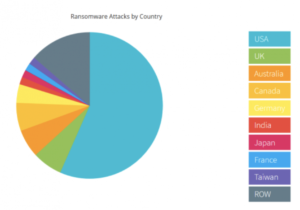
    • Last year, more than half of all successful ransomware attacks occurred in the US.
    NTELogic.com | The State of Cybersecurity

    Wondering what happens in a typical ransomware attack? Often, cyber attackers will lock your system and demand payment, usually in Bitcoin. Other times they will take down your IT system or wreak havoc in other ways. Because you can’t access your data when you’re under attack, you may also have to deal with days of downtime.

    No matter what the specifics are, ransomware attacks are always difficult and often very expensive. Your business may have to pay for:

    • A ransomware recovery IT team to get your company back online and to ensure the IT infrastructure is secure
    • A digital forensics team to identify exactly what happened
    • A public relations firm to help you with any reputational damage caused by the attack
    • The actual ransom – you can hire a ransomware negotiator to try and bring down the cost of the ransom and to manage the transaction on your behalf

    How to Protect Against Malware and Ransomware Threats

    While the threat of these cyberattacks is unnerving, there are many tools a business can use to mitigate risk and keep your systems protected.

    • Real-time backup. With real-time file backups, you can restore your files to any point you need to from the cloud. This enables fast recovery from ransomware attacks. It may save you from having to pay a ransom and reduce business downtime. Make sure your cloud backup solution includes advanced antimalware and antivirus software.
    • Employee training. Phishing emails are the main point of entry for ransomware attacks. All it takes is one individual unknowingly clicking on a malicious link or file attachment to put your business at risk. Make sure all of your employees are aware of the threat of ransomware attacks. They should know how to spot a phishing email and what to do if they think they may have clicked on a malicious link. Also, in general, all employees should be cautious of any email or instant message that they aren’t familiar with.
    • Advanced email protection. Because emails are ground zero for cyberattacks, it’s worth it to consider an advanced email protection solution. Ideally, your email protection comes with anti-phishing and anti-spoofing protection to help filter out external threats, malicious link protection, and outbound scanning. This helps to prevent malware from spreading if an employee clicks on a phishing link.

    NTELogic offers comprehensive, multi-layered email protection for SMBs, as well as secure backup and file management. Our expert team is also happy to talk to you about how Email Protection, ShareSync, and other Intermedia solutions can help protect your business from ransomware and malware threats. Contact us today to learn more.

     
  • 5 Cloud Communication Myths Debunked

    NTELogic.com | 5 Cloud Communication Myths Debunked

    Cloud-based communication and collaboration tools such as video conferencing software, file sharing, and UCaaS (unified communications as a service) empower teams to stay connected and productive wherever they are. After a year that saw a massive rise in remote work — the number of employees working remotely at least five days per week shot up from 17 percent to 44 percent after the pandemic hit — a lot of businesses are adopting cloud communications to make work more flexible. Before you invest in a cloud solution, it’s worth it to take the time to understand what exactly this technology can and cannot do for your business. Here are five cloud communication myths and the facts about how this technology works.

    Myth 1: Our Data Will Be Less Secure if We Use Cloud Communications

    Security concerns are one of the main reasons organizations hesitate to dive into cloud technology. Data is stored off-premises, which means it’s not just protected by your company. Instead, your cloud provider handles the security for information stored in their data centers.

    Using a security-first mindset when it comes to making business technology decisions is a smart move. After all, a data breach can cost your business a lot of money. In 2019, the global average cost of a data breach was $3.9 million.

    However, using cloud communications tools doesn’t mean your data is less secure. Most cloud providers today are using enterprise-class security protections to counter today’s ever-evolving cybersecurity threats. Also, because their entire business revolves around the cloud, chances are, they are using more advanced security than your business is able to implement with an in-house data center.

    Our data centers are monitored and guarded around the clock and protected with strict access control measures. We use multiple redundant, enterprise-class firewall systems, run several intrusion protection systems, and are regularly audited for all the leading security and compliance standards, including CPNI, PCI-DSS, SOC-2, GDPR, and HIPAA. Learn more about how secure our cloud communications solutions are.

    Myth 2: With the Cloud, Our Business Loses Control

    When your business switches to cloud communications tools, you still retain control over how the software works, who can access it, and even what devices your employees use to access it. The software is hosted in the cloud, but that doesn’t mean your administration team can’t manage how the technology is used.

    When comparing cloud communications platforms, make sure the one you use has sophisticated administration tools for onboarding and managing users and devices, as well as great customization features. You should also be able to access insights on employee and system quality performance to help your team make well-informed administrator decisions.

    Additionally, part of having control is knowing you have a team to help you when you run into a question with your software. Make sure the provider you choose prioritizes customer service. You should be able to access technical support and expert help through a chat feature or by phone 24/7.

    Myth 3: Getting Started Is Difficult

    This is one of the biggest cloud communication myths. One of the reasons for this is the confusion between cloud migration and cloud adoption.

    Cloud migration is the process of moving some or all of your workflows and IT systems to the cloud. Because you’re shifting part or all of your infrastructure, cloud migration takes time and requires the help of cloud experts. It is a difficult and complex process.

    Cloud adoption involves adopting one or more cloud services, such as a software-as-a-service solution (SaaS). With SaaS, getting started is simple. You don’t have to worry about business disruption, and your employees can start using the software right away.

    A lot of cloud communications solutions will also integrate with your existing business tools, making it even easier to start leveraging your new software. This is something to look for when comparing cloud-based communication platforms — does the software you’re considering integrate with the specific tools your team is already using?

    Myth 4: Cloud Communications Call Quality Can’t Rival That of Traditional Analog Phones

    This is a common misconception. This myth exists because many people are familiar with free or low-cost consumer-based VoIP (Voice over Internet Protocol) phone services that deliver less-than-prime phone quality. Think of those spotty Skype calls you may have made to friends and family.

    When comparing business-grade cloud-based phones vs. analog phone systems, however, the opposite is true, as long as your business has a strong internet connection and enough bandwidth. Your teams will enjoy excellent call quality with a cloud-based phone system, whether they are calling locally or internationally. Also, users can make calls from wherever and still experience the same high-quality experience.

    Myth 5: Switching to Cloud Communications Will Cost More Than It’s Worth

    Not at all. Your business can save big time by switching to cloud communications. First, you’ll save on phone costs because you’re no longer paying for multiple business lines, international calls, and maintaining and upgrading communications hardware to operate an on-premises system.

    Second, using cloud communications tools makes scaling easier and more affordable. You can add or remove users whenever you need. And, your business can also realize financial benefits because cloud communications is more flexible. You can rely more on working with remote employees, allowing you to save on the costs of providing office space for fully on-premises teams.

    Discover How Cloud Communications Can Help Your Business

    Whether you’re looking for a cloud-based, all-in-one communications platform, video conferencing software, or a contact center solution, we can help. Reach out to our expert team and find out how cloud communications can help your business thrive.

  • Email Phishing Attacks – Part Duex

    As we posted last March, email phishing attacks continue at record levels. Those who seek to commit fraud keep getting more innovative in their efforts. Many people have become savvy enough to recognize the common tell-tale signs. Whether it’s a tragedy or a fake IRS collection notice, we’re rarely surprised by the bait used by those who are phishing. This is one of those instances that gave us pause.
    A client forwarded an email message that appeared to be a voicemail notification from their office phone. Many of us are used to getting text and email notifications for voicemail messages left for us. Whether the fake notification looks similar to what you normally see or not, one link click whilst in a hurry can lead to compromise.

    The recipient did the right thing. Using the information they have learned about the tactics used by cyber-criminals, the client recognized the clues and didn’t take the bait.
    Remember to always think before you click. Stay smart, the criminals are working hard to stay in business. Don’t let them get into your business.

  • Office Tips & Tricks: Using Filters in Excel

    Use Excel Filters to Make Short Work of Long Columns

    Filters are a powerful tool in Excel that let you mask information from your view. For example, filters can be used to only show you the rows that have Widgets as the item type or only show you rows that have blank cells in a particular column.
    For filters to work properly, your range of cells needs to have a column heading (a label at the top of each column). You turn on filters by clicking inside your range and then choosing Home > Sort & Filter > Filter. Voila, a drop down arrow appears next to each column heading. Clicking on any column’s drop down arrow provides a list of all entries in the column. Selecting any entry causes Excel to show only the rows that match that entry.
    Note that on the drop-down menu there are additional filters that can be applied, depending on what type of data is in the column. You may see Text Filters or Number Filters or Data Filters. From those drop-downs you can select additional filters to change what’s displayed even more.
    After you have chosen a particular entry to be filtered, the drop-down arrow on that column changes its icon. To restore the view of all entries, click the drop-down and check Select All or click on Home > Sort & Filters > Filter to turn them off completely.
    More than one column can be filtered at a time, but they are cumulative. The second filter will not overwrite the results of the first filter. It instead restricts it further it. Excel’s basic filter works as an AND statement. You can create more complex filters using the Advanced Filter option. Advanced Filter allows you to filter using AND OR statements.
    Filters can make working with your Excel data easier and faster. Give them a try.