Category: SO/SMB Solutions

  • 6 Webinar Trends Every Company Should Consider

    Webinars have been an important marketing and engagement tool for years. During the pandemic, the use of virtual events skyrocketed. Between February and March of 2020 alone, the number of B2B brands in the United States using live webinars increased by 36 percent. Whether your company is new to hosting virtual events or not, you should familiarize yourself with the latest webinar trends. This space is more active than ever – take a look at what other brands are doing to help inspire your company’s webinar strategy.

    1. Live Interaction Features Keep Attendees Engaged

    Gone are the days of watching a virtual presenter share their screen and calling it a day. Interactive webinars are on-trend. Live polls, chat, and other real-time attendee engagement tools transform the traditional one-sided webinar into a dynamic conversation that pulls the audience into the experience.

    2. Less Is More When It Comes to Webinar Duration

    With marketing webinars, consider keeping your event relatively short. According to research from 2020, the preferred duration for a webinar is 30 to 40 minutes. If you plan a longer event, you may turn away some potential prospects.

    You don’t need to create a jam-packed virtual event to convert leads, but rather, focus on the most relevant, actionable information you can. If you can’t fit a full presentation into 40 or 50 minutes, consider breaking up your webinar content into two or more different virtual events.

    3. Thought Leaders and Micro-Influencers Boost the Appeal of Virtual Events

    Using this webinar trend can help to attract more people to your event. Draw upon the trust, reach, and unique insights offered by thought leaders and micro-influencers in your industry by inviting them to prevent at your virtual event.

    With the right webinar platform, you can count on high-quality HD video broadcasting and still support up to a dozen presenters at once. This allows you to go from a single presenter to a panel of experts and provide even more value to attendees at the same time.

    4. Global Webinars Expand What’s Possible

    After a year of virtual meetings and digital connections, people worldwide are comfortable using webconferencing technology. This makes it easier to branch out to an international audience.

    To reduce friction for your non-local attendees, make sure your platform offers international dial-in numbers. This way, if they want to participate by phone, they don’t have to worry about the cost of an international phone call.

    5. Custom Experiences Raise the Bar on Virtual Events in 2021

    Create a more personalized experience for webinar attendees with customized invitations and reminder emails. Other perks, such as being able to use your own logo and branding for the webinar background, can enhance the experience further while making your brand more memorable.

    6. More Internal Webinars Empower HR

    With the rise of remote work during COVID and the current shift to hybrid work models, HR teams are relying more on technology to train employees. In 2020, the attendance rate for training webinars was 65 percent. Internal webinars can be an excellent way to onboard employees and gain real-time feedback from them at the same time.

    Essential Webinar Features for Keeping Your Attendees Engaged

    Whether your company is focusing on virtual events for marketing or training and onboarding purposes, you’ll need a fully-featured solution to host effective webinars. The right tools give you the capabilities to reach more people and grow your business. Here are some of the features you should look for in a webinar platform:

    • Live polls engage participants while giving you real-time insights into what everyone is thinking.
    • A Q&A feature makes it easy to field questions from your audience. You can sort, edit, and respond quickly. This makes it easy to keep the flow of the conversation without losing anyone’s attention.
    • HD video broadcasting ensures a professional experience, even with hundreds of attendees and multiple presenters.
    • Cloud recording allows you to record the entire event, including screen share slides, videos, and more, which you can then send to your attendees by email or repurpose as other content for marketing purposes.
    • Built-in reporting reveals who attended, for how long, and feedback from interactive tools such as your surveys and quizzes.
    • A presenter green screen gives you and your other presenters the chance to practice and organize the event before going live. This is a key tool for delivering professional virtual events that leave a positive impression on attendees.

    Getting Started with Webinars in 2021

    Webinars are a useful tool because they have the potential to be deeply engaging while enabling your brand to connect with a large number of people at once. Unlike blog posts, videos, and other types of marketing content that your company might create, publish, and leave for customers to digest, webinars offer a virtual hands-on experience. They can feel intimate, even when hundreds of people are tuned in together online. This is because they allow for face-to-face interaction at scale.

    And, with advanced webinar tools, you can create a truly immersive, high-value experience that will deliver the wow factor you need to stand out in a competitive marketplace.

    Online Meeting from NTELogic is a powerful webinar and video conferencing solution designed to help businesses thrive in the digital space. You’ll have all the features you need to create engaging webinars that convert and more. Learn more about how Online Meeting from NTELogic can enable your company to grow.
  • Seven Customer Experience Trends to Have on Your Radar

    Every company strives to deliver exceptional customer experiences. However, customer expectations changed a lot in the last year and are constantly evolving. To meet customers where they are, you’ll want to have these customer experience trends on your radar.

    The pandemic influenced many of these trends, and you can expect many to become permanent fixtures. Let’s look at the trends making an impact and how you can integrate them into your processes and communications.

    1. Honesty, Transparency, and Visibility Are Nonnegotiable

    Getting a customer to trust you is no easy feat. It takes time to build trust, and you must be consistent to maintain it. COVID-19 accelerated this trend, as customers craved transparency and visibility around how businesses responded to the pandemic.

    Customers want to know about safety, hygiene, practices, and actions. No matter what business you’re in, your buyers want reassurance that they can trust you to serve them in the best way. While the health crisis is subsiding, customer feelings about honesty, transparency, and visibility won’t.

    2. Convenient Interactions

    Customers want options when it comes to contacting you. They need convenience in interactions and resolutions. That means omnichannel communication capabilities. They can call, email, or chat with your contact center agents. Thus, it’s imperative that you can integrate all these channels into one solution so that your employees can quickly address customer needs.

    In addition, intelligent routing allows you to ensure that customers talk to the right agent and don’t get passed along or end up waiting in long queues. Having this type of contact center infrastructure enables you to serve customers quickly and more adeptly.

    3. Prioritizing the Employee Experience

    Engaged, happy employees deliver better service. That’s undeniable. If your customer-facing teams don’t feel valued, it will reflect in their interactions. Conversely, those that have support and believe their company cares for them will perform better.

    How do you engage employees? It’s a lot of different things, from ensuring they have the right technology tools to developing a robust onboarding and training program to showing everyday appreciation.

    When you invest in employees, they have more reasons to remain loyal and excel at their job. Considering the cost of turnover, it makes sense to prioritize your team members.

    4. Data-Driven Decision-Making

    Data is the fuel for every business initiative in the modern world. You can gather and analyze lots of data around customer experiences with the right tech stack. For example, contact center software offers insights on queue performance, call volume, team activity, like time on calls and issue resolution, and more KPIs (key performance indicators).

    With this information, you can find themes and patterns that may result in follow-up training, process changes, or new workflows. That improves the customer experience and supports your employees.

    The more data you have, the better your decision-making. You aren’t guessing about what frustrates customers or causes negative experiences. You have the map and can then connect the dots to reduce friction.

    5. Contactless and Self-Service Options Are Here to Say

    Whether on-site or online, customers are okay with doing it themselves. This customer experience trend isn’t new, but the pandemic did boost its adoption. Now that customers changed their buying behaviors, they aren’t likely to fall back into old habits.

    If you want to keep up with customer expectations, then you need to embrace contactless and self-service. However, that doesn’t mean human interaction no longer matters. It’s just that customers may not choose this course unless they need to escalate. Keep this in mind that when self-service goes wrong, your customer service folks need to be responsive.

    6. Personalization Matters

    Customer service once meant that a business knew your name and your story. Of course, it was easier decades ago when there was economic segmentation and localization. Now, it’s a global world, but that doesn’t mean you can’t know your customer.

    One of the best modern examples of this is when customers contact you, and your agents have access to their history. That’s easily achievable when your contact center software integrates with your CRM (customer relationship manager). Agents can quickly get up to speed so that customers don’t have to repeat themselves. Additionally, there are software features that allow customers to connect back with their initial agent.

    7. Relationships Over Transactions

    The last 2021 customer experience trend is one that matters the most. Engineering your customer experience playbook to emphasize relationships over transactions is critical. In some ways, you may look at these interactions as transactions, worrying about the time it takes and the haste in correcting issues. That’s important, but having a strategic approach to relationship-building is imperative to be successful.

    You can build relationships by being responsive, empathetic, consistent, and trustworthy. Every action, initiative, or plan needs to be rooted in these attributes. Cultivate these relationships by delivering convenience, personalization, and options.

    Capitalizing on the Customer Experience Trends: Why Technology Matters

    In most of these trends, technology is a key component. Different platforms can help you capitalize on them. One of the most important is contact center software. Having a flexible, feature-rich solution provides your staff with a vehicle to optimize every customer experience.

    Contact NTELogic today to learn more about how our contact center platform can support your journey to create exceptional customer experiences every day.

  • Essential Features to Look for in a Cloud Communications Platform

    Enabling communication between your employees and with customers is critical for any company’s success. The key to streamlining it and promoting flexibility and mobility is to use a cloud communications platform.

    The reality is that more businesses are leveraging the cloud to power their communications and collaboration. It’s a wise choice since it’s cost-effective, secure, and accessible. If you’re looking to migrate from a legacy on-premises solution or are currently using a platform that doesn’t fit your needs, it’s time to find a better way to communicate.

    Why Cloud Communications?

    Adoption of the cloud continues to grow. The last year, in particular, saw remarkable growth. Remote workforces and the acceleration of digital transformation made it imperative to migrate.

    Cloud communications delivers so many advantages. It keeps all your tools in one enterprise hub and allows staff to work from wherever. It’s scalable, cost-effective, and highly secure.

    However, not all platforms are the same. Most will have the same basic features, but not all will fulfill your needs and deliver on reliability and affordability.

    So, which features do you really need?

    Cloud Communications Platform Features to Seek Out

    PBX Phone System

    A PBX phone system is a fundamental building block for your solution. It uses VoIP (voice over IP) to route calls. That means your team can use it from anywhere, as long as they have a connection.

    While this is a standard feature, there are some more advanced features you’ll want to seek out:

    • Call analytics: Great for measuring the performance of sales or customer service.
    • Desktop and mobile app: Team members should be able to make and receive calls through an app.
    • Virtual voicemail: You can manage voicemails through the app—no pin required. A transcription of the voicemail can also arrive via email.
    • Spam caller protection: This technology can detect spammers and block them or send them directly to voicemail.

    Team Chat and Business SMS

    Chat is a great channel for internal communication, allowing co-workers to get quick responses. It’s much more efficient than long email trails. You can chat within the app or via SMS. One other thing to consider in this feature is if the chat has a presence indicator. This will show you if someone is available, away, or in a meeting.

    Video Conferencing

    Video calls are now part of the normal day-to-day of your employees. You’ll want this as part of your cloud communications platform. Look for these specifics:

    • Browser-based so you can start meetings in a click without the need to download.
    • HD video capabilities.
    • Screen sharing so that users can share any application on their desktop. Also, the ability to annotate on these supports better collaboration.

    File Backup and Sharing

    A secure way to store and share files is a critical feature for cloud communications solutions. It enables access, no matter where the employee is, and provides a way to co-edit documents in real-time.

    Backups of everything are automatic. This ensures quick recovery should a ransomware attack occur. It’s a must-have for business continuity.

    What makes this different from public shared folders like Google Drive is that you control access to the files in a more secure way. With cloud storage, you can also consolidate where you keep documents. One hub means employees can find what they need faster.

    Integrations

    The ability to integrate other applications with your cloud communications platform provides a productivity boost. From Office 365 to CRMs like Zoho and Salesforce, the ability to integrate streamlines processes and creates new efficiencies.

    It can also improve customer experiences. When your employees have access to information in CRMs or other platforms, they have more context and can help the caller faster. Your customers will appreciate you saving them from repeating their issues.

    Security and Protection

    Security features can vary across options. There are some specific things you should be looking for in this category. Providers that are security-first will have:

    • Encryption capabilities for data at rest and in transit
    • Endpoint protection that includes remote wipe of PCs if compromised, MDM (mobile device management), and detection and response
    • Access controls with role-based access assignments
    • Password management and policies
    • IAM (Identity Access Management) features like single sign-on and two-factor authentication
    • Infrastructure security with intrusion prevention and detection, enterprise-class firewalls, and DDoS (Distributed Denial of Service) protection
    • Compliance with regulations like HIPAA or PCI-DSS
    • Security credentials like SOC 1 and 2

    Responsive 24/7 Support

    The last thing on your list should be the support the platform offers. While these applications are intuitive and easy to use for most, you still want to have a good support team in your corner. Look for those with 24/7 support and short wait times.

    Support shouldn’t seem like a burden to your provider. If you get this impression, you should probably keep looking. Companies that win awards for their support and voice their commitment to it will go above and beyond to ensure you have what you need.

    Choose a Cloud Communications Platform That Satisfies All Your Requirements

    If you’re ready to move to the cloud, make sure you opt for a solution with all these features. It will likely exceed your expectations and make a real impact on your workforce’s daily tasks. We invite you to explore Elevate from NTELogic, a unified communications platform that delivers all these features and more.

  • Cybersecurity for Employees: Awareness Can Save You from a Breach

    Your company might use iron-clad network protection and implement encryption across the board. However, your data and systems are still at risk of a cyberattack if you aren’t focusing on employee awareness. This risk exists because employees are behind a significant chunk of data breach incidents. These basic steps can help to raise employee awareness and ensure your company is protected.

    Human Error Is a Major Cybersecurity Weak Point for Businesses

    Employee negligence is a major cybersecurity issue for businesses of all sizes. Shred-It’s Ninth Annual Data Protection Report revealed that human error continues to be the driver of most data breaches. Fifty-three percent of C-suite executives cite external human error or accidental loss as primary problems. Twenty-eight percent of small business owners feel the same way. In the report, Ann Nickolas, Senior Vice President of Stericycle, says, “For the second consecutive year, employee negligence and collaboration with external vendors continues to threaten the information security of US businesses.”

    A data breach can have severe consequences when you add up reputational damage and lost revenue. Employee retention can be a problem as well – 33 percent of respondents in the Shred-It survey stated that they are likely to seek employment elsewhere after their employer experiences a data breach. That goes for both breaches of consumer and employee data.

    According to the 2020 Cost of a Data Breach report published by IBM and the Ponemon Institute, the average cost of each lost record is $146. As losing thousands of records during a breach is common, shoring up your employees’ cybersecurity habits is well worth the effort.

    Use this security checklist for in-office and remote employees to figure out what steps your company can take to reduce the risk of a breach.

    1. Train employees to recognize phishing emails

    Email phishing attacks are common. With this type of cyberattack, a hacker sends an email that appears legitimate and asks the recipient to share information or download a file.

    To protect against phishing emails, it’s important to use advanced email protection, which will help to weed out spoof emails and other external threats. Also, make sure all of your employees understand what a phishing email looks like, what the risks are if they fall for one, and what they should do if they spot what they think might be a phishing email message.

    2. Password Security

    A strong password policy is often the first line of defense against cyber attacks, yet many organizations continue to follow outdated guidelines that expose them to significant risk.

    According to Verizon’s 2020 Data Breach Investigations Report, lost or stolen credentials remain the number one hacking tactic used by malicious actors to perpetrate data breaches, with compromised or weak passwords responsible for 35% of all breaches.

    Password Sharing

    While sharing a password might seem convenient and harmless, it can have serious consequences. Passwords should never be shared with others. Period.

    Password Reuse

    Use different passwords for different accounts. That way, if one account is compromised, at least the others won’t be at risk.

    Password Length & Complexity

    Length trumps complexity. The longer a password is, the better. Use at least 16 characters whenever possible. Make passwords that are hard to guess but easy to remember.

    3. Require Multi Factor Authentication (MFA)

    With Multi Factor Authentication, even if a hacker steals an employee’s password, they still will be locked out of their device or system. This is how it works: an employee will use a password and another identifier such as biometric data or a code sent to their email or phone number. Since a hacker can’t steal biometric data and likely doesn’t have someone’s device, as well as their password, their chances of breaking in drop to nearly zero.

    4. Establish a data breach policy

    What an employee does after a suspected data breach will determine how quickly your business recovers. If they don’t act quickly by alerting your IT team, a hacker may have enough time to infiltrate your systems and do extensive damage. With a fast response, it’s possible to lock down your network and mitigate the risks.

    Tell your employees who they should contact if they notice a suspicious email, receive a security alert, if their device is stolen, or if they believe something is amiss with your company’s networks. Also, let them know they won’t be reprimanded if they fall victim to an attack. Employees should know they have their employer’s support. Otherwise, some people may not speak up when there’s a problem.

    5. Discuss mobile device usage

    If employees are using their smartphone or another personal device for work, teach them how to use their devices securely.

    • Always install the latest updates to ensure they’re using the newest operating system. These updates often include critical security updates.
    • If your company isn’t using a virtual private network (VPN), employees need to be very careful about what network they use when accessing business apps remotely. Only log on when using a secure network. They shouldn’t ever use public networks such as those found in coffee shops and airports.
    • Practice good flash drive hygiene – only use company-issued drives. Once one leaves the office, it should be wiped clean or discarded upon return.

    Make Cybersecurity a Part of Your Work Culture

    Following cybersecurity best practices such as using two-factor authentication, avoiding suspicious emails, and practicing good password security can go a long way in protecting against an attack. But, if cybersecurity isn’t a part of your work culture, it’s easy for these best practices to be forgotten.

    Cultivate a cybersecurity-aware culture by openly talking about risks, updating your employees about new best practices, providing training for new employees, and refreshing knowledge with regular internal messaging such as company-wide emails or training meetings.

  • Ransomware and Malware Threats: The State of Cybersecurity

    Cybersecurity is a growing concern for organizations all over the world. A single attack can lead to thousands or even millions in losses, and cybercriminals continue to come up with more sophisticated methods of attack. Ransomware and malware threats are some of the most common types of cyberattacks.

    Let’s take a look at how big of a risk these threats are right now and dive into what the average small to mid-sized business can do to protect itself from an attack.

    Ransomware and Malware – What’s the Difference?

    Ransomware and malware are sometimes used interchangeably, but they aren’t the same thing. It’s important to know the difference to ensure you have the right protocols and cyber protection in place to protect your business.

    Malware

    Malware is a blanket term that refers to all types of malicious code or files that are used to damage a user’s device or network.

    • Trojan horses, worms, spyware, and viruses are all types of malware.
    • Hackers send malware through emails, USB drives, and software installations. You can also open your computer or your network up to malware simply from browsing the internet.
    • Once malware is on your computer or network, it can cause a number of problems ranging from slowing down performance to a loss of control over your data.
    Ransomware

    Ransomware is one type of malware, and it’s generally the most difficult one to protect against. A cyber attacker will use ransomware specifically to stop you from accessing your system or your data until you pay them a fee. It’s essentially malware designed to hold your device or network for ransom.

    • Ransomware is primarily delivered via phishing emails. A tainted email will have a malicious attachment or a deceptive link that takes you to an infected website if you click on it. Cyber attackers can also send ransomware in an instant message.
    • With this type of threat, an attacker may lock you out of your system or encrypt your files so you can’t access them.

    How Big of a Threat Are They?

    Robust antivirus software and email encryption can help to protect against many malware threats. Ransomware, however, is a massive business threat. It doesn’t matter if you have a global enterprise or a small company – all organizations are vulnerable.

    To give you an idea of the size of the problem, look at these numbers:

    • In 2021, global ransomware damages are expected to cost organizations $20 billion – that’s 57 times more than the cost of damages in 2015.
    • By the end of 2021, a business will be attacked by ransomware every 11 seconds.
    • From 2019 to 2020, there was a 62 percent increase in the number of global ransomware attacks.
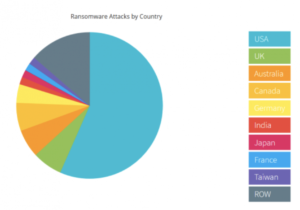
    • Last year, more than half of all successful ransomware attacks occurred in the US.

    NTELogic.com | The State of Cybersecurity

    Wondering what happens in a typical ransomware attack? Often, cyber attackers will lock your system and demand payment, usually in Bitcoin. Other times they will take down your IT system or wreak havoc in other ways. Because you can’t access your data when you’re under attack, you may also have to deal with days of downtime.

    No matter what the specifics are, ransomware attacks are always difficult and often very expensive. Your business may have to pay for:

    • A ransomware recovery IT team to get your company back online and to ensure the IT infrastructure is secure
    • A digital forensics team to identify exactly what happened
    • A public relations firm to help you with any reputational damage caused by the attack
    • The actual ransom – you can hire a ransomware negotiator to try and bring down the cost of the ransom and to manage the transaction on your behalf

    How to Protect Against Malware and Ransomware Threats

    While the threat of these cyberattacks is unnerving, there are many tools a business can use to mitigate risk and keep your systems protected.

    • Real-time backup. With real-time file backups, you can restore your files to any point you need to from the cloud. This enables fast recovery from ransomware attacks. It may save you from having to pay a ransom and reduce business downtime. Make sure your cloud backup solution includes advanced antimalware and antivirus software.
    • Employee training. Phishing emails are the main point of entry for ransomware attacks. All it takes is one individual unknowingly clicking on a malicious link or file attachment to put your business at risk. Make sure all of your employees are aware of the threat of ransomware attacks. They should know how to spot a phishing email and what to do if they think they may have clicked on a malicious link. Also, in general, all employees should be cautious of any email or instant message that they aren’t familiar with.
    • Advanced email protection. Because emails are ground zero for cyberattacks, it’s worth it to consider an advanced email protection solution. Ideally, your email protection comes with anti-phishing and anti-spoofing protection to help filter out external threats, malicious link protection, and outbound scanning. This helps to prevent malware from spreading if an employee clicks on a phishing link.

    NTELogic offers comprehensive, multi-layered email protection for SMBs, as well as secure backup and file management. Our expert team is also happy to talk to you about how Email Protection, ShareSync, and other Intermedia solutions can help protect your business from ransomware and malware threats. Contact us today to learn more.

     
  • 5 Cloud Communication Myths Debunked

    NTELogic.com | 5 Cloud Communication Myths Debunked

    Cloud-based communication and collaboration tools such as video conferencing software, file sharing, and UCaaS (unified communications as a service) empower teams to stay connected and productive wherever they are. After a year that saw a massive rise in remote work — the number of employees working remotely at least five days per week shot up from 17 percent to 44 percent after the pandemic hit — a lot of businesses are adopting cloud communications to make work more flexible. Before you invest in a cloud solution, it’s worth it to take the time to understand what exactly this technology can and cannot do for your business. Here are five cloud communication myths and the facts about how this technology works.

    Myth 1: Our Data Will Be Less Secure if We Use Cloud Communications

    Security concerns are one of the main reasons organizations hesitate to dive into cloud technology. Data is stored off-premises, which means it’s not just protected by your company. Instead, your cloud provider handles the security for information stored in their data centers.

    Using a security-first mindset when it comes to making business technology decisions is a smart move. After all, a data breach can cost your business a lot of money. In 2019, the global average cost of a data breach was $3.9 million.

    However, using cloud communications tools doesn’t mean your data is less secure. Most cloud providers today are using enterprise-class security protections to counter today’s ever-evolving cybersecurity threats. Also, because their entire business revolves around the cloud, chances are, they are using more advanced security than your business is able to implement with an in-house data center.

    Our data centers are monitored and guarded around the clock and protected with strict access control measures. We use multiple redundant, enterprise-class firewall systems, run several intrusion protection systems, and are regularly audited for all the leading security and compliance standards, including CPNI, PCI-DSS, SOC-2, GDPR, and HIPAA. Learn more about how secure our cloud communications solutions are.

    Myth 2: With the Cloud, Our Business Loses Control

    When your business switches to cloud communications tools, you still retain control over how the software works, who can access it, and even what devices your employees use to access it. The software is hosted in the cloud, but that doesn’t mean your administration team can’t manage how the technology is used.

    When comparing cloud communications platforms, make sure the one you use has sophisticated administration tools for onboarding and managing users and devices, as well as great customization features. You should also be able to access insights on employee and system quality performance to help your team make well-informed administrator decisions.

    Additionally, part of having control is knowing you have a team to help you when you run into a question with your software. Make sure the provider you choose prioritizes customer service. You should be able to access technical support and expert help through a chat feature or by phone 24/7.

    Myth 3: Getting Started Is Difficult

    This is one of the biggest cloud communication myths. One of the reasons for this is the confusion between cloud migration and cloud adoption.

    Cloud migration is the process of moving some or all of your workflows and IT systems to the cloud. Because you’re shifting part or all of your infrastructure, cloud migration takes time and requires the help of cloud experts. It is a difficult and complex process.

    Cloud adoption involves adopting one or more cloud services, such as a software-as-a-service solution (SaaS). With SaaS, getting started is simple. You don’t have to worry about business disruption, and your employees can start using the software right away.

    A lot of cloud communications solutions will also integrate with your existing business tools, making it even easier to start leveraging your new software. This is something to look for when comparing cloud-based communication platforms — does the software you’re considering integrate with the specific tools your team is already using?

    Myth 4: Cloud Communications Call Quality Can’t Rival That of Traditional Analog Phones

    This is a common misconception. This myth exists because many people are familiar with free or low-cost consumer-based VoIP (Voice over Internet Protocol) phone services that deliver less-than-prime phone quality. Think of those spotty Skype calls you may have made to friends and family.

    When comparing business-grade cloud-based phones vs. analog phone systems, however, the opposite is true, as long as your business has a strong internet connection and enough bandwidth. Your teams will enjoy excellent call quality with a cloud-based phone system, whether they are calling locally or internationally. Also, users can make calls from wherever and still experience the same high-quality experience.

    Myth 5: Switching to Cloud Communications Will Cost More Than It’s Worth

    Not at all. Your business can save big time by switching to cloud communications. First, you’ll save on phone costs because you’re no longer paying for multiple business lines, international calls, and maintaining and upgrading communications hardware to operate an on-premises system.

    Second, using cloud communications tools makes scaling easier and more affordable. You can add or remove users whenever you need. And, your business can also realize financial benefits because cloud communications is more flexible. You can rely more on working with remote employees, allowing you to save on the costs of providing office space for fully on-premises teams.

    Discover How Cloud Communications Can Help Your Business

    Whether you’re looking for a cloud-based, all-in-one communications platform, video conferencing software, or a contact center solution, we can help. Reach out to our expert team and find out how cloud communications can help your business thrive.

  • Deliver Enhanced Patient Care From Anywhere

    The right communications tools can help you deliver a great patient experience — from wherever.

    When the COVID-19 pandemic hit, the shift to remote work happened virtually overnight. While some healthcare organizations began to adopt remote care initiatives pre-pandemic, there is a renewed sense of urgency to accelerate and broaden these capabilities to ensure patient needs are met in the safest ways possible.

    As your trusted IT provider, we can help your healthcare organization identify and implement cloud-based, HIPAA-compliant tools to keep your teams running efficiently while also communicating with patients—regardless of where anyone may be.

    We invite you to download and read “The Practical Guide for Virtual Healthcare” for best practices and insights on how your organization can:
    • Save money by streamlining operations with the right cloud communications setup
    • Improve virtual patient care
    • Give your employees the tools to work effectively in a remote world

    Read our “Practical Guide for Virtual Healthcare” today.

    Ready to get started today? Contact us at (209) 790-4560 or sales@ntelogic.com

  • Three Ways Auto Dealerships Can Improve the Customer Experience

    Share on facebook
    Share on twitter
    Share on linkedin
    Share on telegram
    Share on email

    Flexible and convenient ways to connect with customers are critical for car sales – wherever you, your team, or your customers may be.


    Auto dealerships need to rethink the buying experience and embrace the customer’s expectations for seamless, digital interactions. A fully integrated cloud communications platform goes a long way toward improving your marketing and customer engagement. It can help you quickly and easily transform customer experiences – from initial inquiry to price negotiations to after-sales service.

    As your trusted IT provider, we want you to succeed in this transformation. Download and read our useful tips – “Accelerating Sales and Improving Your Customer Experience with Cloud Communications” – for best practices and insights into how your organization can:

    • Use mobile communications to untether the sales teams
    • Schedule service appointments quickly and efficiently
    • Communicate seamlessly throughout customers’ preferred channels (phone, chat, text, video¬)


    Read our practical guide “Accelerating Sales and Improving Your Customer Experience with Cloud Communications” today.

    Ready to get started today? Contact us at (209) 790-4560 or sales@ntelogic.com

  • UCaaS Solutions for Small Business: Everything You Need to Know

    Unified Communications as a Service (UCaaS) can unlock a lot of doors for small businesses. Flexible, mobile, and easy to implement, this is one solution that has become even more useful in 2020 for companies forced to work remotely. UCaaS solutions for small business offer a way for teams to communicate, collaborate, and to stay productive from wherever.

    Let’s take a look at why UCaaS is becoming increasingly popular and how this technology is uniquely positioned to help SMBs thrive, even in the coronavirus era.

    Small Businesses Depend on Efficient Solutions

    Unlike big-budget enterprises, smaller companies don’t usually have a lot of financial flexibility. According to a recent McKinsey survey, close to one-third of small businesses in the US were operating at a loss of breaking even – before the pandemic.

    Yet, for many, adopting the right technologies quickly has become vital for sustaining business. With a UCaaS solution, there’s no need to invest in expensive hardware or to shoulder maintenance and IT management costs. To use the software, users simply need to download an app to their laptop or mobile phone.

    Not only that, but as a cloud-based solution, there’s no tech implementation hurdle. Once your teams have the software and your subscription is activated, staff can get to work. UCaaS has served as a frictionless solution for small businesses during the pandemic.

    UCaaS Boosts Productivity

    With Unified Communications technology, users can access all collaboration and communication apps from one interface. Your employees can log in to one platform – which means one password and username for one integrated solution. From there, they’ll have everything they need to connect, share, and stay productive.

    • Business phone system
    • Team chat and SMS
    • Video conferencing
    • Screen sharing
    • File management

    Since all of this is available through one platform in the cloud, your staff can use all these tools on-the-go. Whether employees are working from home, in the office, or anywhere else, they’re equipped to answer emails, chat with co-workers, host meetings with clients, send and review documents, and more.

    This is why UCaaS solutions are often adopted for their ability to increase agility and productivity. It’s also why this technology boasts a year-over-year market growth rate of 29 percent.

    Secure Solutions Are Exactly What Small Businesses Need

    With the right UCaaS solution, small businesses can count on comprehensive security. When exploring solutions, check that your provider is vigilant about keeping their infrastructure – and by extension, your data – safe. Here are some of the standard security measures you can expect:

    • Data centers that are physically monitored 24/7
    • Multi-layered security controls to protect the infrastructure such as formal policies for authentication and configuration standards for firewalls
    • Monitoring controls to identify potential security threats quickly
    • Use of Distributed Denial of Service (DDoS) protection to further safeguard network security

    They should also use data encryption to protect sensitive customer and call data. For a higher level of security, look for a provider that encrypts data both in transit and at rest.

    More than one-third of senior technology executives say that cybersecurity risks have gone up as the majority of employees started working from home. Chief technology officer for Nationwide, Jim Fowler said about the uptick in cyber threats, “Businesses should anticipate that bad actors will assume people aren’t manning the gates, providing them with an opening.”

    One way small businesses can combat this increased risk is to only adopt technologies that they know are safe. As your Unified Communications solution is the hub of business communications, choose a provider that takes security and data protection very seriously.

    UCaaS Is a Win for Small Businesses

    This is true in the current business climate. It’s also the case for the future of work. Whether your teams are working remotely or not, UCaaS solutions empower teams to be more productive and more efficient.

    NTELogic Elevate, our popular Unified Communications as a Service solution, comes with a 99.999% financially-backed uptime service level agreement and relies on state-of-the-art technologies to monitor for and protect against malicious intruders.

    You can also embed your communications into your everyday business apps. NTELogic Elevate integrates with Office 365, Microsoft Teams, Outlook, G Suite, NetSuite, Salesforce, Slack, and other leading CRM, sales, and collaboration applications. Find out more about how it can benefit your business.

  • Exchange Email Environment Top Tips for Security

    Exchange email is an essential tool for any business. By leveraging the cloud, organizations no longer have to house email servers on-premises, lowering costs and improving accessibility. While many Exchange environments offer the same features and functionality, they don’t all have the same security.

    If you’re considering a switch to Exchange or updating your current environment, consider these top tips for the most secure solution.

    The State of Email Security

    Email is essential to business communications. It’s also a vehicle for infiltrating networks via phishing techniques. According to the 2020 Verizon Data Breach Investigations Report, 25 percent of data breaches involved phishing.

    The pandemic has also been a flame to the fire for phishing. From February to May of this year, phishing attacks have risen over 600 percent in some areas.

    Phishing isn’t the only cause for concern. Many workers send sensitive data via email without encryption or security protocols, making it easy for hackers to intercept.

    You know these risks are real and have the potential to devastate your business. There are legal and brand reputation consequences for failing to protect against them. While there are threats internally and externally to your email security, there are also best practices to take to minimize risk.

    Tips for Secure Email Exchange

    Protect your email communication by implementing and maintaining these best practices.

    Choose an Exchange Partner with Credentials

    Any cybersecurity expert will vouch for the fact that cloud Exchange email is much safer than on-premises solutions. You likely don’t have the resources to build a robust security infrastructure, but the right Exchange partner can.

    To gauge the safety of a provider, look for one that meets established auditing standards, such as PCI (payment card industry) and SOC 2 Type II. Achieving these standards is a clear message that the provider has security and data breach protocols in place.

    Ensure Physical Security of Your Email Servers

    Exchange email lives in the cloud, but there are still physical servers at data centers. That means there is still a level of physical security. When comparing providers, ask about the facility’s security.

    Do they have camera surveillance? Secure access policies? Security guards?

    Use Email Encryption

    You can significantly reduce the risk of email data leaks with encryption. Email encryption delivers specific defenses, with outbound email content filtering and scanning of the content and attachments. The technology uses Public Key Infrastructure (PKI), S/MIME, and X.509 certificates to verify confidentiality, user authentication, and message integrity.

    This functionality is a requirement for certain compliance mandates, like HIPAA. However, it can be a useful tool for any industry, regulated or not. With Exchange, you can configure your policies around encryption to cover your specific needs.

    Protect Mobile Devices

    One of the most important benefits of Exchange email is its mobility. Your team can check email from any device, and many are probably using smartphones. When comparing different providers, be sure to ask if security features extend to mobile. Don’t assume that they do.

    With smartphone protection, you’ll also have peace of mind about lost or stolen devices. You can remote wipe them if necessary to protect confidential or private data.

    Arm Your Email System with the Right Defenses

    In the world of rising cybersecurity risk, your email system needs proactive defenses. You’ll find them with a multi-layered approach. Those defenses may include:

    • Anti-spam filtering: Removing spam can mitigate risks and improve bandwidth. You can control these settings and create white and black lists.
    • Continuous updates: Exchange should be auto-updating to fix any weaknesses from previous versions.
    • Malware protection: Stop malware from ever hitting the inbox.
    • Safe link features: This functionality prevents users from accessing known phishing sites.
    • Tier-1 antivirus: This security principle is universal, but not all protections are the same. Seek out solutions with proactive scanning and frequent virus definition updates.

    Document Email Practices and Educate Users

    Having a robust environment and proactive protections is essential to Exchange security, but so are your users. Your organization should document the policies around sending emails, especially if the information is confidential or protected.

    Employees can often be the “weak” link in security. They can also be the last line of defense. To empower them, you’ll need to educate them. Practice this as part of your culture, so they know what to look for and how to handle certain scenarios.

    NTELogic Exchange Email Goes Beyond Secure

    Our Exchange email platform delivers an abundance of security features. The platform encompasses all the best practices and more. Additionally, it offers flexibility and can boost productivity.