Author: NTELogic

  • Backup Strategies to Prevent Data Loss

    We live in a digital age where data has become one of the most valuable commodities in the world. Businesses collect huge volumes of data every day from their customers, and this data plays a critical role in their day-to-day operations. If business organizations happen to lose their data under any circumstance, the consequences can be quite catastrophic.

    This is the harsh reality of today’s digital business landscape. Businesses can experience data loss in many ways, ranging from natural disasters to cyberattacks. Should you suffer an unexpected data loss, your competitive advantage lies in how quickly you can get your operations up and running without experiencing major downtime.

    In this blog, we’ll take a brief look at the various dangers to business data and how you can prevent them with the right backup. We’ll also look at the different ways of backing up data and the advantages of using a robust business continuity and disaster recovery (BCDR) solution.

    Why Do You Need Data Backup?

    Before we look at the different ways of backing up data, you need to know why your business requires data backup. Businesses commonly encounter the following data security threats to data in their everyday operations.

    • Cyberattacks: As technology evolves, cyberattacks continue to evolve as well. The growing threat of ransomware is a testament to that. According to the latest Verizon report, 27 percent of malware incidents can be attributed to ransomware attacks. While antimalware and antivirus programs can certainly offer protection, businesses need to think about what might happen in case of an unavoidable security breach and eventual data loss when formulating a data security strategy.
    • Natural disasters: Natural disasters such as floods, fire, earthquakes and the like pose a big threat to the traditional form of data storage and security. Do you have what it takes to bounce back if these disasters catch you off guard and wipe out your company’s data?
    • Hardware issues: Mishaps originating from hardware issues play a major role in business data loss. With traditional data storage methods, data is stored in a physical location on hard drives and backup appliances. Any hardware issues arising in these devices can pose a serious threat to your valuable data.
    • Human errors: Human errors still play a major role in data loss. According to Verizon, as much as 30 percent of data loss incidents are caused by internal actors. This could be attributed to anything from poor password practices to falling for phishing scams.

    All these factors indicate that data loss can happen to any organization irrespective of their size or the security precautions they take. What you need is a solid data backup solution to make sure that your lost data is not completely unrecoverable.

    How to Back Up Your data

    As you understand the importance of data backup, it’s inevitable that certain questions may spring to mind – What is the best way to store data? How many copies should you take?

    With regards to the best way of storing data, both cloud backup and on-site backup appliances need to be considered. This is because both have their own advantages and limitations. On-storage devices are faster, giving organizations full control over their data. However, they are prone to physical mishaps and hardware issues. Cloud-based backup, on the other hand, is not vulnerable to natural disasters but requires a lot of bandwidth to backup large files.

    The ideal backup strategy is one that combines both these approaches, with multiple copies stored in different locations. When it comes to backing up your data, you need to consider the 3-2-1 rule, which simultaneously answers your questions on what the right approach to data backup is and the number of copies that need to be made.

    As per this rule, it is prudent to have at least three copies of data – one production copy and two backup copies on two different media (internal hard drive and removable storage media) along with one off-site copy (cloud) for disaster recovery. Newer variations of this rule suggest having at least two copies (3-2-2 rule) on the cloud depending on the importance of your data. Ultimately, the more copies you make, the higher your chances of recovery after a loss.

    Advantages of BCDR Over File-Only Backups

    In crude terms, data backup is simply the process of making copies of your files and storing them. However, the main purpose of a backup is to get your business up and running in no time following an unexpected disaster. Hence, an effective backup strategy is symbiotic with business continuity as well. Business continuity refers to the ability of your organization to get back in working order as quickly as possible following an unexpected data loss.

    When you think about business continuity, you must think in terms of Recovery Time Objective (RTO) and Recovery Point Objective (RPO). RTO refers to the maximum time an application can be down without affecting the business. RPO refers to the maximum amount of data that can be lost without harming the business.

    A good BCDR solution will provide you with the following benefits:

    • Significant reduction in RTO and RPO
    • Ability to predict business restoration following an unexpected disaster
    • Reduction in downtime and associated revenue losses
    • Lower interruption to critical business processes
    • Avoid compromise to business reputation
    • Ability to customize disaster recovery as per your needs


    Best Practices for Data Backup

    While incorporating an effective backup strategy, you need to implement the following best practices to limit data loss:

    • Increase frequency: Digitally-run businesses are required to back up their data multiple times a day. Doing it once a day, at the end of business hours, is no longer sufficient, especially with the number of threats gunning for your data.
    • Use cloud backup: The Cloud has become an indispensable component of data backup in this digital age. Cloud backup comes with a multitude of benefits such as easy recovery, easy scalability, better cost efficiency and more.
    • Use the power of automation: Automation has become a game changer with regards to various IT tasks and backup is no exception. When you automate your disaster recovery process, you can bounce back from serious disasters and continue business operations without suffering too much downtime.
    • Determine your retention span: Retaining all data backup versions forever is not a feasible solution for most small businesses. Due to this, you need to determine the duration for which you will retain your data. This requirement will vary based on your industry, needs and compliance regulations. You need to come up with a solution that ticks all parameters.


    To Sum Up…

    Backup should be a part of every organization’s business strategy, irrespective of its size, location or industry. Threats to business data are very real and are happening at an alarming rate. In this scenario, a solid data backup plan could be the preventative measure that saves your business when disaster strikes.
    Talk to us today so we can help you zero in on an effective backup strategy that’s tailor-made for you.

  • Busting 3 Ransomware Myths

    It’s Time to Bust These 3 Ransomware Myths

     In today’s digital age, ransomware attacks are becoming increasingly frequent, sophisticated and costly. With cybercriminals constantly evolving their tactics and targeting businesses of all sizes, organizations like yours must proactively safeguard your data and systems. Unfortunately, many companies fall prey to common ransomware myths, which can leave them vulnerable to attacks and unprepared to respond effectively in the event of an incident.

    In this blog, we’ll debunk three of the most prevalent ransomware myths and provide the accurate information you need to protect your business. Understanding the realities of ransomware and taking proactive steps against it can mitigate the risk and ensure you’re prepared to fight against cybercriminals.

    Top Myths to Bust

    Without further ado, let’s debunk the ransomware myths you should avoid at any cost:

    Myth #1: If my business gets hit with ransomware, I’ll pay the ransom and return to business.
    Many businesses believe that paying a ransom is the quickest and easiest way to recover encrypted data. However, that’s just a dangerous assumption.

    Paying a ransom does not guarantee that the attackers will keep their word and provide the decryption key. Also, paying a ransom only encourages cybercriminals to carry out more attacks in the future.

    The best way to protect your business is to have a solid backup strategy and a comprehensive security plan in place.

    Myth #2: My backups will get me back up and running if I get hit with ransomware. 

    While backups are essential to ransomware prevention, it’s a myth that backups will always save the day. Cybercriminals have upgraded their tactics to compromise backup files as part of their attack strategy.

    With the rise of double extortion attacks, cybercriminals not only encrypt data but also steal it. This means that even if you have a backup strategy in place, your data may still be at risk if attackers threaten to leak sensitive data unless a ransom is paid.

    Myth #3: My antivirus software (or any other security solution) provides complete protection from ransomware attacks. 

    Antivirus software is essential to a comprehensive defense against ransomware, but it’s not enough. Relying on a single security product to defend against ransomware is a mistake. There’s no silver bullet solution to ransomware. However, implementing a defense-in-depth strategy can help your business build the most.

    Partner to succeed

    While it’s true that no security measure is foolproof, taking proactive steps to secure your data and systems can significantly reduce the risk of falling victim to a ransomware attack. We can help ensure your organization is well-prepared to fight against ransomware and other cyberthreats. Feel free to reach out to us for a no-obligation consultation.

    To learn more about ransomware criminals and how to defend your business, download our infographic “The Anatomy of a Ransomware Attack.” It’s a valuable resource that can help you increase your basic understanding of ransomware, identify the signs if you’ve fallen victim and prepare you to defend against these attacks.

  • Using Mentions to Organize Your Inbox

    Use @mentions to get someone’s attention

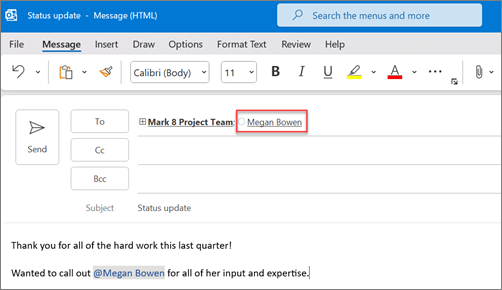
    If you’d like to get someone’s attention in an email message or a meeting invite, you can type the @ symbol, followed by their name, in the body of the email message or a meeting invite. If you do this, not only will their name be highlighted in the message body or invite details, but Outlook will automatically add them to the To line of the email or meeting invite, and they’ll see the @ symbol next to the message in their Inbox.

    Use @ in the body of a message or meeting invite

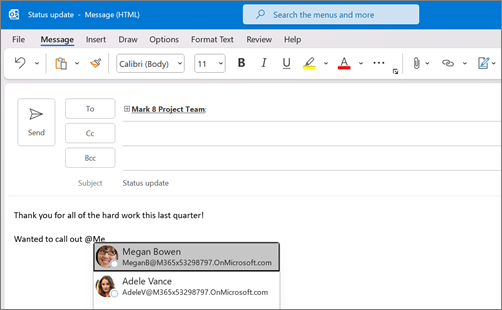
    In the body of the email message or calendar invite, enter the @ symbol and the first few letters of the contact’s first or last name.

    Add the @ symbol and the first few characters of a person's name

    When Outlook offers you one or more suggestions, choose the contact you want to mention. By default, the contact’s full name is included and added to the To: line.
    The mentioned person's full name and email are shown by default

    You can delete a portion of the mention, for example, everything other than the person’s first name.You can choose to show only a person's first name

    Filter for messages that mention you

    If you receive a lot of email, you might want to filter the messages in a folder to see only those messages that mention you.

    In Outlook for Windows,
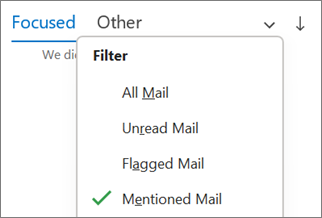
    Above the message list, choose All. Choose Mentioned Mail.

    Filter to Mentioned Mail in Outlook for Windows

    In Outlook for Mac,
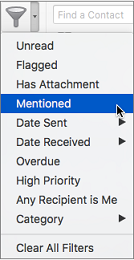
    On the Home tab, choose Filter Email.
    Choose Mentioned.

    Use Mentioned on the Filter Email menu to search for emails where you're @mentioned
    In New Outlook for Windows,
    To the right of Focused and Other, select Filter. Select @ Mentions me.

    Note: The Mentioned mail feature is only available for recipients using Exchange Server 2016, Exchange Server 2019, Exchange Online, or Outlook.com.  The @ (at symbol) indicator is only available for Exchange Online or Outlook.com.

    Add Mention to your email columns to see where you are mentioned

    If you use the full email list to view your emails, you can add the Mention column to quickly see if you are @mentioned in an email.
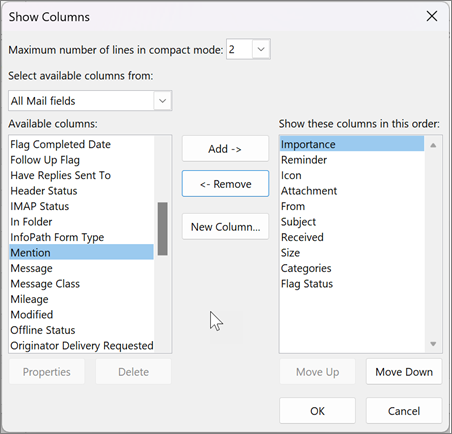
    Select View > Current View > View Settings. Select Columns.
    If Mention is not listed in the Show these columns in this order: list on the right side, change the available columns to All Mail fields.
    Scroll down to Mention and select it.

    View settings for columns in Outlook
    Select Add and then OK and OK again.

    Emails are an essential communication tool used to provide important information, make announcements and assign tasks. Full inboxes can take time to read and sort through. You should organize your inbox to help reduce clutter and easily locate important information.
  • PRESS RELEASE: NTELogic Joins JumpCloud Partner Program

    Businesses can easily adopt a zero-trust security model to improve identity access management and enhanced protection against cyber threats.

    Sonora, CA. – Mon.  May 15, 2023 – NTELogic announced today it has joined the JumpCloud Partner Program to secure their clients using JumpCloud, an Open Directory Platform provider that unifies identity, access and device management across cloud services, applications, IT resources and devices. JumpCloud’s mission is to Make Work Happen®, by providing people Secure, Frictionless AccessTM to the resources they need to do their jobs.

    By utilizing JumpCloud’s platform, NTELogic can provide their customers with secure access to the resources they need to get their jobs done, without sacrificing productivity or increasing their risk of a cyber-attack.

    Matt Kiolbassa, Chief Technology Officer at NTELogic said: “JumpCloud’s platform offers a comprehensive security solution that provides businesses with the peace of mind they need to focus on their core operations. By leveraging JumpCloud’s cutting-edge technology, NTELogic helps businesses strengthen their security posture and protect their valuable assets against cyber threats. With features such as multi-factor authentication, user identity and access management, and seamless integration with other security tools, JumpCloud’s platform is a game-changer in the world of cybersecurity. We are proud to offer businesses the opportunity to enhance their security and minimize their risk with JumpCloud.”

    “We’re pleased to welcome NTELogic to the JumpCloud Partner Program and our growing community of MSPs,” said Antoine Jebara, general manager MSP channel and co-founder, JumpCloud. “Today’s hybrid and remote work landscape continues to challenge businesses to remain productive and secure. JumpCloud partners like NTELogic are dedicated to enabling their customers to securely work from anywhere and from any device.”

    For IT admins with limited resources, JumpCloud puts simple, secure, and cost-effective user management within reach by consolidating identity across any and all IT resources without the complexity of other enterprise solutions. JumpCloud won the 2022 CyberSecurity Breakthrough Award as Identity Management Platform of the Year, was named one of America’s Best Startup Employers 2022 by Forbes, and named CrowdStrike’s 2022 Ecosystem Emerging Partner of the Year. G2 acknowledged

    JumpCloud across several categories for Best Software of 2022, and over 1300 IT admins have rated JumpCloud as an industry leader in an array of identity, device, and directory categories by G2, the business technology industry’s most trusted source for customer reviews.

    The JumpCloud Partner Program gives MSPs tools, resources, and easy-to-manage cloud directory solutions to effectively grow their business, including dedicated channel sales, technical, and marketing resources. Learn more about the JumpCloud Partner Program and apply to be a JumpCloud Partner at jumpcloud.com/partners.

    About NTELogic
    NTELogic is a Managed IT Services Provider based in Sonora, California that serves the small office and small to mid-sized business sector in California’s Mother Lode and Central Valley. NTELogic connects small businesses to the world with a suite of essential IT services that focus on voice, data, security, support, and service.

    About JumpCloud
    JumpCloud® helps IT teams Make Work Happen® by centralizing management of user identities and devices, enabling small and medium-sized enterprises to adopt Zero Trust security models. JumpCloud has a global user base of more than 180,000 organizations, with more than 5,000 paying customers including Cars.com, GoFundMe, Grab, ClassPass, Uplight, Beyond Finance, and Foursquare. JumpCloud has raised over $400M from world-class investors including Sapphire Ventures, General Atlantic, Sands Capital, Atlassian, and CrowdStrike.

    About JumpCloud for MSPs
    JumpCloud for MSPsTM provides MSPs an Open Directory Platform for delivering modern IT services that are identity-centric, cloud native, and vendor agnostic. Using JumpCloud, MSPs can centralize identity, access and device management capabilities under a single Multi-Tenant Portal. To learn more, please visit jumpcloud.com/msp.

    MEDIA CONTACT
    Matt Kiolbassa
    (209) 322-1639
    info@ntelogic.com


    ###

  • The Best Email Service for Business: 7 Must-Have Features in 2023

    It’s easy to take email for granted because it’s been around for so long that you expect it to always work. However, like other vital business functions, having the best email service can improve your operations by helping you close deals and retain valuable customers. 

    As well, without a reliable provider, you might be more likely to suffer a disastrous data breach through email. Recent figures show that the average cost of breaches for small and medium-sized businesses is $2.98 million.

    To get the most out of your email communications, review the top features your organization must have when choosing (or switching to) an email provider.

    Key Takeaways:

    • Your email service can improve or impair the quality of your business.
    • Use an email service that offers sufficient storage, gives you a custom domain, and integrates with your other business applications.
    • Your email service should offer exceptional security, reliable backup and recovery, archiving capabilities, and round-the-clock support.


    More Reasons Why You Need To Find the Best Email Service 

    If you’re still not convinced that you need to invest in the best email service you can get, keep the following five points in mind:

    1. Over half of the world’s population uses email to communicate.
    2. Over three-quarters of marketers have seen an increase in email engagement.
    3. Customers prefer brand communications through email.
    4. Business professionals prefer to communicate through email.
    5. Email marketing has one of the highest returns on investment of all marketing techniques.


    Since email remains vital, you don’t want problems with attachments, campaigns, or spam to become issues that interrupt your activities. Take full advantage of all email can offer by selecting a service with the following features.

    1. Abundant Storage Capacity

    When you’re serious about client outreach, you’re going to be emailing a lot. The best email service will provide more storage than you can use. 

    As images and video become more important to communication, you don’t want overly restrictive limits on file sizes to get in the way of getting your message across. Check that available plans have sufficient storage for your company’s needs.

    2. Custom Domain Names

    Messages from the domain of a free email provider like Gmail or Yahoo do not look professional, and recipients may send them straight to the Spam folder. One of the best email service features is the ability to use one of your websites as the domain for your email.

    Custom domains demonstrate that you’re serious about your business. Plus, personalized domains give you another way to get your branding out there.

    3. Integration With Productivity Apps

    A wealth of information flows through your email communications. Your team needs to access and transfer that information into your other software that facilitates your operations, such as Microsoft 365.

    Minutes your team spends toggling between apps for data entry turn into hours of lost time that your people could use for more important activities. That’s why the best email service integrates with your communications tools for seamless collaboration and productivity. 

    One dashboard lets workers handle email, voice calls, video conferencing, and chat. Putting all of your communications tools into one interface saves time and alleviates the frustration of constantly switching screens.

    4. Full-Time Security

    Email still remains a heavy conduit for cyberattacks and threats. The best email service providers will protect you from data breaches with secure encryption, whether your messages are at rest or in transit.

    Also, continual reports about system hacks show that passwords can be the easiest thing to steal. This means security should start at login. 

    A provider with two-factor authentication requires more than a password to enter an account. The system verifies users through another device, so your precious data remains guarded behind another wall of protection.

    Security services can scan your email traffic to prevent confidential information from falling into the wrong hands. Language-powered detection checks for irregularities and potential threats to stop malicious attacks.

    5. Reliable Backup

    Personal and professional email users have become more reliant on the cloud. That cloud is only as good as the provider maintaining it, though. You may just assume that your information will always be there when you need it, until it isn’t.

    The best email service protects you from data loss with server redundancies so that outages, malfunctions, and disasters do not erase valuable information.

    6. Email Archiving

    You need to be able to access your emails later for numerous reasons. Quick message retrieval can resolve service issues and legal complications.

    For example, when a worker makes an egregious mistake, that person may take great pains to erase the trail of what happened. Archiving keeps all information that occurs on your servers and gives you full access to it.

    Further, companies in industries with strict regulations can have the reassurance that they have the necessary emails on hand to meet compliance standards. If a legal issue arises and electronic discovery is necessary, your legal team doesn’t have to worry about losing precious data or evidence.

    7. Customer Support

    You might think, “What could go wrong with email?” However, a little downtime on your server can snowball into a mountain of problems, whether you’re dealing with a technological issue, security threat, or human error.

    With the best email service providers, you have constant support. Lesser providers might only have customer assistance as an add-on feature. Other services limit how many calls you can make for help. When you have any issues, you should be able to count on world-class support at all times. 

    Additionally, you can’t get the most out of your productivity tools without someone guiding you on which options meet your unique needs and showing you how to use them. Support services should also offer complimentary expert migration and onboarding.

    Your Source for the Best Email Service Features

    The quality of your business cloud applications can be the deciding factor in the success of your organization. To ensure you’re using the best email service, contact NTELogic for solutions that maximize your productivity and minimize your headaches.

  • OneNote Being Used to Spread Malware


    With Microsoft disabling macros by default on Office documents, cybercriminals are left needing another means to launch malware that’s victim-supported by default.

    We should expect nothing less of threat actors; when pushed up against a wall with their most powerful asset – Office macros – taken away from them, the most cunning of them will find alternative methods. The challenge for the most sophisticated of cybercriminals is to ensure that the greatest number of potential victims have the application needed that acts as the launcher.

    According to a recent tweet from email security company Prevention Point, a new method involving weaponized OneNote attachments has been spotted in the wild. The initial phish looks relatively standard for a socially-engineered email.

    With the OneNote execution looking somewhere between unexpected (after all, who ever needs to double-click a button within an application to see a supported document?) and sort of brilliant (I would assume that most knowledge workers haven’t interacted frequently with OneNote, so, “maybe this is how it works?”).

    And to boot, the default installation of Office 365 (that is, the software installed on a Windows endpoint) includes OneNote.

    The takeaway here is this is downright dangerous – threat actors have found yet another new way to engage with users in a way that helps move their attack forward with a double-click. This example of the constant evolution of the phish perfectly justifies why organizations need to keep users continually enrolled in security awareness training so that Joe User is always kept up on their toes with security top of mind.

  • Tame the Meeting Monster

    Meetings are what happens when people aren’t working Elon Musk famously said.

    Several recent articles have highlighted Elon’s advice on making meetings more efficient. While the outspoken Tesla CEO has no shortage of advice, his three rules for meetings are spot-on.

    Most meetings are scheduled without ever thinking about their actual “cost”.  Even small, weekly check-ins can cost organizations $30K or more per year. Large, all-hands meetings can run into the mid-6 figures.

    Meetings are actually one of the largest expenses and largest productivity drains in most organizations. In fact, workers expend more than 129 hours per year in meetings that were entirely unnecessary.

    Elon’s Three Rules for Meetings
    • Get rid of all large meetings, unless you’re certain they are providing value to the whole audience, in which case keep them very short.
    • Get rid of frequent meetings, unless you are dealing with an extremely urgent matter. Meeting frequency should drop rapidly once the urgent matter is resolved.
    • Walk out of a meeting or drop off a call as soon as it is obvious you aren’t adding value. It is not rude to leave, it is rude to make someone stay and waste their time.

    Some have said walking out of a meeting can be career suicide. Perhaps… but excusing yourself when leaving early the right way fends this off.

    Reducing the Cost of Meetings

    How to reduce the cost of meetings? Simply put, eliminate and reduce. 

    Eliminate the meeting entirely.

    Eliminating a meeting can be done by canceling it or conducting it asynchronously. That means using communication tools like Online Meeting, email, or video/audio recordings instead of holding a meeting. This saves time, frees up people’s schedules, and has many other benefits that come with real-time communication.

    Reduce the number of people.

    Strongly considering who needs to be there in the first place. Remember, you can always pull someone in for a portion of the meeting or send out meeting notes afterward to keep people in the loop.

    Reduce its duration.

    Cut all your recurring meetings by 15 minutes and see what happens. You can always add time back into a meeting.

    Reduce its frequency.

    If the meeting is recurring, try cutting its cadence in half. Moving a weekly meeting to biweekly often has very few negative consequences — but it halves the cost of the meeting.

  • U.S Government Issues Advisory on Texting Scams

    The Federal Communications Commission (FCC) has issued an advisory about a substantial increase in Robotext scams via automated smishing attacks.

    These attacks involve unsolicited and automated text messages impersonating entities such as government agencies or familiar businesses.

    Verizon’s 2022 Mobile Threat Index reports 45% of organizations have suffered a mobile compromise in 2022. That number increased 50% from 2021, and users using mobile devices in 53% of organizations have access to more sensitive data than a year ago.

    It shouldn’t come to any surprise that the FCC has put out an advisory warning about the increased use of robotexting-based phishing scams targeting mobile users, commonly called smishing. The FCC noted that unwanted text messages include false but believable claims about unpaid bills, package delivery snafus, bank account problems, or law enforcement actions.

    According to the Federal Trade Commission, Amazon is the most impersonated brand in smishing attacks. Apple, Chase, Bank of America, Citigroup, and Wells Fargo are also common in robotext scams.

    Some malicious SMS’s may also contain links aimed at stealing personal information for use in subsequent attacks or sale to other threat actors. Cybercriminals such as FluBot operators also leveraged smishing attacks to spread malware.

    Warning signs of malicious robotexts or smishing messages include:

    • Unknown numbers
    • Misleading information
    • Misspellings to avoid blocking/filtering tools
    • 10-digit or longer phone numbers
    • Mysterious links
    • Sales pitches
    • Incomplete information


    Being proactive is key

    Here are some simple steps you can use to combat smishing attacks:

    • Avoid responding to unsolicited text messages even with the word “STOP” or “NO.”
    • Do not click on any links included in such SMSs. If your contact sends a link via text, confirm that they have not been hacked.
    • Avoid sending sensitive information via text messages
    • Report texting scam messages to SPAM (7726) and file a complaint with the FCC
    • Check for misspellings and text messages from email addresses
    • Delete all malicious texts from your phone
    • Update your device’s operating system and security apps


    Knowledge is power

    NTELogic has partnered with KnowBe4, the world’s leading provider of cybersecurity training, to bring organizations like yours a tailored security awareness training platform without the hassles of doing it yourself. Contact us today to learn more or to register for our free phishing test offer.

  • 4 Clever Ways to Reduce Costs with Unified Communications

    4 Clever Ways to Reduce Costs with Unified Communications


    Because of the cost of unified communications (UC) and the opportunity for financial savings that it brings, using UC is a smart decision for most organizations. The reality is that switching to a cloud communications system and adopting UC costs less than using a traditional telephony system.

    According to Jose Pastor, former senior vice president of product management at RingCentral, organizations can save tens of thousands of dollars with unified communications.

    If you’re thinking of investing in unified communications, you’ll probably save a lot of money, especially in the long term.

    But before you invest, you should do your research and perform a cost-benefit analysis for your business. That’s the only way you can assess the value that it can bring to your organization.

    You also want to know what strategies you can use to minimize your costs so you can maximize your benefits.

    Let’s look at the ways your business can save with UC so you have the information you need to perform a unified communications cost-benefit analysis and make an informed purchasing decision.

    The Case for Unified Communications

    Businesses of all sizes are implementing unified communications, most of which are either using the cloud or are planning on moving to the cloud soon. The global market for UC is expected to exceed $234 billion in 2028 with a compound annual growth rate of nearly 20 percent over the next few years.

    Why the massive growth?

    UC is a necessary communications tool for hybrid work, which is becoming the norm post-pandemic. It also offers tools that empower businesses to enhance the customer experience.

    But one of the biggest drivers of adoption is the ability to save money.

    4 Ways to Save Money with Unified Communications

    With a cloud-based unified communications solution, you can minimize your IT and operating costs, simplify your technology stack, and save on your phone bill.

    Here are the ways you can reduce costs when you invest in unified communications and clever ways to optimize those savings.

    1. Lower Upfront Costs

    With unified communications, you can use a cloud phone system, which means voice data transmits over the internet rather than phone lines. Instead of paying for all the hardware and maintenance costs of a traditional PBX phone system, you can get started with a mobile app downloaded onto your devices and a subscription licensing fee.

    How to reduce your costs: Don’t purchase cloud phones for all your users. Pre-configured desktop phones are useful because they offer the same features as modern business phones. But, with UC, you already have a lot of functionality within your software.

    Decide which employees need a desk phone – everyone else can enjoy all the features and security benefits of your unified communications solution through the app. They can place calls, host or join a video conference, share files, and more from their laptop, smartphone, or tablet.

    2. Fewer Communications Apps

    Because you have voice, video conferencing, chat messaging, and file sharing all rolled up into one platform, you aren’t paying multiple vendors. This can lead to significant cost savings. One study found that using a single vendor results in a 56 percent lower total cost of ownership versus using a multi-vendor approach.

    How to reduce your costs: When choosing a unified communications provider, look for a vendor that offers all the communications tools your business will need so you aren’t paying multiple vendors. If you want contact center functionality, make sure your vendor has Unified Communications as a Service (UCaaS) and Contact Center as a Service (CCaaS). You should also be able to integrate your tools so your data updates across platforms. That will make using your software seamless for users, which can boost productivity and lead to even greater benefits.

    3. Smaller Phone Bill

    You’ll also see lower costs with unified communications through a better rate per line and reduced long-distance calling costs.

    Businesses that use cloud phone systems save money each month on their phone bill. When NTELogic compared what other phone companies were charging, we found that most of our customers were paying about 50 percent less with us. Other phone companies charge about $67 per line, while NTELogic’s hosted phone users pay a fraction of that.

    How to reduce your costs: Choose a cloud-based unified communications system instead of an on-premises solution. That way you can take advantage of the immense savings that come with a cloud phone system. You’ll have a smaller phone bill and never have to worry about downtime for app updates – your cloud provider automatically updates the software.

    4. Increased Productivity and Less Employee Recruitment

    When you empower your teams with user-friendly, full-featured software, they have the tools they need to work more efficiently. Additionally, with UCaaS, your staff can be productive from anywhere.

    Your employees are going to be more productive and more satisfied with their job when they have technology that makes work more flexible and seamless, which means your company will probably spend less on recruitment and training over time.

    How to reduce your costs: Choose a provider with excellent customer support and reliability. That way your employees will have the best experience possible, technical support will be there when you need it for fast problem-solving, and you don’t have to worry about issues with downtime.

    Optimize Your Unified Communications Costs by Choosing the Right Provider

    Cloud communications is a popular business tool because businesses end up saving money when they switch from their legacy phone systems. But, you can optimize those savings if you choose the right cloud provider.

    Contact us today to learn how easy it is to make the move to UCaaS.

  • Does Your Organization Need Cybersecurity Awareness Training?

    Cybercriminals are getting smarter and more savvy with their attacks nowadays. Even the best security solutions in the world would not do any good if users are not cyber-aware and know what to do when they encounter suspected cyberthreats.

    Most cybercrime incidents begin on a smaller scale and do not become a full-blown data breach until it’s too late. 95% of cybersecurity breaches are caused by human error, and firewalls cannot keep a staff member from succumbing to a phishing email.

    According to data collected by the FBI’s Internet Crime Complaint Center, phishing attacks accounted for over half of all reported cybercrimes in 2021, and losses from phishing attacks topped $2.4 billion. In fact, phishing attacks increased by 280% in 2020 alone, and human-caused data breaches topped 82%.

    Email attacks almost always involve some sort of phishing. Phishing is the fraudulent practice of sending emails posing as a legitimate source to compel victims to reveal sensitive information, such as passwords and credit card numbers. You may have seen phishing emails before, offering you a free TV or asking you to change your password. While an email spam filter will catch many of these, some will still occasionally make it through to your inbox.

    Defending against phishing and social engineering attacks ultimately comes down to knowing what you’re up against. These can come in several forms, but the most common cyber-attacks are phishing emails that ask you for usernames, passwords, and personally identifiable information (PII). A good rule of thumb is to have healthy skepticism whenever an email asks for personal information—especially emails from an unexpected sender.

    FREE Phishing Test Offer

    Register today for your free phishing security test and find out how many of your employees are phish-prone.

    Click Here

    SPECIAL OFFER

    This can sound like quite the daunting task for any company, let alone a small business. The reality is that the opportunity cost of not training your employees is too high to ignore. According to IBM, the average cost of a data breach last year was $4.24 million. Thirty-eight percent of companies lost business because of a breach, which accounted for over half of the total financial losses.

    While cybersecurity awareness is the first step, employees must willingly embrace and proactively use cyber-secure practices both professionally and personally for it to truly be effective. This is known as a culture of security or security culture. Security culture is defined as an organization’s collective awareness, attitudes, and behaviors toward security.

    For security culture to be most effective, it’s important to make security training not only engaging but also relevant to employees so they understand how cybersecurity impacts them in and outside of work. The best part about cybersecurity training is that it can be customized to your organization’s needs. From a formal security awareness training program to a monthly email with cybersecurity tips and tricks, any cybersecurity awareness and training can significantly impact employee behavior.

    Our training platform consists of built-in phishing training and comes with the option of letting your organization create its own training courses and upload/deploy them internally. This can include, but is not limited to, employee safety, conduct (anti-harassment) and more. It could even be used for human resources (HR) training such as employee onboarding, policy training, etc.

    Contact us today to learn more or to register for our a free demonstration.