Category: SMB Tech

  • Four Ways Disasters Fuel Cyberattacks

    Your business, in all likelihood, already faces numerous challenges in today’s tech-driven world. However, the aftermath of an unexpected disaster can push your organization to breaking point. This unintentionally creates opportunities for cybercriminals to launch devastating attacks, amplifying the chaos caused by such events.

    Disaster preparedness should be a top priority for your business — not only for physical resilience but also for fortifying your digital defenses. By understanding how disasters fuel cyberattacks, you can proactively safeguard your business against these deceptive threats.

    Understanding how disasters amplify cyberthreats

    Let’s look at four major ways disasters amplify cyberthreats and what strategies you can utilize to bolster your cybersecurity posture in the face of adversity.

    Leveraging diverted attention and resources
    When a disaster strikes, the immediate focus shifts toward safety and recovery. Unfortunately, this diverts attention and resources away from maintaining and protecting your IT systems and networks.

    With a reduced emphasis on cybersecurity measures, essential updates and monitoring may be overlooked, leaving your networks vulnerable to intrusion. Cybercriminals seize this opportunity to infiltrate your systems, compromise sensitive data and disrupt your operations.

    To tackle this situation, establish a dedicated team responsible for monitoring and maintaining cybersecurity, even during times of crisis. Implement automated security systems to scan for vulnerabilities and apply necessary patches continuously. By ensuring cybersecurity remains a priority, even in challenging times, you can minimize the risk of cyberattacks.

    Exploiting fear, urgency, chaos and uncertainty
    Disasters create an environment of fear, urgency, chaos and uncertainty — prime conditions for cybercriminals to thrive in. They launch targeted attacks, such as deceptive emails or fraudulent websites, capitalizing on the sense of urgency and the need for quick solutions. By manipulating individuals into disclosing sensitive information, cybercriminals gain unauthorized access to critical systems.

    To combat this, educate your employees about the tactics used in phishing attacks and social engineering scams. Train them to recognize warning signs, such as suspicious emails or requests for sensitive information. Encourage a culture of skepticism and verification, where employees double-check the authenticity of requests before sharing confidential data.

    By fostering a vigilant and informed workforce, you can fortify your defense against cybercriminals seeking to exploit fear and uncertainty.

    Damaging critical infrastructure
    Disasters can cause severe damage to your critical infrastructure, compromising components integral to your cybersecurity measures. Destruction of servers, routers or firewalls can weaken your defense mechanisms, allowing cybercriminals to exploit security gaps.

    To address this challenge, ensure your critical infrastructure has backup and disaster recovery in place. Regularly back up your data, store it securely off-site or in the cloud, and test the restoration process to ensure it functions smoothly. Implement robust disaster recovery and business continuity plans, including provisions for cybersecurity.

    By maintaining resilient infrastructure and regularly testing your backup and recovery processes, you can mitigate the impact of infrastructure damage on your cybersecurity.

    Impersonation and deception
    In the wake of a disaster, cybercriminals often exploit the trust associated with relief organizations and government agencies. By impersonating these trusted sources, they deceive victims through phishing emails, messages or calls, tricking them into divulging sensitive information or engaging in fraudulent transactions.

    To protect yourself from such scams:

    • Encourage your employees to verify the authenticity of any communication received during a disaster.
    • Advise them to independently contact the organization or agency through known, trusted channels to confirm the legitimacy of any requests.
    • Establish robust security awareness training programs that educate employees about common impersonation tactics and teach them how to report them effectively.

    By promoting a culture of caution and verification, you can defend against impersonation and deception tactics used by cybercriminals.

    Act now to safeguard your business

    Now that we know how cybercriminals can target your business during a disaster, prioritizing disaster preparedness and implementing the above-highlighted measures are important to navigate today’s ever-evolving technology landscape.

    If you need expert guidance, we’re here to help fortify your disaster preparedness and cybersecurity efforts. Together, let’s ensure a resilient and secure future for your business. Contact us today to proactively safeguard what you’ve worked so hard to build.
     

  • Be Aware of These Top AI Cyber-Risks

    Our third installment for Cyber Security Awareness Month focuses on the benefits and risks of AI.

    The rise of AI has sparked a revolution. Everyone, from industry giants to smaller enterprises, is captivated and eager to leverage AI’s endless possibilities.

    However, amid the celebrations of AI’s merits, let’s not ignore its potential risks. A new array of cyberthreats emerges when intricate AI algorithms cross paths with malicious cyber elements. From AI-powered phishing schemes to ultra-realistic deepfakes, these dangers serve as a reminder to stay vigilant and prepared.

    In this blog, we embark on a journey to explore AI benefits and risks. Our aim is to guide you in harnessing AI’s strengths while safeguarding against its potential pitfalls.

    AI’s positive impact on business

    The top benefits of AI include:

    Smart data analysis
    AI’s expertise lies in swiftly deciphering massive data sets to uncover patterns. This ability proves invaluable in traversing through modern markets. The insights derived empower you to make well-founded decisions, steering clear of guesswork.

    Boosted productivity
    AI’s automation prowess liberates your employees from mundane tasks, helping them focus on more critical tasks. Tedious and manual work can now be done seamlessly without human intervention, boosting productivity.

    Faster business maneuvering
    In an ever-evolving technological landscape, keeping up to date is paramount. AI empowers you to process and respond to real-time information promptly. This agility enables swift reactions to evolving scenarios, customer demands and opportunities.

    AI’s cyber challenges

    As we delve into the world of AI, we must also acknowledge the potential risks:

    AI-powered phishing scams
    Sneaky cybercriminals employ AI-driven chatbots to create impeccable phishing emails without the usual red flags, such as grammar errors. These attacks exploit human vulnerabilities, luring even the most vigilant to share sensitive information.

    To bolster your defense, exercise caution with emails from unfamiliar sources. Scrutinize sender details, avoid suspicious links and employ anti-phishing tools for added protection.

    Malicious AI-generated code
    Cybercriminals harness AI tools for swift code generation, surpassing manual capabilities. These generated code snippets find their way into malware and other malicious software.

    Defend against these intricate schemes by educating your team about them. Strengthen your defenses through layered security measures, such as firewalls, antivirus software and automated patch management.

    Deepfakes and impersonations
    AI-generated deepfakes can propagate misinformation, deceiving unsuspecting individuals and leading to fraud or character defamation. For example, in the current era, where many banks rely on online KYC (KYC or Know Your Customer is commonly implemented in banks to comply with regulatory requirements and mitigate the risk of financial crimes), malicious actors can create ultra-realistic videos using another person’s voice and image samples to open accounts for illegal transactions.

    Identifying deepfakes necessitates a discerning eye. Among other factors, anomalies in skin texture, blinking patterns and facial shadows help distinguish genuine content from manipulated content.

    Collaborative path to success

    At the crossroads of innovation and challenges, knowledge takes center stage.

    Our comprehensive eBook, “Protecting Your Business – Navigating AI Safety,” stands as your compass in the AI landscape. Delve into AI’s intricacies, uncover potential pitfalls and acquire strategies for responsible and secure utilization in your business.

    If navigating AI on your own seems daunting, don’t worry. Connect with us for a no-obligation consultation. Together, we’ll navigate AI’s realm, harness its power and ensure your organization’s safety.

  • How Social Media Misuse Can Harm Your Business

    Our second installment for Cybersecurity Awareness Month focuses on social media.

    Social media has significantly transformed the way we communicate and do business. However, this growing popularity also comes with potential risks that could cause harm to businesses like yours.

    Unfortunately, many organizations remain unaware of these rapidly evolving challenges. In this blog, we will explore the dangers associated with social media and share practical tips to safeguard your organization’s reputation and financial stability so that you can safely reap the benefits of social media platforms.

    Exploring the risks

    Social media presents several risks that you need to address, such as:

    Security breaches
    Cybercriminals can exploit social media to steal sensitive information by creating fake profiles and content to trick people into sharing confidential data. Social media platforms are also vulnerable to hacking, which can have a negative impact on your business.

    Reputation damage
    Negative comments from dissatisfied customers, envious competitors or even unhappy employees can quickly spread online and cause significant damage to your brand’s image within seconds.

    Employee misconduct
    Certain employees may share offensive content or leak confidential information on social media, which can trigger a crisis that can be challenging for you to handle.

    Legal accountability
    Social media has the potential to blur the boundaries between personal and professional lives, which can, in turn, create legal liabilities for your business. If your employees make malicious remarks about competitors, clients or individuals, the public can hold you responsible for their actions. Employees may also face the consequences if their social media behavior violates the organization’s regulations.

    Phishing threats
    Social media phishing scams can target your business and employees by installing malware or ransomware through seemingly authentic posts.

    Fake LinkedIn jobs
    Cybercriminals often pose as recruiters on LinkedIn and post fake job listings to collect data for identity theft scams.

    Securing your business

    Taking proactive measures is essential to avoid social media risks, including:

    Checking privacy settings
    Set privacy settings to the highest level across all accounts, restricting your and your employees’ access to sensitive information.

    Strengthening security
    Employ robust passwords and multifactor authentication (MFA) to bolster account security.

    Establishing clear guidelines
    Enforce clear social media rules for company and personal devices, customizing policies to fit your industry’s unique risks.

    Educating your teams
    Educate your team on social media risks, imparting safe practices to thwart scams and phishing attempts.

    Identifying impersonation
    Develop protocols to detect and manage fake profiles and impersonations swiftly. Remain vigilant and report any suspicious activity.

    Vigilant monitoring
    Set up a system to monitor social media, promptly addressing fraudulent accounts or suspicious activity that could stain your brand image.

    Act now to safeguard your business

    Understanding the risks and adhering to social media best practices are crucial for businesses of all sizes. By following these guidelines, you can reduce your business’s vulnerability while reaping the rewards of social media.

    For comprehensive insights into social media safety, download our eBook “From Vulnerability to Vigilance: Social Media Safety.”

    Navigating the intricate realm of social media threats might seem daunting; however, our expert team stands ready to guide you through the ever-evolving digital landscape. Don’t wait until trouble strikes — connect with us today and fortify your digital presence.

  • A Deep Dive Into Phishing Scams

    Phishing scams remain one of the most prevalent and successful types of cyberattacks today, so being aware of the danger they pose to businesses like yours is extremely crucial. Your business could easily be the next victim if you don’t clearly understand how threat actors leverage phishing emails.

    In this blog, you’ll learn the intent behind phishing emails, the various types of phishing attacks, and most importantly, how you can secure your email and business.

    The goal behind phishing emails

    Cybercriminals use phishing emails to lure unsuspecting victims into taking actions that will affect business operations, such as sending money, sharing passwords, downloading malware or revealing sensitive data. The primary intent behind a phishing attack is to steal your money, data or both.

    Financial theft — The most common aim of a phishing attempt is to steal your money. Scammers use various tactics, such as business email compromise (BEC), to carry out fraudulent fund transfers or ransomware attacks to extort money.

    Data theft — For cybercriminals, your data, such as usernames and passwords, identity information (e.g., social security numbers) and financial data (e.g., credit card numbers or bank account information), is as good as gold. They can use your login credentials to commit financial thefts or inject malware. Your sensitive data can also be sold on the dark web for profit.

    Be vigilant and look out for these phishing attempts:

    • If an email asks you to click on a link, be wary. Scammers send out phishing emails with links containing malicious software that can steal your data and personal information.
    • If an email directs you to a website, be cautious. It could be a malicious website that can steal your personal information, such as your login credentials.
    • If an email contains an attachment, be alert. Malicious extensions disguised to look like a document, invoice or voicemail can infect your computer and steal your personal information.
    • If an email tries to rush you into taking an urgent action, such as transferring funds, be suspicious. Try to verify the authenticity of the request before taking any action.


    Different types of phishing

    It’s important to note that phishing attacks are constantly evolving and can target businesses of all sizes. While phishing emails are a common method used by cybercriminals, they also use texts, voice calls and social media messaging.

    Here are the different kinds of phishing traps that you should watch out for:

    Spear phishing — Scammers send highly personalized emails targeting individuals or businesses to convince them to share sensitive information such as login credentials or credit card information. Spear phishing emails are also used for spreading infected malware.

    Whaling — A type of spear phishing, whale phishing or whaling is a scam targeting high-level executives where the perpetrators impersonate trusted sources or websites to steal information or money.

    Smishing — An increasingly popular form of cyberattack, smishing uses text messages claiming to be from trusted sources to convince victims to share sensitive information or send money.

    Vishing — Cybercriminals use vishing or voice phishing to call victims while impersonating somebody from the IRS, a bank or the victim’s office, to name a few. The primary intent of voice phishing is to convince the victim to share sensitive personal information.

    Business email compromise (BEC) — A BEC is a spear phishing attack that uses a seemingly legitimate email address to trick the recipient, who is often a senior-level executive. The most common aim of a BEC scam is to convince an employee to send money to the cybercriminal while making them believe they are performing a legitimate, authorized business transaction.

    Angler phishing — Also known as social media phishing, this type of scam primarily targets social media users. Cybercriminals with fake customer service accounts trick disgruntled customers into revealing their sensitive information, including bank details. Scammers often target financial institutions and e-commerce businesses.

    Brand impersonation — Also known as brand spoofing, brand impersonation is a type of phishing scam carried out using emails, texts, voice calls and social media messages. Cybercriminals impersonate a popular business to trick its customers into revealing sensitive information. While brand impersonation is targeted mainly at the customers, the incident can tarnish the brand image.

    Bolster your email security

    Emails are crucial for the success of your business. However, implementing email best practices and safety standards on your own can be challenging. That’s why you should consider partnering with an IT service provider like us. We have the resources and tools to protect your business from cyberattacks, helping you to focus on critical tasks without any worry. Contact us now!

    Meanwhile, to learn how to secure your inbox, download our eBook — Your Guide to Email Safety — that will help you improve your email security and avoid potential traps.

  • 8 Elements of a Business Impact Analysis for Compliance

    A compliance program helps businesses like yours minimize risk and increase business efficiencies. It also ensures that your business complies with relevant laws and industry regulations.

    An essential element of an effective compliance program is Business Impact Analysis (BIA). It measures the impact of a disruption (due to an accident, disaster, etc.) on critical business operations.

    You must conduct a BIA to:

    1. Identify gaps in the existing compliance agreements (whether regulatory like HIPAA, GDPR or CMMC).
    2. Ensure compliance with cyber liability insurance policies and other IT compliance policies unique to your
      organization, industry, geography, etc.

    Conducting a BIA for compliance

    There is no fixed method for conducting a BIA. It varies from one business to the next. However, to achieve compliance, a BIA must:

    1. Identify critical processes and functions.
    2. Draft a roadmap for business recovery.
    3. Find out resource interdependencies.
    4. Track the flow of sensitive data.
    5. Determine the impact of an incident on operations.
    6. Sort processes and functions based on their necessity for business continuity.
    7. Establish recovery time requirements.
    8. Evaluate the impact a disruption will have on compliance.


    To get started, you can ask challenging questions, such as:

    What steps do you need to take immediately to become compliant?
    This question helps detect the compliance gaps that need urgent attention. A few common compliance gaps you may encounter are:

    • Improper firewall management.
    • Lack of documentation of sensitive data flow.
    • Poor incident prevention practices.
    • Failure to document preventative measures.

    Do you have a data governance strategy in place that considers compliance requirements relevant to your organization?
    An effective data governance strategy ensures that data gets managed well, making data management compliant with internal and external regulations.

    How long will it take to bridge known compliance gaps?
    It is essential to fill compliance gaps as quickly as you can. If it’s going to take too long, you should consider outsourcing your compliance matters to an experienced IT service provider like us.

    Do you have in-house expertise?
    If you have a compliance specialist employed at your business, they can manage the compliance gaps efficiently.

    Even if you have in-house expertise, can the work be completed within an acceptable timeframe?

    Having in-house expertise won’t be helpful if filling the compliance gaps takes too long. The longer the issues remain unresolved, the more opportunity there is for vulnerabilities to result in data exposure and data loss incidents and could attract regulatory fines.

    Does it make sense to have a partner to accomplish your compliance goals?

    Sometimes, having a partner who can effectively manage your compliance-related issues will be more convenient for your business. With the help of a partner, you can address vulnerabilities much faster and reduce the likelihood of your organization suffering non-compliance-related fines.

    In addition to conducting or refreshing your BIA at least once a year, you must ensure that regular risk assessments are part of your non-compliance hunting strategy. Using BIA and risk assessments ensures that nothing inadvertently falls out of compliance.

    Regular risk assessments help detect, estimate and prioritize risks to an organization’s individuals, assets and operations. While a risk assessment lets you know your business’s risks, a BIA helps you understand how to quickly get your business back on track after an incident to avoid severe damages.

    Implement an effective compliance program

    Achieving and maintaining compliance on your own can be challenging, especially if you don’t have the resources and expertise to keep up with changes in compliance frameworks. This can lead to inefficient processes and increased risk. By partnering with an experienced IT service provider like us, you can effortlessly enhance your compliance program without spending a fortune. Contact us now to schedule a no-obligation consultation to see if we’re the right partner for your business.

  • Busting 3 Ransomware Myths

    It’s Time to Bust These 3 Ransomware Myths

     In today’s digital age, ransomware attacks are becoming increasingly frequent, sophisticated and costly. With cybercriminals constantly evolving their tactics and targeting businesses of all sizes, organizations like yours must proactively safeguard your data and systems. Unfortunately, many companies fall prey to common ransomware myths, which can leave them vulnerable to attacks and unprepared to respond effectively in the event of an incident.

    In this blog, we’ll debunk three of the most prevalent ransomware myths and provide the accurate information you need to protect your business. Understanding the realities of ransomware and taking proactive steps against it can mitigate the risk and ensure you’re prepared to fight against cybercriminals.

    Top Myths to Bust

    Without further ado, let’s debunk the ransomware myths you should avoid at any cost:

    Myth #1: If my business gets hit with ransomware, I’ll pay the ransom and return to business.
    Many businesses believe that paying a ransom is the quickest and easiest way to recover encrypted data. However, that’s just a dangerous assumption.

    Paying a ransom does not guarantee that the attackers will keep their word and provide the decryption key. Also, paying a ransom only encourages cybercriminals to carry out more attacks in the future.

    The best way to protect your business is to have a solid backup strategy and a comprehensive security plan in place.

    Myth #2: My backups will get me back up and running if I get hit with ransomware. 

    While backups are essential to ransomware prevention, it’s a myth that backups will always save the day. Cybercriminals have upgraded their tactics to compromise backup files as part of their attack strategy.

    With the rise of double extortion attacks, cybercriminals not only encrypt data but also steal it. This means that even if you have a backup strategy in place, your data may still be at risk if attackers threaten to leak sensitive data unless a ransom is paid.

    Myth #3: My antivirus software (or any other security solution) provides complete protection from ransomware attacks. 

    Antivirus software is essential to a comprehensive defense against ransomware, but it’s not enough. Relying on a single security product to defend against ransomware is a mistake. There’s no silver bullet solution to ransomware. However, implementing a defense-in-depth strategy can help your business build the most.

    Partner to succeed

    While it’s true that no security measure is foolproof, taking proactive steps to secure your data and systems can significantly reduce the risk of falling victim to a ransomware attack. We can help ensure your organization is well-prepared to fight against ransomware and other cyberthreats. Feel free to reach out to us for a no-obligation consultation.

    To learn more about ransomware criminals and how to defend your business, download our infographic “The Anatomy of a Ransomware Attack.” It’s a valuable resource that can help you increase your basic understanding of ransomware, identify the signs if you’ve fallen victim and prepare you to defend against these attacks.

  • Using Mentions to Organize Your Inbox

    Use @mentions to get someone’s attention

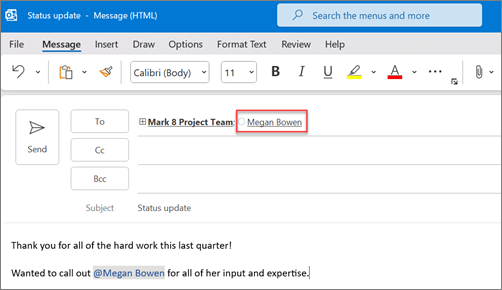
    If you’d like to get someone’s attention in an email message or a meeting invite, you can type the @ symbol, followed by their name, in the body of the email message or a meeting invite. If you do this, not only will their name be highlighted in the message body or invite details, but Outlook will automatically add them to the To line of the email or meeting invite, and they’ll see the @ symbol next to the message in their Inbox.

    Use @ in the body of a message or meeting invite

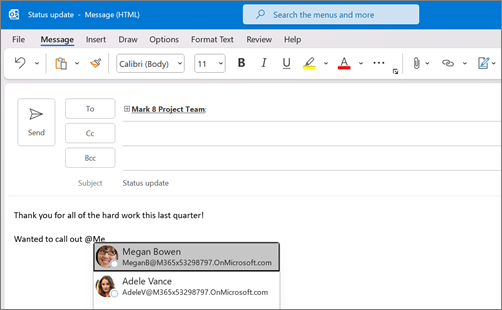
    In the body of the email message or calendar invite, enter the @ symbol and the first few letters of the contact’s first or last name.

    Add the @ symbol and the first few characters of a person's name

    When Outlook offers you one or more suggestions, choose the contact you want to mention. By default, the contact’s full name is included and added to the To: line.
    The mentioned person's full name and email are shown by default

    You can delete a portion of the mention, for example, everything other than the person’s first name.You can choose to show only a person's first name

    Filter for messages that mention you

    If you receive a lot of email, you might want to filter the messages in a folder to see only those messages that mention you.

    In Outlook for Windows,
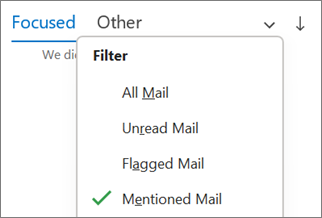
    Above the message list, choose All. Choose Mentioned Mail.

    Filter to Mentioned Mail in Outlook for Windows

    In Outlook for Mac,
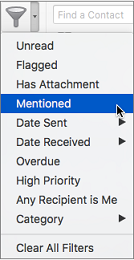
    On the Home tab, choose Filter Email.
    Choose Mentioned.

    Use Mentioned on the Filter Email menu to search for emails where you're @mentioned
    In New Outlook for Windows,
    To the right of Focused and Other, select Filter. Select @ Mentions me.

    Note: The Mentioned mail feature is only available for recipients using Exchange Server 2016, Exchange Server 2019, Exchange Online, or Outlook.com.  The @ (at symbol) indicator is only available for Exchange Online or Outlook.com.

    Add Mention to your email columns to see where you are mentioned

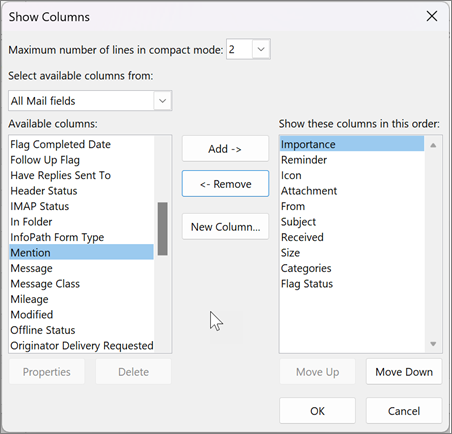
    If you use the full email list to view your emails, you can add the Mention column to quickly see if you are @mentioned in an email.
    Select View > Current View > View Settings. Select Columns.
    If Mention is not listed in the Show these columns in this order: list on the right side, change the available columns to All Mail fields.
    Scroll down to Mention and select it.

    View settings for columns in Outlook
    Select Add and then OK and OK again.

    Emails are an essential communication tool used to provide important information, make announcements and assign tasks. Full inboxes can take time to read and sort through. You should organize your inbox to help reduce clutter and easily locate important information.
  • What to Consider When Starting a Computer Science Career

    Computer science is a very popular field, with thousands of college students opting to major in the subject each year. However, there is much more to starting a career in computer science or information technology than checking off a box on your college application. Here are some things to consider when starting a computer science career. 

    Where Your Strengths Lie

    No matter your age, it is a good idea to assess where your strengths and weaknesses lie before considering which job field you want to go into. Whether you are a new high school graduate or a professional who is seeking a career change, consider taking a job aptitude test for an in-depth look at your abilities. While it may seem obvious to you that, for example, you are good at science but bad at history, an aptitude test will give a deeper look into things such as which types of positions you might enjoy at a company. Doing something you enjoy and are good at will lead to a longer-lasting, more satisfying career. 

    How to Pursue an Education

    If you are thinking about going to college for computer science, carefully consider the cost and flexibility of the program, especially if you are a working professional. If you are a self-motivated person, there are online resources that allow you to learn IT subjects in your own time. Completing some of these courses prior to pursuing more formal education is a good option for those who are still on the fence about an IT career.

    What Jobs Are Out There

    No matter how much you want to have a career in computer science or IT, you will only be able to start that career if people are hiring in the sector you are seeking. Some common career titles for those with a computer science degree include web developer, information security analyst, systems architect, and artificial intelligence engineer. However, there are many more niche fields out there to consider. Industry publications and websites can be good resources for finding a computer science or IT position. 

    Whether You Have an Entrepreneurial Side

    Many people seeking a computer science career wish not to engage with the more public-facing side of their company. However, those who enjoy having more of a leadership role may consider using their computer skills to open their own business. If this sounds like you, keep in mind the benefits of an LLC business structure, which include:

    • Protection of personal assets in case your company is sued
    • The ability to have one or several members
    • Profit distribution to members


    If you wish to hone your managerial skills and make more money, opening your own business might be for you. 


    If You Might Enjoy Freelancing

    IT and computer science make for excellent freelancing opportunities due to the fact that having a computer and reliable internet connection is generally all that is required to complete projects. If you go this route, be aware that it is very easy to create an online profile where clients can select providers tasked with developer resources like you based on factors such as your experience and other clients’ reviews. 

    If you enjoy working with computers in any capacity, consider a career in IT or computer science. This might mean working for a company, being a freelancer, or anything in between. 

  • Cybersecurity for Employees: Awareness Can Save You from a Breach

    Your company might use iron-clad network protection and implement encryption across the board. However, your data and systems are still at risk of a cyberattack if you aren’t focusing on employee awareness. This risk exists because employees are behind a significant chunk of data breach incidents. These basic steps can help to raise employee awareness and ensure your company is protected.

    Human Error Is a Major Cybersecurity Weak Point for Businesses

    Employee negligence is a major cybersecurity issue for businesses of all sizes. Shred-It’s Ninth Annual Data Protection Report revealed that human error continues to be the driver of most data breaches. Fifty-three percent of C-suite executives cite external human error or accidental loss as primary problems. Twenty-eight percent of small business owners feel the same way. In the report, Ann Nickolas, Senior Vice President of Stericycle, says, “For the second consecutive year, employee negligence and collaboration with external vendors continues to threaten the information security of US businesses.”

    A data breach can have severe consequences when you add up reputational damage and lost revenue. Employee retention can be a problem as well – 33 percent of respondents in the Shred-It survey stated that they are likely to seek employment elsewhere after their employer experiences a data breach. That goes for both breaches of consumer and employee data.

    According to the 2020 Cost of a Data Breach report published by IBM and the Ponemon Institute, the average cost of each lost record is $146. As losing thousands of records during a breach is common, shoring up your employees’ cybersecurity habits is well worth the effort.

    Use this security checklist for in-office and remote employees to figure out what steps your company can take to reduce the risk of a breach.

    1. Train employees to recognize phishing emails

    Email phishing attacks are common. With this type of cyberattack, a hacker sends an email that appears legitimate and asks the recipient to share information or download a file.

    To protect against phishing emails, it’s important to use advanced email protection, which will help to weed out spoof emails and other external threats. Also, make sure all of your employees understand what a phishing email looks like, what the risks are if they fall for one, and what they should do if they spot what they think might be a phishing email message.

    2. Password Security

    A strong password policy is often the first line of defense against cyber attacks, yet many organizations continue to follow outdated guidelines that expose them to significant risk.

    According to Verizon’s 2020 Data Breach Investigations Report, lost or stolen credentials remain the number one hacking tactic used by malicious actors to perpetrate data breaches, with compromised or weak passwords responsible for 35% of all breaches.

    Password Sharing

    While sharing a password might seem convenient and harmless, it can have serious consequences. Passwords should never be shared with others. Period.

    Password Reuse

    Use different passwords for different accounts. That way, if one account is compromised, at least the others won’t be at risk.

    Password Length & Complexity

    Length trumps complexity. The longer a password is, the better. Use at least 16 characters whenever possible. Make passwords that are hard to guess but easy to remember.

    3. Require Multi Factor Authentication (MFA)

    With Multi Factor Authentication, even if a hacker steals an employee’s password, they still will be locked out of their device or system. This is how it works: an employee will use a password and another identifier such as biometric data or a code sent to their email or phone number. Since a hacker can’t steal biometric data and likely doesn’t have someone’s device, as well as their password, their chances of breaking in drop to nearly zero.

    4. Establish a data breach policy

    What an employee does after a suspected data breach will determine how quickly your business recovers. If they don’t act quickly by alerting your IT team, a hacker may have enough time to infiltrate your systems and do extensive damage. With a fast response, it’s possible to lock down your network and mitigate the risks.

    Tell your employees who they should contact if they notice a suspicious email, receive a security alert, if their device is stolen, or if they believe something is amiss with your company’s networks. Also, let them know they won’t be reprimanded if they fall victim to an attack. Employees should know they have their employer’s support. Otherwise, some people may not speak up when there’s a problem.

    5. Discuss mobile device usage

    If employees are using their smartphone or another personal device for work, teach them how to use their devices securely.

    • Always install the latest updates to ensure they’re using the newest operating system. These updates often include critical security updates.
    • If your company isn’t using a virtual private network (VPN), employees need to be very careful about what network they use when accessing business apps remotely. Only log on when using a secure network. They shouldn’t ever use public networks such as those found in coffee shops and airports.
    • Practice good flash drive hygiene – only use company-issued drives. Once one leaves the office, it should be wiped clean or discarded upon return.

    Make Cybersecurity a Part of Your Work Culture

    Following cybersecurity best practices such as using two-factor authentication, avoiding suspicious emails, and practicing good password security can go a long way in protecting against an attack. But, if cybersecurity isn’t a part of your work culture, it’s easy for these best practices to be forgotten.

    Cultivate a cybersecurity-aware culture by openly talking about risks, updating your employees about new best practices, providing training for new employees, and refreshing knowledge with regular internal messaging such as company-wide emails or training meetings.

  • Protect Your Employees Against Vishing

    Cybercriminals are always looking for new ways to scam users. Attacks continue to be more sophisticated and common. Organizations must remain vigilant and understand all the different avenues, including vishing (voice phishing), which uses the telephone as the channel for scamming.

    This post will define what vishing is and critical steps to take to protect your employees from falling prey to it.

    What is Vishing?

    Vishing is a cybercrime that uses voice communication, most often VoIP (voice over IP) phone systems. Cybercriminals use social engineering tactics to attempt to defraud the person on the other end.

    In many cases, these scammers impersonate the government, the IRS, a bank agent, the police, or another trustworthy organization. The content of the call is typically a threat of arrest, bank account closure, or other serious consequences.

    Unfortunately, many fall victim to it, giving in to the demands of the scammer. They may release private information, such as banking accounts, Social Security numbers, or other sensitive data.

    What’s the State of Vishing?

    Vishing grew tremendously in 2020, somewhat as a consequence of remote work. The FBI (Federal Bureau of Investigation) and CISA (Cybersecurity and Infrastructure Security Agency) released a joint advisory on the surge.

    They noted that in mid-July, a vishing campaign targeted various companies through VPN login pages. Actors created phishing pages for the internal VPN login page. They then created employee dossiers with social engineering tactics. The hackers often posed as another employee using spoofed numbers. They advised victims of a new VPN page, which they would send to the targeted employee. When the victim used the fake VPN page, the hacker could gain access to the company’s networks.

    The combination of VPNs and the elimination of in-person verification made these attacks fruitful for many.

    One example was the Twitter breach in July 2020. Hackers were able to hijack 130 accounts of prominent figures. The company admitted that social engineering and phone spear-phishing were the cause.

    Vishing Techniques

    There are several ways that cybercriminals can execute vishing.

    • VoIP: Creating fake numbers is easy for hackers. That can appear to be local or use the 1-800 prefix.
    • Wardialing: This approach uses software to call specific area codes and leave an urgent voicemail claiming that some security issue occurred. In the voicemail, they ask the victim to call back with account information.
    • Caller ID Spoofing: This is similar to VoIP vishing. Cybercriminals use a fake number or caller ID. It could appear as unknown or as a legitimate number, such as the phone number of a trusted government organization.

    These represent the more technologically forward tactics. However, there’s a low-tech way for hackers to get information—from your trash. They can collect vital information if documents aren’t shredded or properly destroyed.

    Now that we’ve covered the background of the topic, let’s discuss prevention

    Ways to Protect Against Vishing Attacks

    There are many ways to protect against cybercriminals that use these tactics. They fall into a few buckets of awareness, technology, and best practices.

    Ensure Every Employee Is Aware and Trained

    Employees are often the weak link in a cyber breach. Vishing is just one more way to isolate them. The best thing you can do is to create a continuous campaign of awareness around cyberattacks. It should be part of your wide-ranging cybersecurity education. Here are some ideas for implementing and maintaining such a campaign:

    • Every new employee should undergo training.
    • All employees should have at least yearly training if not more.
    • IT teams should work with marketing or HR to deliver bite-sized security content. You could distribute this via internal newsletters, intranet sites, or visually with signs and posters.
    • If employees receive a suspicious call, they should have a process to report it to security leaders.
    • Companies should issue advisories to employees about specific scams going on right now, so they’ll be more alert (i.e., scams related to COVID-19 or the IRS around tax time).
    Use Technology to Prevent Calls

    Most organizations employ cloud-based phone systems. Often these platforms have built-in spam caller protection. That’s a good first defense. The technology can detect calls from fraudsters. You then have the chance to either block them or send them to voicemail, so they never get answered.

    Further, phone systems today are often part of a unified communications (UC) platform. There are various security features you’ll want the system to have to protect it from hackers. Having these features in place will mitigate any attack if the hacker successfully gets information from the employee.

    • Advanced firewall systems that prevent intrusions and integrate with VPNs and traffic management
    • Intrusion protection systems (IPS) for detecting traffic that appears suspicious that made it through the firewall
    • DDoS (Distributed Denial of Service) protection
    • Commercial-grade edge routers, which are configured to resist IP-based network attacks
      Regular vulnerability scans
    Other Best Practices to Protect Against Vishing

    There are several other practices to put into place to keep vishing attacks at bay. The use of mobile apps via your UC platform will keep calls routing through your company’s VoIP. Calls won’t come directly to your smartphone number.

    You can also let employees know, especially those working in contact centers, that it’s okay to hang up the phone. If an employee can quickly define the call as vishing, the best thing to do is end the call.

    Finally, be sure you have strict security protocols about exchanging information, especially around accounts or wires. With this as part of your bedrock, employees won’t fall for scams.